INTRODUCTION
7
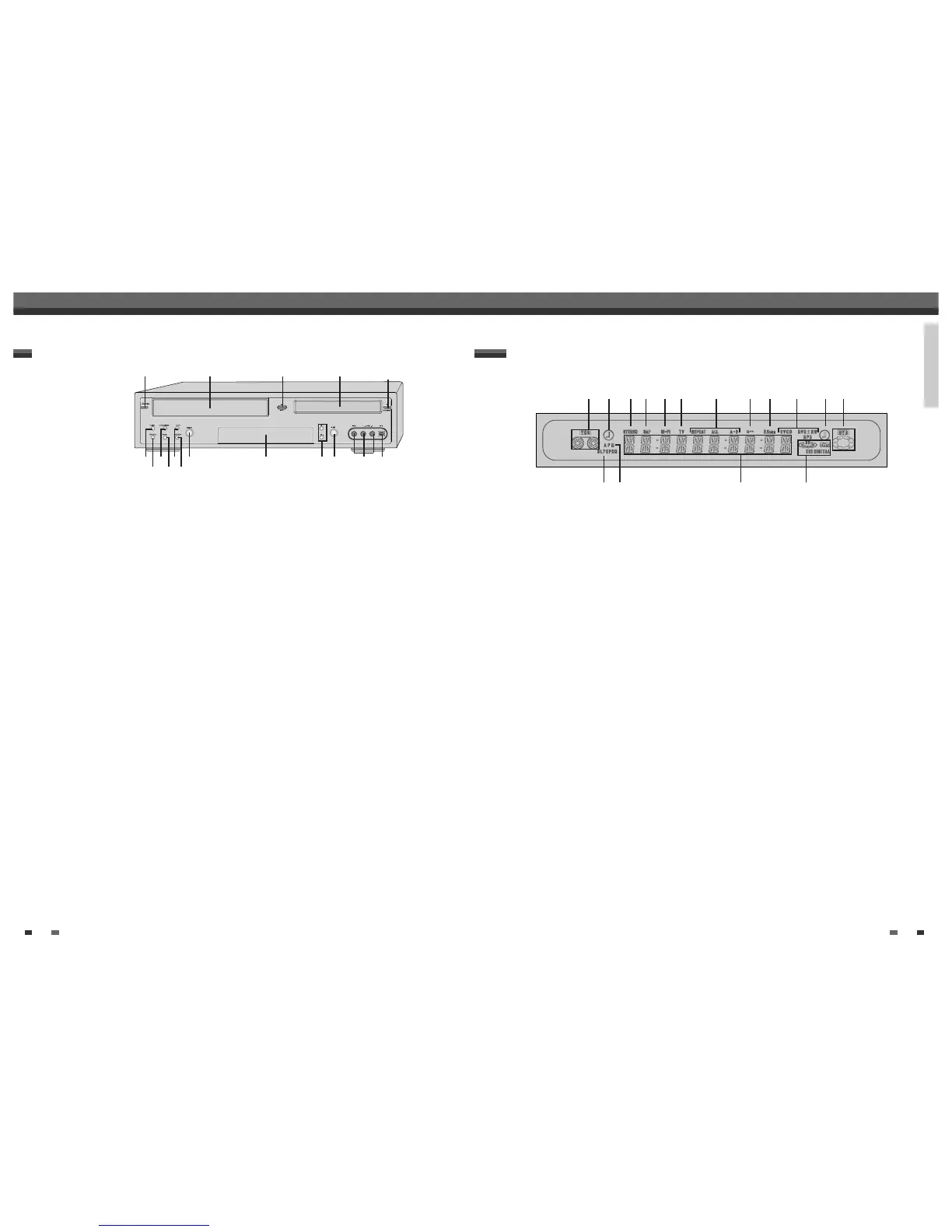
Front Panel Display
! Indicates a VHS tape is inserted in the VCR deck.
@ Circle : Indicates the VCR is recording.
Clock : Indicates a VCR Timer Recording is set.
# Indicates that a stereo broadcast is being
received.
$ Indicates when a Second Audio Program (SAP)
broadcast is being received.
% Indicates when the DVD Recorder+VCR is playing
or recording a tape with Hi-Fi sound.
^ Indicates the DVD Recorder+VCR is in TV mode
(as set by the TV/VCR button).
& Indicates the current Repeat mode.
* Indicates when the DVD Recorder+VCR is locked.
( Indicates when the DVD Recorder+VCR is
outputting the video signal in Progressive Scan
mode.
)
Disc Type indicators
Indicates the type of disc loaded.
1 Circle : Indicates a DVD+R(+RW) is recording.
Clock : Indicates a DVD Timer recording is set.
2 Indicates a disc is inserted in the DVD deck.
3 Indicates the current Recording mode.
4 Indicates AM or PM.
5
Front Panel Display Message
Indicates clock, total playing time, elapsed time,
remaining time, title number, chapter/track
number, channel, VCR counter, etc.
6 DTS: Indicates a DVD is playing with a DTS
soundtrack.
Dolby : Indicates a DVD is playing with a Dolby
Digital soundtrack.
! @ # $ % ^ & * ( ) 1 2
3 4 5 6
6
Front Panel
!
STANDBY/ON
Turns the DVD Recorder+VCR on and off.
Lock/Unlock the front panel and Remote control
by pressing and holding it over 5 seconds.
@
Cassette Compartment (VCR deck)
Insert a video cassette here.
#
VCR EJECT
Ejects the tape in the VCR deck.
$
Disc Tray (DVD deck)
Insert a disc here.
%
OPEN/CLOSE
Opens or closes the disc tray.
^
REW
DVD: Skips to previous chapter.
VCR: Rewinds the tape during Stop mode. Press
during Play mode for fast reverse picture search.
&
DISC MENU
Displays disc menu or title menu of DVD disc.
*
PLAY/PAUSE
Starts playback of a disc or tape. Pauses playback
or recording temporarily.
(
STOP
Stops playback.
)
FF
DVD: Skips to next chapter.
VCR: Advances the tape during Stop mode. Press
during Play mode for fast forward picture search.
1
REC SPEED
Changes Record speed.
2
SELECT DVD/VCR
Toggles control between the DVD deck and the
VCR deck.
Reset the DVD Recorder+VCR by pressing and
holding it for 5 seconds.
3
Front Panel Display
Shows the current status of the DVD
Recorder+VCR.
4
CH+/–
Scans up or down through memorized channels.
Also moves up and down in DVD navigation
menus.
5
REC
Starts recording. Press repeatedly to set the
recording time. Lights red when the DVD
Recorder+VCR is recording.
6
LINE1 (VIDEO, L-AUDIO-R)
Connects to the audio/video output of an external
source (VCR, Camcorder, etc.).
7
DV IN
Connects to the DV output of a digital camcorder,
video deck, or DVD+R/RW recorder.
! @ # $
%
6
2
(
&
^ * 3 5 74
1
)
Identification of Controls
Identification of Controls
Identification of Controls



 To Next Page