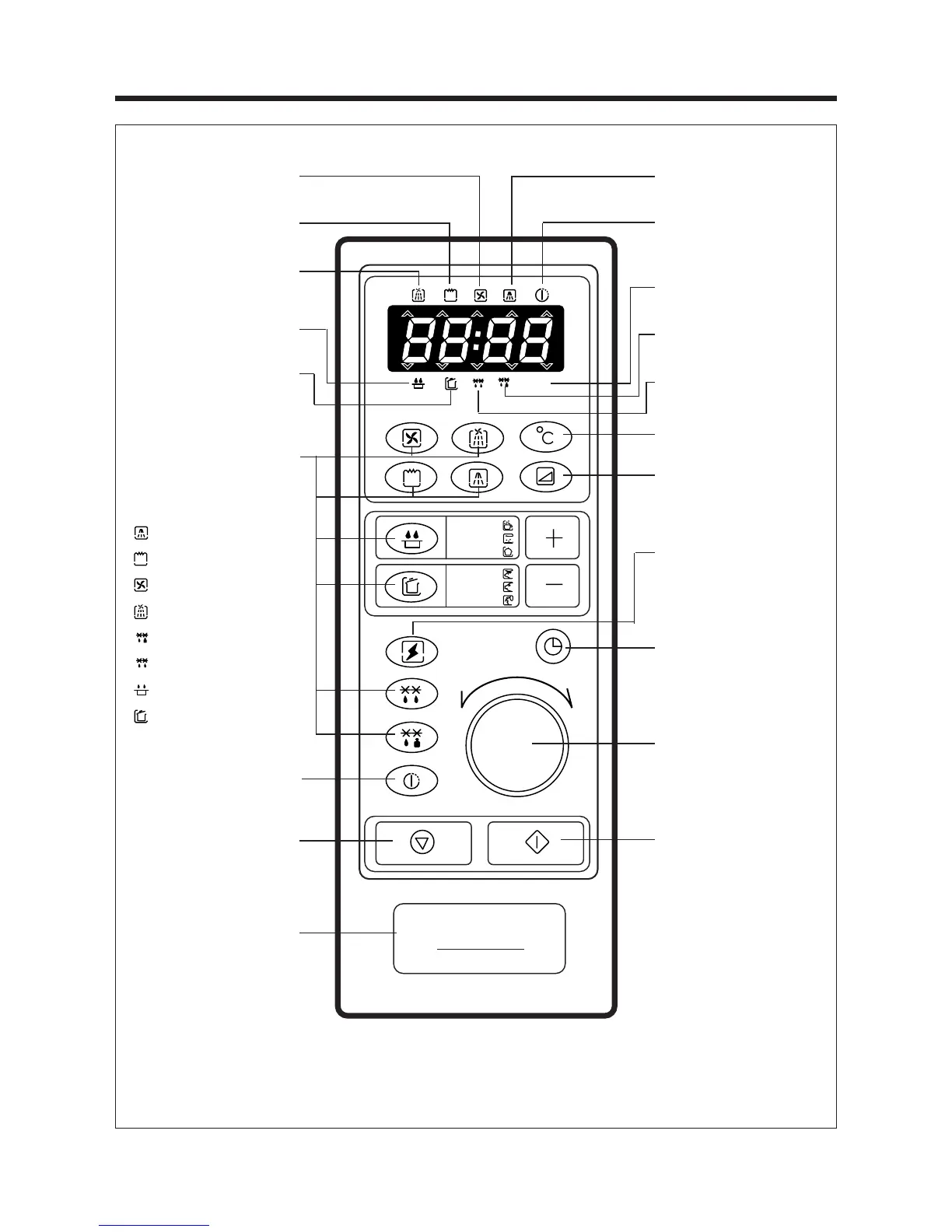
When blinking, the oven is
operating in CONVECTION.
When blinking, the oven is
operating in GRILL
When blinking, the oven is
operating in COMBI COOKING.
When blinking, the oven is
operating in AUTO REHEAT.
When blinking, the oven is
operating in PROGRAM
COOK.
Function Pads
ƒƒ¡¡
Used to
select the desired oven
operation.
Auto start pad
ƒƒ¡¡
Used to
set desired starting time.
Stop/Clear Pad
ƒƒ¡¡
Used to
pause or clear all information
manually put into the oven
control panel except clock.
Push to open button used to
open the door.
When blinking, the oven is oper-
ating in MICROWAVE mode.
When blinking, the oven will
automatically turn on at preset
time.
When blinking, the oven is
operating in weight input mode.
When blinking, the oven is
operating in WEIGHT DEFROST.
When blinking, the oven is
operating in AUTO DEFROST.
Temperature Pad
ƒƒ¡¡
Used to
set desired temperature.
Power Level Pad
ƒƒ¡¡
Used to
select the variable power level.
Speedy Cook Pad
ƒƒ¡¡
Used to
set desired time.
(It is increased 30 seconds)
Clock Pad
ƒƒ¡¡
Used to set and
recall the time of day.
Timer, temp knob
ƒƒ¡¡
Used to
input the cooking time, weight
or time of day.
Start Pad
ƒƒ¡¡
Used to start the
selected cycle.


 To Next Page