EasyManua.ls Logo

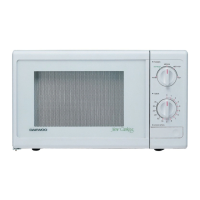
Daewoo KOR-611Q - User Manual

Daewoo KOR-611Q
21 pages
Print Icon
To Next Page IconTo Next Page
Loading...
Before operating this oven, please read these instructions completely.
OPERATING
INSTRUCTIONS
MICROWAVE OVEN
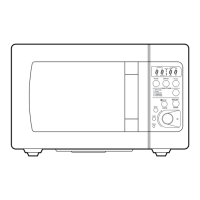
STAGE DEFROST AUTO
START
12
WEIGHT TIME
LOCK NO CUPS oz lbs
Popcorn
Muffin
Baked
Potato
Dinner
Plate
Power
Clock/
A.Start
Soup
Beverage
Frozen
Pizza
Fresh
Vegetable
SPEEDY
COOK
More
Less
AUTO
DEF.
STOP/
CLEAR
START
1 2 3
4 5 6
7 8 9
0
ONE TOUCH COOKING
KOR-611Q
KOR-611Q0A(¿ ) 02.2.19 12:29 PM ˘`1
Question and Answer IconNeed help?

Do you have a question about the Daewoo KOR-611Q and is the answer not in the manual?

Summary

Important Safety Instructions

General Operational Safety

Covers reading instructions, installation, intended use, supervision, damage, servicing, blocking openings, and outdoor use.

Electrical and Cleaning Safety

Covers cord immersion, cleaning, cord placement, and related warnings.

Fire Prevention and Chemical Safety

Covers fire risk reduction and chemical interactions with safety interlocks.

FCC Radio Frequency Interference Statement

Interference Reduction Recommendations

Advises on reorienting antennas, relocating the oven, or using different circuits.

Grounding Instructions

Grounding Warnings and Extension Cord Usage

Details grounding requirements and safe extension cord use.

Installation Guide

Initial Inspection and Location

Checks for damage and requires a level, flat surface.

Ventilation Requirements

Specifies allowing space around the oven for airflow.

Placement and Power Supply

Advises placement away from interference sources and details power requirements.

Features Diagram

Door Latch and Safety Interlock

Describes the automatic locking mechanism and safety system.

Door Seal and Screen

Explains the function of the door seal and viewing screen.

Oven Cavity and Spatter Shield

Details the oven interior and the spatter shield.

Door Release and Tray Components

Describes the door release button, glass tray, and roller guide.

Control Panel Functions

Time Setting and Display Functions

Explains pads for setting time and the display indicators.

Quick Cook and One Touch Controls

Describes Speedy Cook, One Touch Cooking, and related buttons.

Power and Defrost Controls

Details the Power level setting and Auto Defrost functions.

Clock, Auto Start, and Operation Controls

Covers clock setting, auto start, and stop/clear functions.

Operation Procedure

Initial Setup and Door Closure

Steps for plugging in, placing food, and closing the door.

Oven Operation Basics

Explains oven light, beeps, auto power, and display indications.

Troubleshooting Start Issues

Addresses potential issues if the oven does not start.

Control Functions: Clock and Defrost

Setting the Clock

Step-by-step guide for setting the internal clock.

Weight Defrosting

Instructions for defrosting food based on weight.

Control Functions: Cooking Modes

Time Defrosting

Instructions for defrosting food using a set time.

Single-Stage Cooking

Guide for cooking food using one power level and time.

Control Functions: Multi-Stage Cooking

Two-Stage Cooking

Instructions for cooking with two different power levels and times.

Defrost and Two-Stage Cooking

Combines defrosting with two-stage cooking.

Control Functions: Advanced Features

Auto Start Programming

Steps to set a delayed cooking start time.

Quick Cooking Functions

Checking Auto Start Time

How to view the programmed auto start time.

Speedy Cook and Popcorn

Using rapid reheat and one-touch popcorn feature.

One Touch Cooking Options (Part 1)

Frozen Pizza and Beverage Cooking

Instructions for one-touch frozen pizza and beverage.

Dinner Plate and Muffin Cooking

Instructions for one-touch dinner plate and muffin.

One Touch Cooking Options (Part 2)

Soup and Fresh Vegetable Cooking

Instructions for one-touch soup and fresh vegetables.

Baked Potato and Time Adjustment

Instructions for baked potato and using More/Less.

Safety and Utensil Guidance

Child Safety Lock Operation

How to set and cancel the child safety lock.

Stopping and Restarting Oven

Methods to stop, restart, or clear cooking operations.

Utensil Suitability Test

Procedure to test if utensils are safe for microwave use.

Utensil Recommendations

Guidance on safe and unsafe microwave utensils.

Care and Maintenance

General Cleaning Procedures

How to clean the oven interior, exterior, and control panel.

Cleaning Tray and Roller Guide

Instructions for cleaning removable components.

Safe Usage Guidelines

General Use Safety

Covers safe operation, door integrity, and avoiding damage.

Food Safety

Addresses safe food preparation, heating, and specific items like eggs and popcorn.

Troubleshooting and FAQs

Common Troubleshooting Issues

Addresses oven not working or sparking.

Frequently Asked Questions

Answers common user queries about operation.

Summary

Important Safety Instructions

General Operational Safety

Covers reading instructions, installation, intended use, supervision, damage, servicing, blocking openings, and outdoor use.

Electrical and Cleaning Safety

Covers cord immersion, cleaning, cord placement, and related warnings.

Fire Prevention and Chemical Safety

Covers fire risk reduction and chemical interactions with safety interlocks.

FCC Radio Frequency Interference Statement

Interference Reduction Recommendations

Advises on reorienting antennas, relocating the oven, or using different circuits.

Grounding Instructions

Grounding Warnings and Extension Cord Usage

Details grounding requirements and safe extension cord use.

Installation Guide

Initial Inspection and Location

Checks for damage and requires a level, flat surface.

Ventilation Requirements

Specifies allowing space around the oven for airflow.

Placement and Power Supply

Advises placement away from interference sources and details power requirements.

Features Diagram

Door Latch and Safety Interlock

Describes the automatic locking mechanism and safety system.

Door Seal and Screen

Explains the function of the door seal and viewing screen.

Oven Cavity and Spatter Shield

Details the oven interior and the spatter shield.

Door Release and Tray Components

Describes the door release button, glass tray, and roller guide.

Control Panel Functions

Time Setting and Display Functions

Explains pads for setting time and the display indicators.

Quick Cook and One Touch Controls

Describes Speedy Cook, One Touch Cooking, and related buttons.

Power and Defrost Controls

Details the Power level setting and Auto Defrost functions.

Clock, Auto Start, and Operation Controls

Covers clock setting, auto start, and stop/clear functions.

Operation Procedure

Initial Setup and Door Closure

Steps for plugging in, placing food, and closing the door.

Oven Operation Basics

Explains oven light, beeps, auto power, and display indications.

Troubleshooting Start Issues

Addresses potential issues if the oven does not start.

Control Functions: Clock and Defrost

Setting the Clock

Step-by-step guide for setting the internal clock.

Weight Defrosting

Instructions for defrosting food based on weight.

Control Functions: Cooking Modes

Time Defrosting

Instructions for defrosting food using a set time.

Single-Stage Cooking

Guide for cooking food using one power level and time.

Control Functions: Multi-Stage Cooking

Two-Stage Cooking

Instructions for cooking with two different power levels and times.

Defrost and Two-Stage Cooking

Combines defrosting with two-stage cooking.

Control Functions: Advanced Features

Auto Start Programming

Steps to set a delayed cooking start time.

Quick Cooking Functions

Checking Auto Start Time

How to view the programmed auto start time.

Speedy Cook and Popcorn

Using rapid reheat and one-touch popcorn feature.

One Touch Cooking Options (Part 1)

Frozen Pizza and Beverage Cooking

Instructions for one-touch frozen pizza and beverage.

Dinner Plate and Muffin Cooking

Instructions for one-touch dinner plate and muffin.

One Touch Cooking Options (Part 2)

Soup and Fresh Vegetable Cooking

Instructions for one-touch soup and fresh vegetables.

Baked Potato and Time Adjustment

Instructions for baked potato and using More/Less.

Safety and Utensil Guidance

Child Safety Lock Operation

How to set and cancel the child safety lock.

Stopping and Restarting Oven

Methods to stop, restart, or clear cooking operations.

Utensil Suitability Test

Procedure to test if utensils are safe for microwave use.

Utensil Recommendations

Guidance on safe and unsafe microwave utensils.

Care and Maintenance

General Cleaning Procedures

How to clean the oven interior, exterior, and control panel.

Cleaning Tray and Roller Guide

Instructions for cleaning removable components.

Safe Usage Guidelines

General Use Safety

Covers safe operation, door integrity, and avoiding damage.

Food Safety

Addresses safe food preparation, heating, and specific items like eggs and popcorn.

Troubleshooting and FAQs

Common Troubleshooting Issues

Addresses oven not working or sparking.

Frequently Asked Questions

Answers common user queries about operation.

Daewoo KOR-611Q Specifications

General IconGeneral
TypeCountertop
Capacity0.6 cu. ft.
Power Output600 Watts
Control TypeMechanical
Weight24.3 lbs
CountertopYes
TurntableYes
Voltage120 V
Frequency60 Hz
Capacity (cu. ft.)0.6 cu. ft.
Power600 Watts

Related product manuals