This document outlines the features, usage, and maintenance of the Access Control Extension Module, a device designed to enhance the security and functionality of access control systems. It serves as a comprehensive guide for users, covering everything from basic operation to advanced cybersecurity recommendations.
The Extension Module acts as an intermediary device, connecting an access control terminal or door station to various peripheral components of an access control system. Its primary function is to expand the capabilities of a standard access control setup by integrating additional security and monitoring features. Communication between the Extension Module and the main access control terminal or door station is facilitated via an RS-485 BUS, ensuring reliable data exchange.
Function Description
The core function of the Access Control Extension Module is to manage and relay information from multiple access control peripherals to a central access control terminal or door station. This integration significantly enhances the overall security and operational efficiency of the access control system.
- Peripheral Integration: The module connects to essential access control components such as door detectors, exit buttons, card readers, and locks. This allows for a more comprehensive and robust access control solution compared to standalone systems.
- Data Transmission: It is responsible for transmitting critical data, including card information, door open/close status, and various alarm signals, back to the main access control terminal or door station. This real-time data flow is crucial for effective monitoring and response.
- Enhanced Security: By centralizing the management of multiple security points, the Extension Module improves the overall security posture of the access control system. For instance, it can detect unauthorized door openings via the door detector and trigger alarms, or manage access based on card reader inputs.
- Lock Control: The module directly interfaces with electric locks (both electromagnetic and electric bolt types), enabling precise control over door locking and unlocking mechanisms based on authorized access events.
- Exit Management: It supports the integration of exit buttons, allowing authorized individuals to exit a secured area without requiring card authentication, while still logging the exit event for security purposes.
- Door Status Monitoring: Through connection to a door detector, the module continuously monitors the open/closed status of the door, providing valuable feedback to the access control system and enabling features like "door left open" alarms.
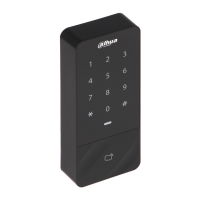
- Card Reader Interface: The module connects to card readers, processing card swipe data and relaying it to the main access control terminal for authentication against stored user credentials.
Usage Features
The Extension Module is designed for straightforward integration and operation within an existing access control infrastructure.
- Simple Networking: It utilizes an RS-485 BUS for communication with the main access control terminal, a common and reliable standard for industrial control systems, simplifying wiring and setup.
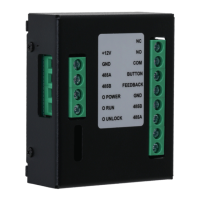
- Clear Port Identification: The module features clearly labeled ports for power input, RS-485 communication, and connections to various peripherals (exit button, door detector, lock, card reader), making installation intuitive.
- Status Indicators: Equipped with LED indicators for power, running status, and unlock status, the module provides immediate visual feedback on its operational state, aiding in troubleshooting and monitoring.
- Compatibility: Designed to work seamlessly with compatible access control terminals and door stations, ensuring broad applicability across different system setups.
- Management Platform Integration: The data collected and processed by the Extension Module is ultimately relayed to a management platform, allowing administrators to configure access rules, monitor events, and manage user credentials from a central interface.
- Flexible Deployment: Its role as an extension module allows for flexible deployment scenarios, enabling the expansion of existing access control systems without needing to replace core components.
Maintenance Features
Maintaining the Access Control Extension Module involves adhering to safety guidelines, regular checks, and proactive troubleshooting.
- Safety Instructions: The manual emphasizes critical safety instructions, including proper transportation, storage, and installation requirements, to prevent damage to the device and ensure user safety. This includes warnings against improper power connections, exposure to extreme conditions, and unauthorized disassembly.
- Firmware Updates: Users are advised to regularly update the module's firmware to ensure it benefits from the latest security patches and performance enhancements. This proactive approach helps maintain system integrity and resilience against potential vulnerabilities.
- Physical Protection: Recommendations include placing the module in a secure environment, such as a dedicated computer room or cabinet, to protect it from physical damage, tampering, and unauthorized access.
- Regular Checks: Users are encouraged to perform regular checks on the system, including verifying card information on the management platform, ensuring proper connections of peripherals (exit button, card reader, door detector), and monitoring the module's status indicators.
- Troubleshooting Guide: The manual provides a dedicated FAQ section to address common issues, such as doors not opening with card swipes or exit buttons, or the module not functioning correctly after networking. This guide helps users diagnose and resolve minor problems independently.
- Technical Support: For complex issues that cannot be resolved through the troubleshooting guide, users are directed to contact technical support, ensuring expert assistance is available when needed.
- Power Supply Verification: Before use, it is crucial to verify that the power supply is correct and stable, conforming to the module's requirements, to prevent damage and ensure reliable operation.
- Environmental Considerations: The module should be operated within specified humidity and temperature conditions, and protected from liquids, dust, and direct heat sources to ensure its longevity and reliable performance.
- Professional Installation/Disassembly: Users are explicitly warned against disassembling the module without professional instruction, highlighting the importance of qualified personnel for any internal maintenance or repairs.
- Documentation: The manual itself serves as a key maintenance tool, providing detailed information on the module's functions, port descriptions, and troubleshooting steps. Users are advised to keep the manual safe for future reference.

 Need help?
 General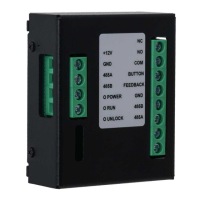



 To Next Page