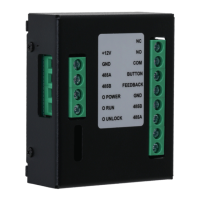
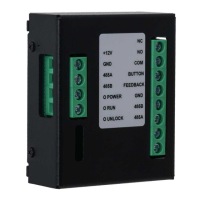
The Access Control Extension Module is a device designed to enhance the security and functionality of access control systems. It operates in conjunction with an access control terminal or door station, communicating via an RS-485 BUS. This module serves as an intermediary, connecting various peripheral devices such as door detectors, exit buttons, card readers, and locks to the main access control unit. Its primary function is to transmit critical information, including card data, door open events, and alarms, back to the access control terminal or door station, thereby bolstering the overall security of the access control system.
Function Description:
The core function of the Extension Module is to expand the capabilities of an access control system by integrating additional security and control elements. It acts as a hub for these peripherals, centralizing their communication with the main access control terminal.
- Card Information Transmission: When a card is swiped at a connected card reader, the Extension Module captures this information and relays it to the access control terminal for verification against the management platform's database. This allows for authorization checks based on card validity, expiration, and defined time schedules.
- Door Open Information: The module monitors the status of doors through connected door detectors. It transmits door open events to the access control terminal, which can then trigger alarms or log the event for security auditing.
- Alarm Transmission: In the event of unauthorized access attempts, forced entry (detected by the door detector), or other security breaches, the Extension Module is responsible for transmitting alarm signals to the access control terminal. This enables prompt responses to security incidents.
- Lock Control: The module directly interfaces with various types of locks, including electromagnetic locks and electric bolt locks, allowing the access control terminal to control their locking and unlocking mechanisms based on authorization.
- Exit Button Integration: It connects to exit buttons, enabling authorized personnel to exit a secured area by simply pressing the button, which then signals the module to unlock the door.
Important Technical Specifications:
While specific numerical values are not provided in the manual, the following technical aspects are highlighted:
- Communication Interface: RS-485 BUS for communication with the access control terminal/door station. This is a robust serial communication standard suitable for industrial environments and longer distances.
- Power Supply: The module requires a +12V DC power input. It is crucial to ensure the ambient voltage is stable and meets the power supply requirements to prevent damage. The power supply must conform to ES1 in IEC 62368-1 standard and be no higher than PS2. It is a Class I electrical appliance, requiring connection to a power socket with protective earthing.
- Indicators: The module features several LED indicators:
- Power indicator: To show if the device is receiving power.
- Running indicator: To indicate operational status.
- Unlock indicator: To show when a connected lock is in an unlocked state.
- Environmental Conditions: The device must be transported, used, and stored under allowed humidity and temperature conditions. It should be kept away from direct sunlight, heat sources, dampness, dust, and soot.
- Connectivity Ports:
- Power Input: +12V, GND.
- Access Control Terminal/Door Station: 485A, 485B.
- Lock Control: NC (Normally Closed), NO (Normally Open), COM (Common).
- Exit Button: BUTTON, GND.
- Door Detector: FEEDBACK, GND.
- Card Reader: 485A, 485B.
Usage Features:
The Extension Module is designed for straightforward integration and operation within an existing access control infrastructure.
- Enhanced Security: By offloading the direct connection of peripherals from the main access control terminal, the module can potentially enhance security by creating a more distributed and resilient system.
- Flexible Installation: Its design allows for connection to various types of locks, exit buttons, and door detectors, offering flexibility in system configuration.
- Troubleshooting Guidance: The manual provides a FAQ section to address common operational issues, such as doors not opening with a card swipe or exit button, or the lock remaining open. This indicates a user-friendly approach to problem-solving.
- Networking Integration: The module's functionality is dependent on proper networking with the access control terminal, requiring specific security module or second lock functions to be enabled on the main device's web interface.
Maintenance Features:
Maintenance of the Extension Module primarily revolves around ensuring proper installation, power supply, and adherence to safety guidelines.
- Safety Instructions: The manual emphasizes critical safety instructions, including not connecting the power adapter while powered on, adhering to local electrical safety codes, and avoiding multiple power sources.
- Physical Protection: Recommendations include placing the equipment in a secure computer room or cabinet and implementing access control permissions to prevent unauthorized physical contact or connection of removable equipment.
- Firmware and Software Updates: While not directly for the module itself, the manual stresses the importance of keeping the main access control equipment's firmware and client software up-to-date for optimal security and performance.
- Regular Checks: Users are advised to check online users and equipment logs regularly to detect unauthorized access or unusual operations.
- Environmental Care: Maintaining the module in a well-ventilated, stable, and clean environment free from moisture, dust, and extreme temperatures is crucial for its longevity and reliable operation.
- Professional Servicing: Users are explicitly warned against disassembling the Extension Module without professional instruction, indicating that internal repairs or modifications should only be performed by qualified personnel.
- Power Cord Management: Using recommended power cords that conform to rated power specifications is essential for safe and reliable operation.
- Liquid Avoidance: Preventing liquid spills onto the module and ensuring no liquid-filled objects are placed on it is a key maintenance point to avoid damage.

 Need help?
 General



 To Next Page