This document describes the Digital Villa VTO (VTO2 series) device, a digital villa video door phone system designed for easy operation, simple installation, and comprehensive security features.
Function Description
The Digital Villa VTO is a versatile video door phone system that offers a range of functionalities for residential security and communication. Its core functions include:
- WiFi Connectivity: Enables wireless network connection for flexible installation and remote access.
- Mobile Phone Live Preview: Allows users to view live video feeds from the VTO on their mobile phones, providing remote monitoring capabilities.
- Call VTH and Perform Video Talk: Facilitates two-way video communication with the indoor monitor (VTH) for visitor interaction.
- Door Unlock by Card: Supports unlocking the door using authorized IC cards, providing convenient and secure access control.
- One-click MGT Center: Offers a quick access button to the management center for various operations.
- Vandal-proof Alarm and etc.: Incorporates security features such as vandal-proof design and alarm functions to enhance safety.
The device supports various models, including VTO2111D-WP, VTO2111D-W, and VTO2111D, each offering specific features like mechanical keypad, WiFi support, and different lock control options.
Important Technical Specifications
The VTO2 series devices are built with robust specifications to ensure reliable performance:
- Main Process: Embedded micro controller.
- OS: Embedded Linux OS.
- Video Compression Standard: H.264.
- Audio Standard: G.711.
- Audio Input/Output: Input and Output.
- Talk: Supports talk functionality.
- Operation Mode: Mechanical keypad.
- Alarm Input: 1-ch unlock button, 1-ch door sensor feedback.
- Alarm Output: 1-ch relay output.
- Front Camera: 1.0 MP.
- Ethernet: 10M/100Mbps self-fit.
- WiFi: Supported on VTO2111D-WP and VTO2111D-W models.
- Other Hardware Interface: 485 BUS (1-ch).
- External TF Card: Max support 64G.
- Power: DC 12V or standard POE (Power over Ethernet).
- Water-proof: IP65 level.
- Consumption: Standby ≤1W, works≤7W.
- Dimension: 135mm×70.4mm×34.4mm.
The video settings allow for various formats and bit rates, including 720P (1280×720), WVGA (800×480), and D1 (720×576) for main format, and WVGA (800×480), D1 (720×576), and QVGA (320×240) for extra format. Bit rates can be adjusted from 256kbps to 3Mbps, and image parameters like brightness, contrast, and saturation are adjustable within a range of 40-60 to 100.
Usage Features
The Digital Villa VTO is designed for user-friendly operation and offers several usage features:
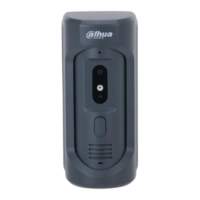
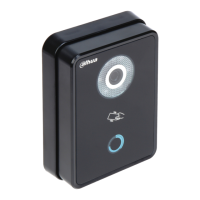
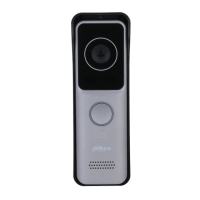
- Front Panel Components: Includes a MIC for audio input, a Camera for video capture, a Card Area for IC card authorization, an Indicator for status display, a Call Button for initiating calls, and a Speaker for audio output.
- Rear Panel Components: Features a Bracket Position for fixing the device, a Vandal-proof Switch for alarm activation, an Alarm Input/output Interface, a RESET Key for system reset and WiFi configuration, and an RJ45 Interface for standard Ethernet cable and POE power.
- Networking Scene: The device can be integrated into a comprehensive networking scene with a digital VTH, network switch, MGT center/platform, and client, supporting various sensors like smoke, IR, emergency, and door sensors.
- Device Wiring: Detailed wiring diagrams are provided for connecting electric drop bolts, door sensors, unlock buttons, electric strikes, and 485 devices.
- Installation Steps: A clear, step-by-step guide is provided for physical installation, including drilling, inserting expansion bolts, fixing brackets, and securing the device.
- Debugging: Comprehensive debugging instructions cover connecting to power, accessing the web server via PC browser, entering username and password, and configuring network settings.
- Wireless Configuration: Users can select available Wi-Fi networks, enter passwords, and connect the device wirelessly.
- Wired Configuration: Instructions for connecting via wired network, including setting IP, subnet mask, and gateway.
- VTH Room Number Configuration: Guides on setting the VTH room number for both master and extension VTHs.
- VTO Configuration: Steps to configure VTO name, IP address, device type, and enable status.
- Monitoring and Control: The device allows for monitoring video, taking snapshots, recording, adjusting volume, accepting calls, and hanging up. It also supports unlocking the door via the VTH interface.
- Web Login and Logout: Accessing the device's web interface requires entering a default username ("admin") and password ("admin"), which should be changed for security.
- System Configuration: Users can configure local settings like sensor thresholds, storage points (FTP or SD card), device type, reboot date, version info, and dial rules.
- A&C Manager: Manages unlock responding interval, unlock period, door sensor check time, auto snapshot, upload unlock record, and issue cards.
- Talk Manager: Configures auto snapshot, leave message upload, and upload talk record settings.
- System Time: Allows setting date, time, and synchronizing with PC time, supporting DST and NTP server settings.
- Config Manager: Provides options for backup, restore backup, import config, and default settings.
- LAN Config: Configures building number, building unit number, VTO number, max extension index, group call, and MGT center IP address.
- Indoor Manager: Enables adding, deleting, and modifying VTHs (digital indoor stations), including family name, first name, nick name, VTH short number, and IP address.
- Network Config (TCP/IP, FTP, P2P): Configures IP address, subnet mask, default gateway, MAC address, DNS address, DHCP, FTP server settings, and P2P connection for mobile phone client access.
- Video Set: Adjusts video format, frame rate, bit rate, brightness, contrast, and saturation.
- Audio Set: Adjusts MIC volume and speaker volume.
- User Manager: Allows adding, deleting, and modifying user accounts, with different rights for admin and regular users.
- IPC Configuration: Configures IPC (IP Camera) settings, including IPC name, IP address, username, and password.
- WIFI Info: Displays available WiFi networks, allows connecting to a network by entering the password.
- Info Search: Enables searching call history, alarm records, and unlock records.
- Status Statistics: Displays VTH connection status, monitor status, and VTO/VTH connection status.
Maintenance Features
The Digital Villa VTO incorporates features and guidelines to ensure proper maintenance and longevity:
- Important Safeguards and Warnings: Provides critical safety instructions to prevent damage to the device and ensure user safety, including precautions against exposure to extreme temperatures, humidity, direct sunlight, fire, electric shock, and improper handling.
- Battery Safety: Warnings against using non-specified batteries and improper disposal.
- Regular Backup: The system automatically saves card number and VTH info every half an hour, and users can manually perform backups of card info and VTH info.
- Restore Backup: Allows restoring card info or VTH info from a backup, useful in cases of abnormal data or misconfiguration.
- Default Settings: Provides options to restore default settings for various configurations, including LAN, A&C Manager, and System Config.
- Refresh Interface: A "Refresh" button is available in many configuration pages to update the current interface.
- Firmware Updates: While not explicitly detailed as a user-accessible feature, the presence of a "Version Info" suggests that firmware updates may be available to improve performance and add new features.
- Professional Installation and Debugging: Emphasizes that installation and debugging should be done by professionals to prevent damage and ensure proper functioning.
- After Sales Service: Users are advised to contact after-sales service in case of device failure.
- User Management: Allows for creating different user accounts with varying access rights, which can help in managing who can make changes to the device settings.
- SD Card for Storage: Supports external TF cards for storing records and snapshots, facilitating data management and retrieval.
This comprehensive set of features makes the Digital Villa VTO a robust and user-friendly solution for modern villa security and communication needs.

 Need help?
 General




 To Next Page
