
 Need help?
Do you have a question about the Dahua IPC-HDW2531T-AS and is the answer not in the manual?
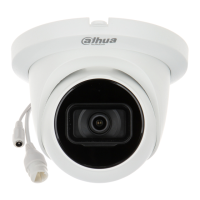
This document serves as a Quick Start Guide for the Dahua Eyeball Network Camera, providing essential information for its installation, configuration, and operation. It begins with general safety instructions, outlining signal words like "WARNING" and "CAUTION" to highlight potential hazards and risks, as well as "NOTE" for supplementary information. The guide also includes a revision history, indicating the initial release in May 2019.
A crucial section addresses privacy protection, emphasizing the user's responsibility as a data controller to comply with local privacy laws when collecting personal data. This includes providing clear identification of surveillance areas and contact information for data subjects. The manual itself is presented as a reference, with disclaimers about potential inconsistencies with the actual product and the right for designs and software to change without prior notice. Users are advised to consult the latest documentation and customer service for updates.
The "Important Safeguards and Warnings" section details electrical safety, environmental considerations, and operation/daily maintenance. For electrical safety, it stresses adherence to local electrical codes, use of Safety Extra Low Voltage (SELV) power sources conforming to IEC6050-1, and ensuring correct power supply. It also highlights the importance of readily accessible disconnect devices and preventing damage to power cables. Environmentally, users are warned against aiming the device at strong light sources, placing it in damp, dusty, or electromagnetically unstable environments, and exposing it to liquids, rain, or extreme temperatures. Proper ventilation and handling during transport, storage, and installation are also emphasized.
Maintenance guidelines include avoiding direct contact with heat dissipation components, following disassembly instructions carefully to prevent water leakage or poor image quality, and contacting after-sale service for desiccant replacement if condensation occurs. Users are advised to use a lightning arrester and ground the device for enhanced reliability. Direct contact with the image sensor (CMOS) is discouraged; dust can be removed with an air blower or a soft cloth moistened with alcohol. The device body should be cleaned with a soft dry cloth or mild detergent, avoiding volatile solvents. The dome cover, an optical component, requires gentle cleaning with oil-free cotton moistened with diethyl or a soft cloth, or an air blower.
Network, device data, and personal information protection are paramount. Users are urged to use strong passwords, modify them regularly, upgrade firmware, and isolate computer networks. For older firmware, ONVIF passwords may need manual updating or firmware upgrades. Only standard components and accessories provided by the manufacturer should be used, and installation/maintenance should be performed by professional engineers. The image sensor should not be exposed to laser beam radiation, and multiple power supply sources should be avoided unless specified.
Regulatory information, particularly regarding FCC compliance, is provided. It warns against unauthorized modifications that could void the user's authority to operate the equipment. The device complies with FCC Rules Part 15, meaning it should not cause harmful interference and must accept any interference received. For Class A devices, limits are designed for commercial environments, while Class B limits are for residential installations. Troubleshooting steps for interference, such as reorienting antennas or increasing separation, are suggested.
The "Cable" section describes the device's ports, including Ethernet (supporting network connection and PoE) and 12V DC power input. It emphasizes the importance of waterproofing cable joints and supplying power correctly to prevent damage.
Network configuration involves initializing the device and setting its IP address using the "ConfigTool" or web interface. Initialization is required for first use or after a reset, and the device's IP address (default 192.168.1.108) must be in the same network segment as the PC. The process involves searching for devices, selecting uninitialized ones, setting a strong password, and entering a valid email address for password reset. IP addresses can be modified individually or in batch, with options for static or DHCP modes.
Logging into the web interface is done via an IE browser by entering the device's IP address. First-time users will need to install a plugin.
The installation section provides a packing list, noting that tools like electric drills are not included and that the manual and related tools are on a disk or accessible via a QR code. Dimensions are provided in millimeters and inches. Installation direction and various mounting methods are illustrated, including ceiling and wall mounts. Detaching the device involves pushing and rotating. Installing an SD card (optional) requires pulling off the power plug first. Attaching the device emphasizes ensuring the mounting surface is strong enough to support at least three times the device's weight. Instructions are provided for routing cables through the mounting surface or side cable tray. An optional waterproof connector installation is detailed for outdoor use. Finally, the guide shows how to adjust the lens angle for optimal viewing.
 General
| Model | IPC-HDW2531T-AS |
|---|---|
| Scanning System | Progressive |
| S/N Ratio | ≥ 50dB |
| Lens Mount | M12 |
| Max. Aperture | F1.6 |
| Aperture Type | Fixed |
| IR Distance | Up to 30m |
| IR On/Off Control | Auto/Manual |
| Day/Night | ICR |
| Video Compression | H.265/H.264/MJPEG |
| Bit Rate Control | CBR/VBR |
| BLC | Yes |
| HLC | Yes |
| WDR | 120dB |
| White Balance | Auto/Manual |
| Gain Control | Auto/Manual |
| Noise Reduction | 3D DNR |
| Motion Detection | Yes |
| Region of Interest | Yes |
| Smart IR | Yes |
| Defog | Yes |
| Flip | Yes |
| Mirror | Yes |
| Privacy Masking | Yes |
| Streaming Method | Unicast/Multicast |
| Max. User Access | 20 |
| Ingress Protection | IP67 |
| Vandal Resistance | IK10 |
| Casing | Metal |
| Image Sensor | 1/2.7" CMOS |
| Effective Pixels | 1920(H) x 1080(V) |
| Resolution | 1920×1080 |
| RAM/ROM | 512MB/128MB |
| Lens | 2.8 mm; 3.6 mm |
| Smart Codec | H.265+/H.264+ |
| Video Frame Rate | 30fps (1920x1080) |
| Bit Rate | 32 Kbps ~ 8Mbps |
| Ethernet | 10/100M Ethernet |
| Protocol | HTTP, HTTPS, TCP/IP, DHCP, DNS, DDNS, RTP, RTSP, UPnP, SMTP |
| Interoperability | ONVIF, CGI, PSIA |
| Edge Storage | Micro SD Card |
| Web Viewer | IE, Chrome, Firefox, Safari |
| Management Software | Smart PSS, DSS, DMSS |
| Certifications | CE, FCC |
| Power Supply | DC12V ±10%, PoE (802.3af) |
| Power Consumption | Max. 5W |
| Operating Conditions | -30°C to +60°C |
| Storage Conditions | -40 °C to +60 °C (-40 °F to +140 °F) |
| Net Weight | 0.4kg |
| Gross Weight | 0.5kg |



 To Next Page