English 21
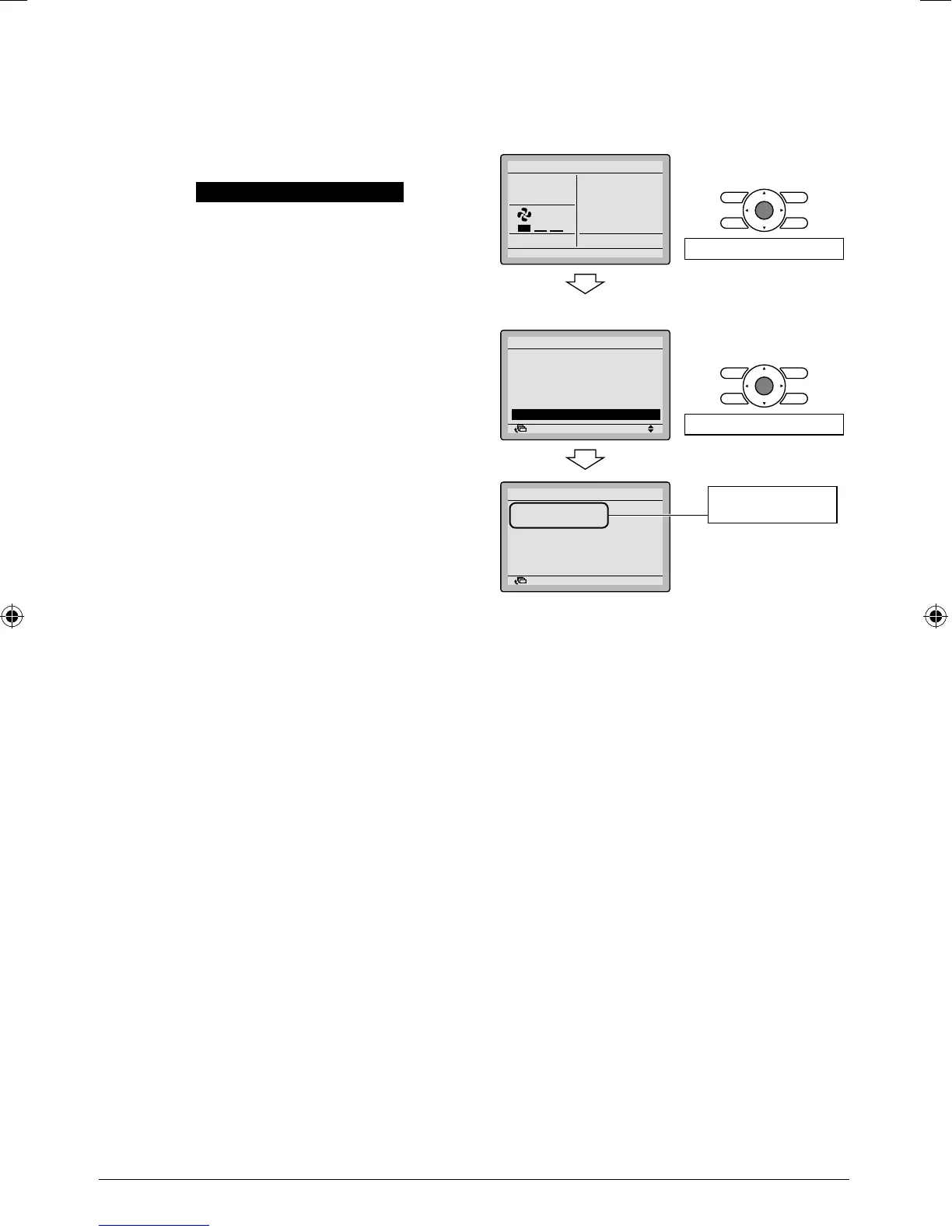
Confi rmation of registered details10.
10-1 Press Menu/Enter button in the basic
screen.
Main menu is displayed.
Select Service Contact/Model Info in
the main menu, and press Menu/Enter
button.
Press Cancel button twice.
10-2
The basic screen returns.
<Basic screen>
110-
Set temperature
28°C
Cool
Return Setting
Press Menu/Enter button.
<Main menu screen>
Return Setting
MainMenu
Set temp mode changeover
Airflow Direction
Quick Cool/Heat On/Off
Ventilation
Timer setting
Service Contact/Model Info
1/2
Press Menu/Enter button.
Return Setting
Service Contact/Model info
Indoor unit
–––
/000
Outdoor unit
–––
/000
Contact address
0123
–
4567
–
8900
Registered details
are displayed.
01_EN_EM08A086.indd 2101_EN_EM08A086.indd 21 4/7/2009 7:32:19 PM4/7/2009 7:32:19 PM



 To Next Page