38 English
5
Return Setting
Monday
Schedule timer
Time Operation
06
:
00 28°C
12
:
30 20°C
–
26°C
––:–– –
––:–– –
––:–– –
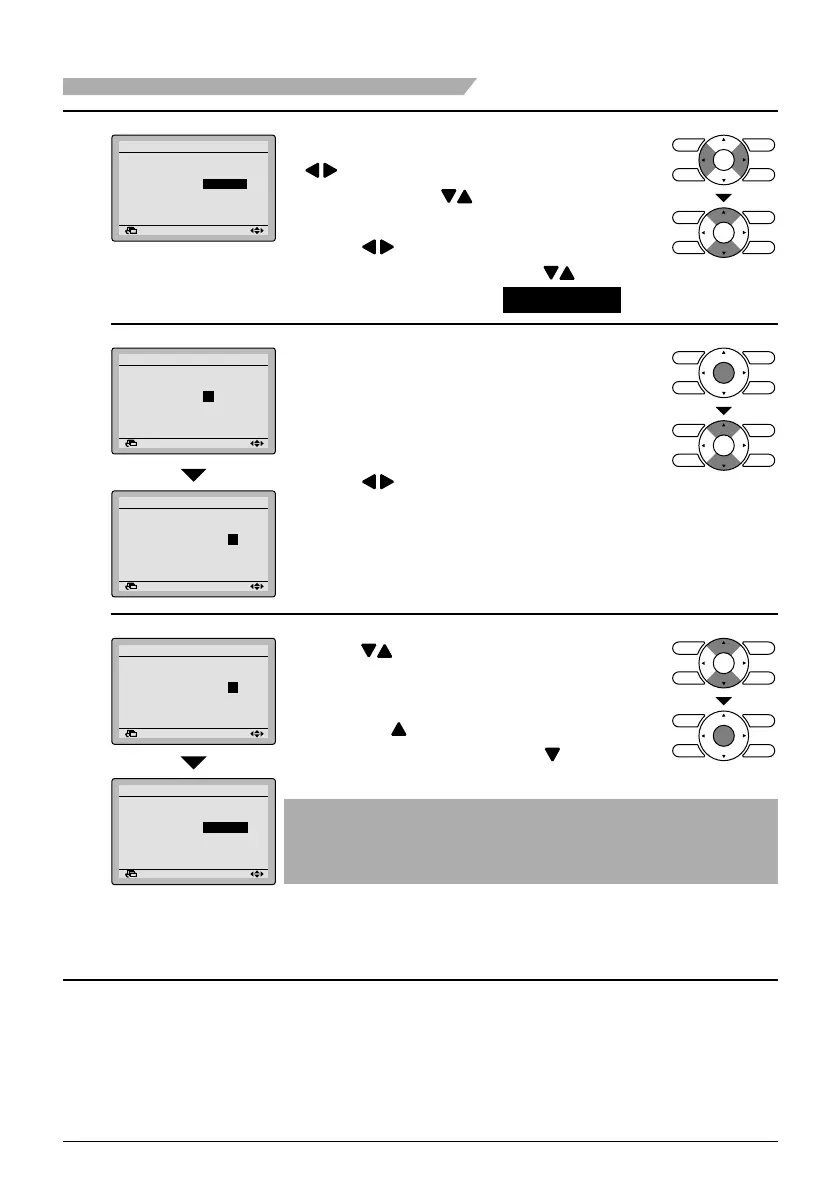
To make limit operation settings, press ●
buttons to move the highlighted
item and press
buttons to input the
desired set time.
Press ● buttons to move the
highlighted item and press buttons
to set the operation to 20°C - 26°C .
Return Setting
Monday
Schedule timer
Time Operation
06
:
00 28°C
12
:
30 20°C
–
26°C
––:–– –
––:–– –
––:–– –
To change the maximum and minimum ●
temperatures, press the Menu/Enter
button so that the temperatures will be
ready to be changed.
Return Setting
Monday
Schedule timer
Time Operation
06
:
00 28°C
12
:
30 20°C
–
26°C
––:–– –
––:–– –
––:–– –
Press ● buttons to select the desired
temperature to be changed.
Return Setting
Monday
Schedule timer
Time Operation
06
:
00 28°C
12
:
30 20°C
–
28°C
––:–– –
––:–– –
––:–– –
Return Setting
Monday
Schedule timer
Time Operation
06
:
00 28°C
12
:
30 22°C
–
28°C
––:–– –
––:–– –
––:–– –
Press ● buttons to change the set
temperature.
The set temperature will increase by 1°C
when the button is pressed and
decrease by 1°C when the button is
pressed.
Note
The difference between the maximum and minimum ●
temperatures cannot be set to less than 6°C.
(* Maximum temperature – Minimum temperature ≥ 6°C)
Pressing Menu/Enter button enters the ●
set temperature change.
Menu Manipulation
01_EN_3P243520-1B.indd 3801_EN_3P243520-1B.indd 38 5/15/2009 10:21:21 AM5/15/2009 10:21:21 AM


 To Next Page