English 45
Convenient Functions
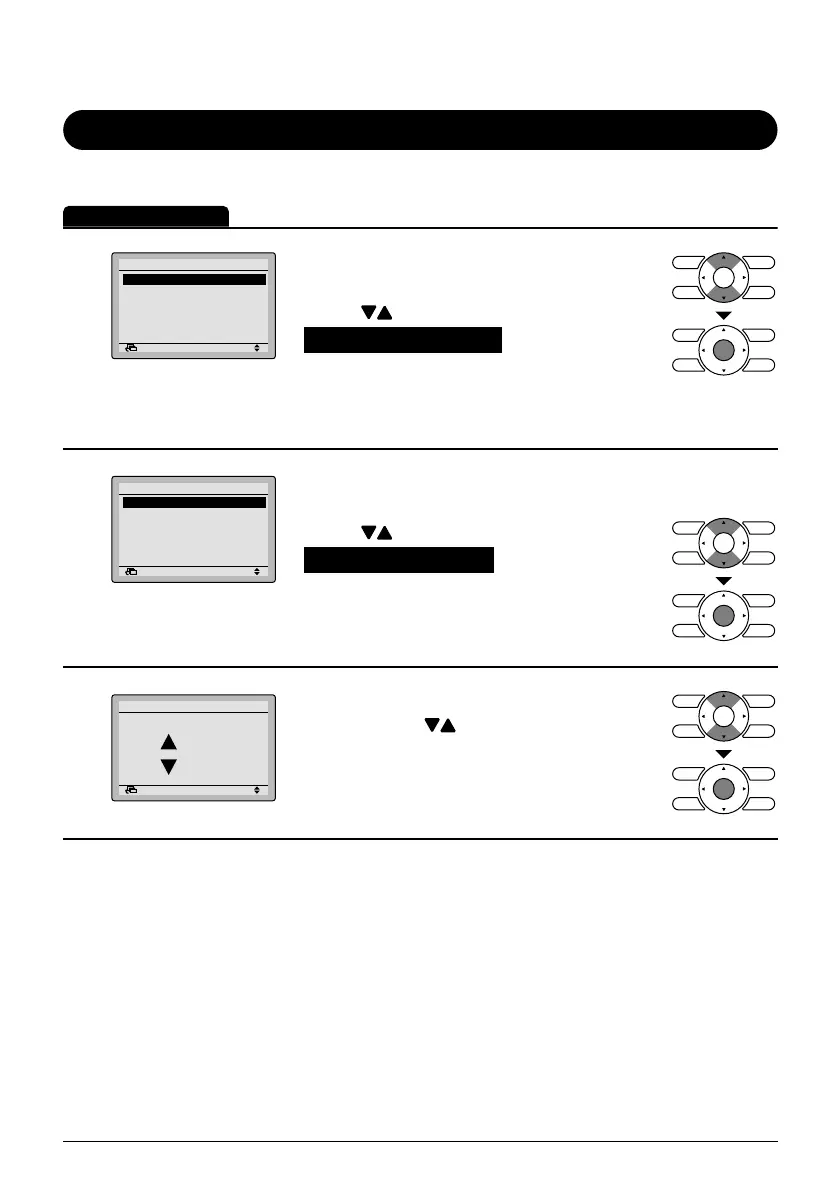
Contrast Adjustment
Operation Method
1
Return Setting
MainMenu
Convenient functions
Setting status list
Clock setting
Language changeover
2/2
Display the main menu screen. ●
(See page 26.)
Press ● buttons to select
Convenient functions on the main
menu screen.
Press Menu/Enter button to display the
convenient functions settings screen.
2
Return Setting
Convenient functions
Contrast adjustment
Display changeover
Bring up the convenient functions ●
settings screen.
Press ● buttons to select
Contrast adjustment on the convenient
functions settings screen.
Press Menu/Enter button to display the
contrast adjustment settings screen.
3
Return Setting
Adjusts contrast
Dark
Light
Contrast adjustment
On the contrast adjustment settings ●
screen press buttons until you reach
the desired contrast.
After setting, press Menu/Enter button
and return to the basic screen.
01_EN_3P243520-1B.indd 4501_EN_3P243520-1B.indd 45 5/15/2009 10:21:26 AM5/15/2009 10:21:26 AM



 To Next Page