English 41
Return Setting
Sunday
Holiday
Time Operation
––:–– –
––:–– –
––:–– –
––:–– –
––:–– –
Schedule timer
Holiday that are set will be displayed on ●
the condition settings screen.
Enabling or disabling the schedule timer without
changing the set day or time
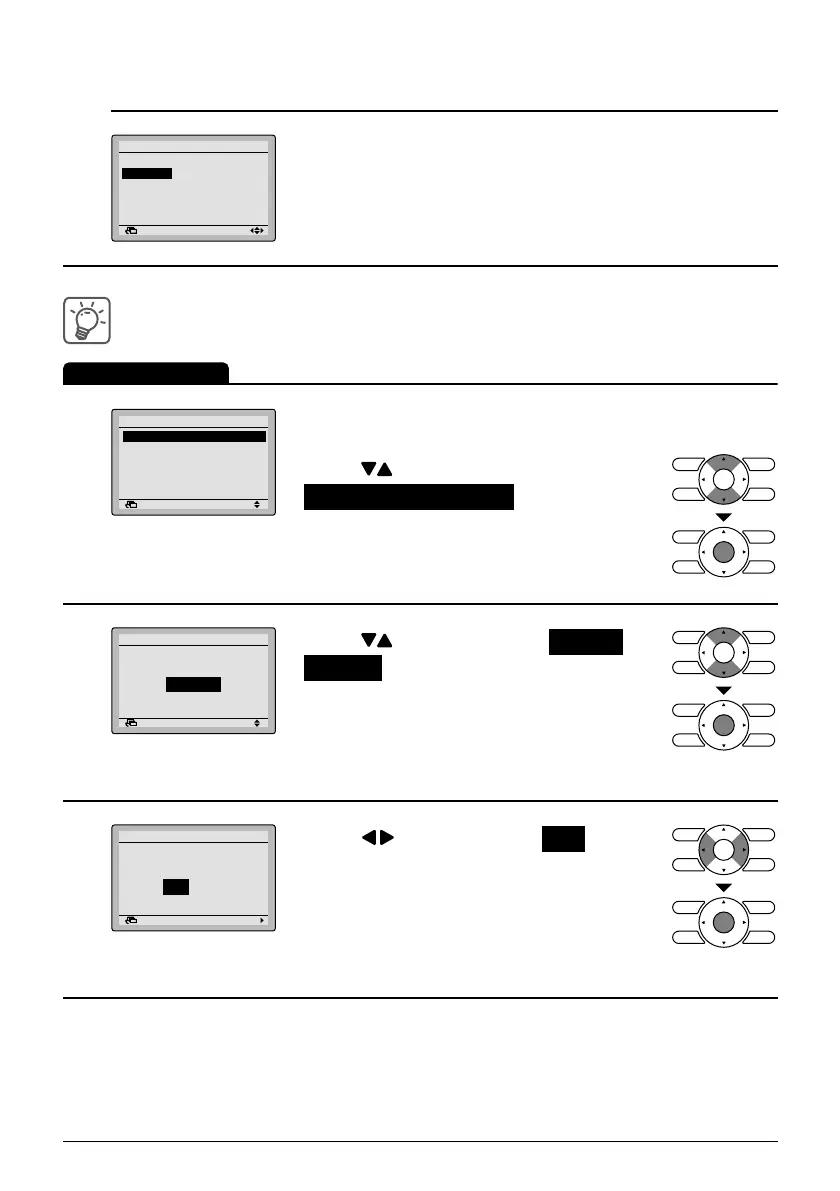
Operation Method
1
Return Setting
Schedule timer
Enable/Disable setting
Condition setting
Holiday setting
Bring up the schedule timer settings ●
screen. (See page 35.)
Press ● buttons to select
Enable/Disable setting on the schedule
timer settings screen.
Press Menu/Enter button to display the
enable/disable settings screen.
2
Return Setting
Enable/Disable setting
Schedule timer
Disable
Press ● buttons to select Enable or
Disable on the enable/disable settings
screen.
Press Menu/Enter button after selecting
the item. Then the settings confi rmation
screen will appear.
3
Return Setting
Is it settled by setting?
Schedule timer
Yes No
Press ● button to select Yes on the
settings confi rmation screen.
Pressing Menu/Enter button enters the
enable/disable settings for the schedule
timer and takes you back to the basic
screen.
01_EN_3P243520-1B.indd 4101_EN_3P243520-1B.indd 41 5/15/2009 10:21:23 AM5/15/2009 10:21:23 AM



 To Next Page