FIELD SETTING
If optional accessories are mounted on the indoor unit,
the indoor unit setting may have to be changed. Refer
to the instruction manual for each optional accessory.
Procedure
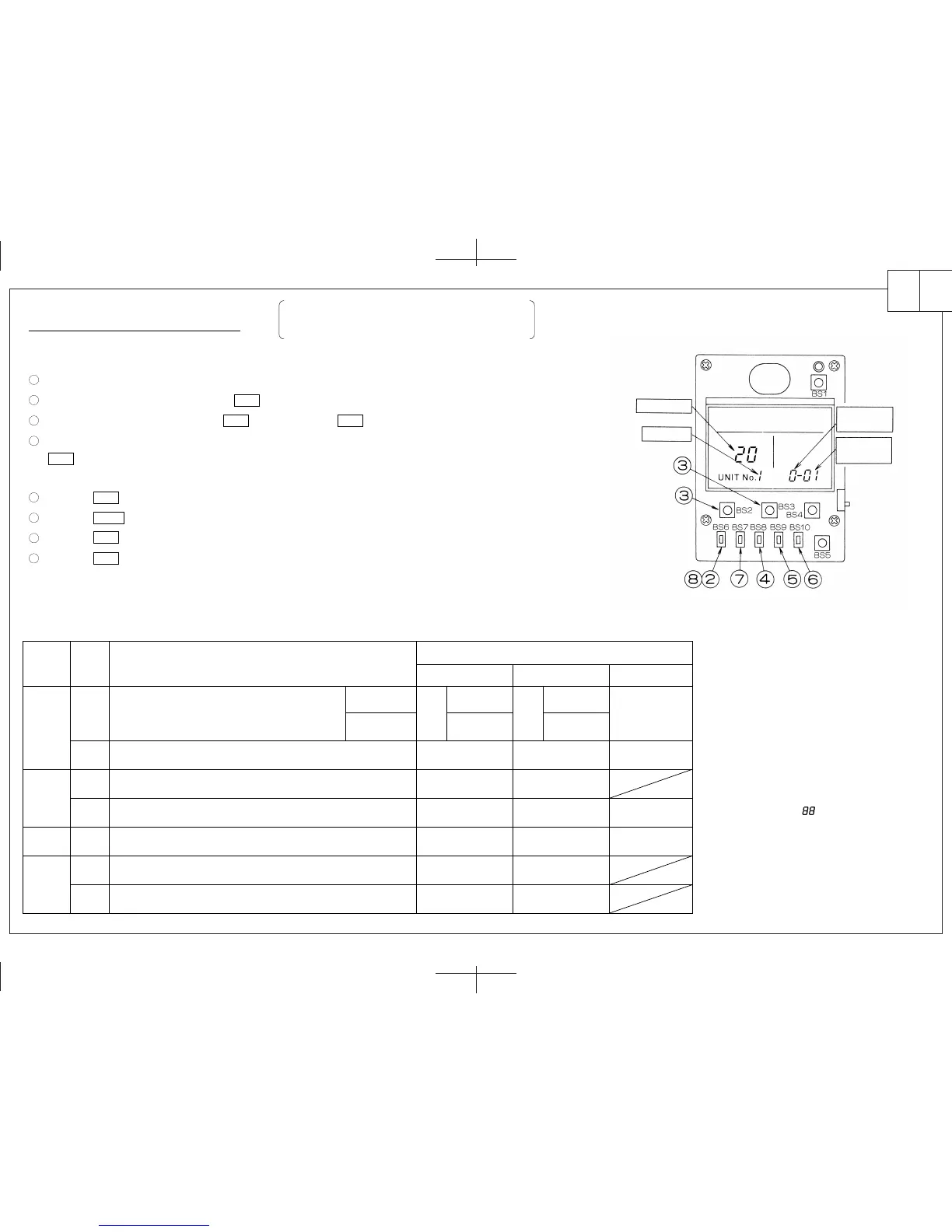
Remove the upper part of remote controller.
When in the NORMAL MODE, press the BS6 BUTTON and the FIELD SET MODE is entered.
Select the desired MODE No. with the BS2 BUTTON and the BS3 BUTTON.
During group control, when setting by each indoor unit (MODE No. 20, 22 and 23 have been selected), push the
BS8 BUTTON and select the INDOOR UNIT No. to be set. (This operation is unnecessary when setting
by group.)
Push the BS9 BUTTON and select FIRST CODE No.
Push the BS10 BUTTON and select SECOND CODE No.
Push the BS7 BUTTON once and the present settings are SET.
Push the BS6 BUTTON to return to the NORMAL MODE.
(Example) If during group setting and the time to clean air filter is set to FILTER CONTAMINATION - HEAVY, set
MODE No. to “10”, FIRST CODE No. to “0”, and SECOND CODE No. to “02”.
MODE No.
Note) 1
10(20)
Note) 6
Filter Contamination - Heavy/Light
(Setting for spacing time of display time to clean air filter)
(Setting for when filter contamination is heavy, and spacing
time of display time to clean air filter is to be halved)
Spacing Time of Display Time to Clean Air Filter Count
(Setting for when the filter sign is not to be displayed)
ON/OFF Input from Outside. (Setting for when forced ON/OFF is to be
operated from outside.)
Humidifying with thermostat OFF
Drain pump operation with humidifying
Thermostat Differential Changeover (Setting for when using the remote sensor)
FXCQ, FXFQ, FXKQ or FXHQ only
Selection of Air Flow Direction (Setting for when a blocking pad kit has been
installed) FXFQ only
12(22)
13(23)
15(25)
FIRST
CODE
No.
Description of Setting
SECOND CODE No. Note) 2
01
Display
Forced OFF
1.8°F
4-way flow
Not equipped
Not equipped
Do not Display
ON/OFF Operation
0.9°F
3-way flow
Equipped
Equipped
02 03
0
3
1
2
1
1
3
Long Life Filter
Standard Filter
Approx. 2,500
Hrs.
Approx.
200 Hrs.
Light
Approx. 1,250
Hrs.
Approx.
100 Hrs.
Heavy
-
-
-
2-way flow
NOTE) 1. Setting is carried out in the group
mode, however, if the MODE No.
inside the parentheses is selected,
indoor units can also be set
individually.
2. The SECOND CODE No. is set to
“01” when shipped from the factory.
3. Do not make any settings not given
in the table on the left.
4. Not displayed if the indoor unit is
not equipped with that function.
5. When returning to the NORMAL
MODE, “ ” may be displayed in
the LCD in order for the remote
controller to initialize itself.
6. This mode is used to set the time
until the display time to clean air
filter lights up when using the
central remote controller.
3P146206-1
MODE No.
UNIT No.
FIRST
CODE No.
SECOND
CODE No.
En.
英
1
2
3
4
5
6
7
8



 To Previous Page
 Loading...







