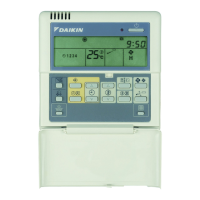
This document is an installation manual for the Daikin BRC1D527 remote controller, providing detailed instructions for its setup, wiring, and configuration.
Function Description:
The Daikin BRC1D527 is a remote controller designed to manage indoor air conditioning units. It allows users to control various aspects of the air conditioning system, including power on/off, temperature adjustment, fan speed, operation mode (e.g., MIN-MAX), and air flow direction. The controller supports both single indoor unit control and group control, where multiple indoor units can be managed simultaneously. It also features a schedule timer function for automated operation. A key feature is its ability to operate in a "main" or "sub" configuration, enabling control of a single indoor unit or group of units from two separate remote controllers. The device also includes a thermostat sensor, which can be used for temperature regulation.
Usage Features:
The remote controller offers a user-friendly interface with a display showing the unit number, group number, current settings, and various operational indicators.
- Basic Operation: Users can turn the unit on/off, adjust the temperature, change fan speed, and modify air flow direction using dedicated buttons.
- Schedule Timer: A schedule timer button allows for programming operational times.
- Mode Selection: The operation change/MIN-MAX button enables selection of different operating modes.
- Field Settings: The remote controller provides access to "Field settings" for advanced configuration, which may be necessary when optional accessories are mounted on the indoor unit. This includes settings for filter contamination (heavy/light), long-life filter type, thermostat sensor usage, spacing time for filter cleaning display, number of connected Sky Air simultaneous operation system indoor units, ON/OFF input from outside, thermostat differential changeover, high air outlet velocity, air flow direction selection, air flow function, air flow direction range setting, external static pressure, and drain pump operation with humidifying.
- Permission Levels: To restrict user actions, the controller supports different permission levels:
- Level 1 (All): All buttons are operable.
- Level 2: Allows use of on/off, schedule timer, temperature adjust, operation change/MIN-MAX, fan speed, and air flow direction adjust buttons.
- Level 3: Limits operation to on/off, temperature adjust, and fan speed buttons.
These permission levels can be set via a specific procedure involving simultaneous button presses.
- Main/Sub Configuration: When using two remote controllers for one indoor unit or group, one controller must be set to "main" and the other to "sub." The "main" controller is factory set, and the "sub" setting is configured through the "Field settings" menu. It is crucial to set the remote controller to "main" if only one controller is used.
- Display Indicators: The display shows "UNIT No." and "GROUP" information. During startup, "88" is displayed for approximately one minute, during which the controller cannot be operated. The display also shows "SETTING" values for various parameters.
- Leave Home Function: The controller supports a "leave home function," which can be permitted or not permitted based on settings.
- Thermostat Sensor: The thermostat sensor can be enabled ("Use") or disabled ("Not use") for temperature control, particularly for limit operation and the leave home function.
Maintenance Features:
The manual emphasizes several points related to maintenance and safe operation:
- Filter Contamination Settings: The "Field settings" include options for managing filter contamination, such as setting the spacing time for the "clean air filter" display. This can be configured for "heavy/light" contamination and for different filter types (ultra long-life, long-life, standard).
- Wiring Specifications: The controller uses a 2-wire connection with a size of 0.75-1.25 mm². It is important to run the wiring away from power supply wiring to avoid electric noise.
- Installation Safety: The manual provides warnings against improper installation, which could lead to electric shock, short-circuits, leaks, fire, or other damage. It stresses the importance of using only Daikin-made accessories and having a professional perform the installation.
- PC Board Protection: Users are warned not to damage the PC board with a minus screwdriver during installation and to avoid directly touching the PC board with their hands.
- Mounting Precautions: When mounting the controller, it is advised to choose the flattest possible surface and not to overtighten mounting screws to prevent distortion of the lower part of the controller.
- Wiring Protection: Care must be taken not to pinch the wiring when reattaching the upper part of the remote controller.
- Shielding: The shield for the part that passes through the inside of the remote controller case should be peeled.
- Field Settings Restrictions: Field settings cannot be changed on a remote controller that is set to "sub."
- Manual Retention: Users are instructed to keep the manual for future reference.

 Need help?
 General

 To Next Page