9 English
ADJUSTMENT
STOPPING THE SYSTEM
Press ON/OFF button again.
OPERATION lamp goes off and the system
stops OPERATION.
NOTE
• Do not turn OFF power immediately after
the unit stops. Then, wait no less than
5 minutes. Water is leaking or there is
something else wrong with the unit.
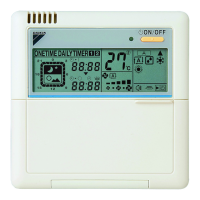
〈〈FOR SYSTEMS WITH COOL/HEAT
CHANGEOVER REMOTE CONTROL
SWITCH (Fig. 6)〉〉
Select COOLING OPERATION
MODE with the COOL/HEAT
CHANGEOVER REMOTE CONTROL
SWITCH.
Press OPERATION MODE
SELECTOR button several
times and select PROGRAM DRY “ ”.
Press ON/OFF button.
OPERATION lamp lights up and the system
starts.
STOPPING THE SYSTEM
Press ON/OFF button once again.
OPERATION lamp goes off, and the system
stops OPERATION.
NOTE
• Do not turn OFF power immediately after
the unit stops. Then, wait no less than
5 minutes. Water is leaking or there is
something else wrong with the unit.
3
1
2
3
4
MOVEMENT OF THE AIR FLOW FLAP
For the following conditions, micro computer
controls the air flow direction so it may be dif-
ferent from the display.
Operation mode includes automatic operation.
• The timer is operated in the following two
ways.
Programming the stop time ( )
....The system stops operating after the set
time has elapsed.
Programming the start time ( )
.... The system starts operating after the
set time has elapsed.
• The timer can be programmed a maximum
of 72 hours.
• The start and the stop time can be simulta-
neously programmed.
Press the TIMER MODE
START/STOP button several
times and select the mode on the dis-
play.
The display flashes.
For setting the timer stop...............“ ”
For setting the timer start .............. “ ”
Operation
mode
Cooling Heating
Operation
conditions
• When room
temperature
is lower than
the set tem-
perature
• When room
temperature
is higher than
the set tem-
perature
• At defrost
operation
• When operating continuously
at horizontal air flow direction
PROGRAM TIMER OPERATION
(Fig. 7)
1
01_EN_3P107422-29P.fm Page 9 Thursday, January 17, 2008 1:46 PM



 To Next Page