10
OPERATION
AUTO · DRY · COOL · HEAT · FAN Operation
The air conditioner operates with the operation mode of
your choice.
From the next time on, the air conditioner will operate
with the same operation mode.
■ To start operation
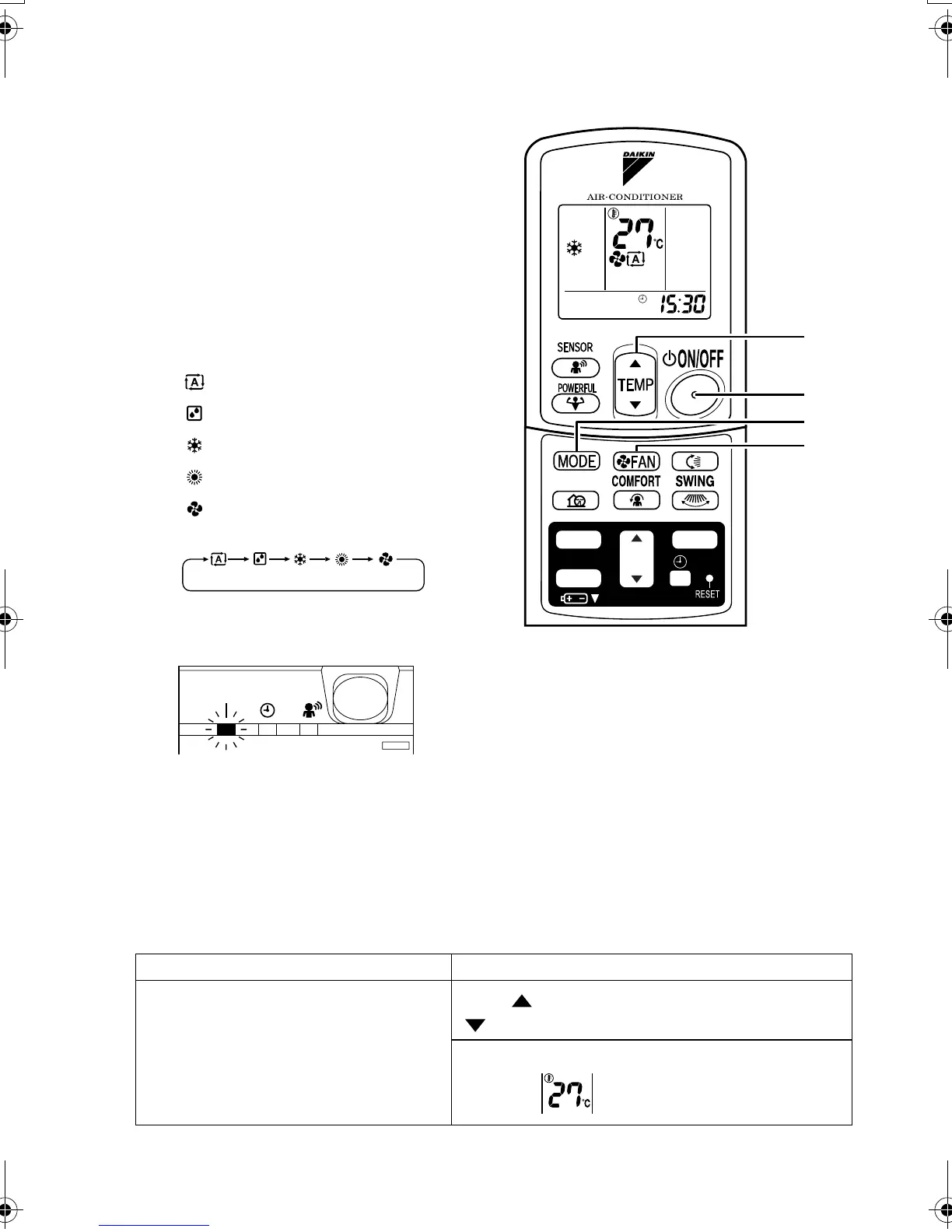
1. Press “MODE selector button”
and select a operation mode.
• Each pressing of the button advances the
mode setting in sequence.
:AUTO
:DRY
: COOL
:HEAT
:FAN
2. Press “ON/OFF button”.
• The operation lamp will light up and the panel will open.
■ To stop operation
3. Press “ON/OFF button” again.
• The operation lamp will go off and the panel will close.
■ To change the temperature setting
4. Press “TEMPERATURE adjustment button”.
DRY or FAN mode AUTO or COOL or HEAT mode
The temperature setting is not variable.
Press “ ” to raise the temperature and press
“ ” to lower the temperature.
Set to the temperature you like.
2, 3
4
5
1
TIMER
ON
CANCEL
OFF
QUIET
01_EN_3P231228-1.fm Page 10 Wednesday, May 14, 2008 9:12 AM



 To Next Page