10
Installation
Installation
Installation
Work
TYPE A2
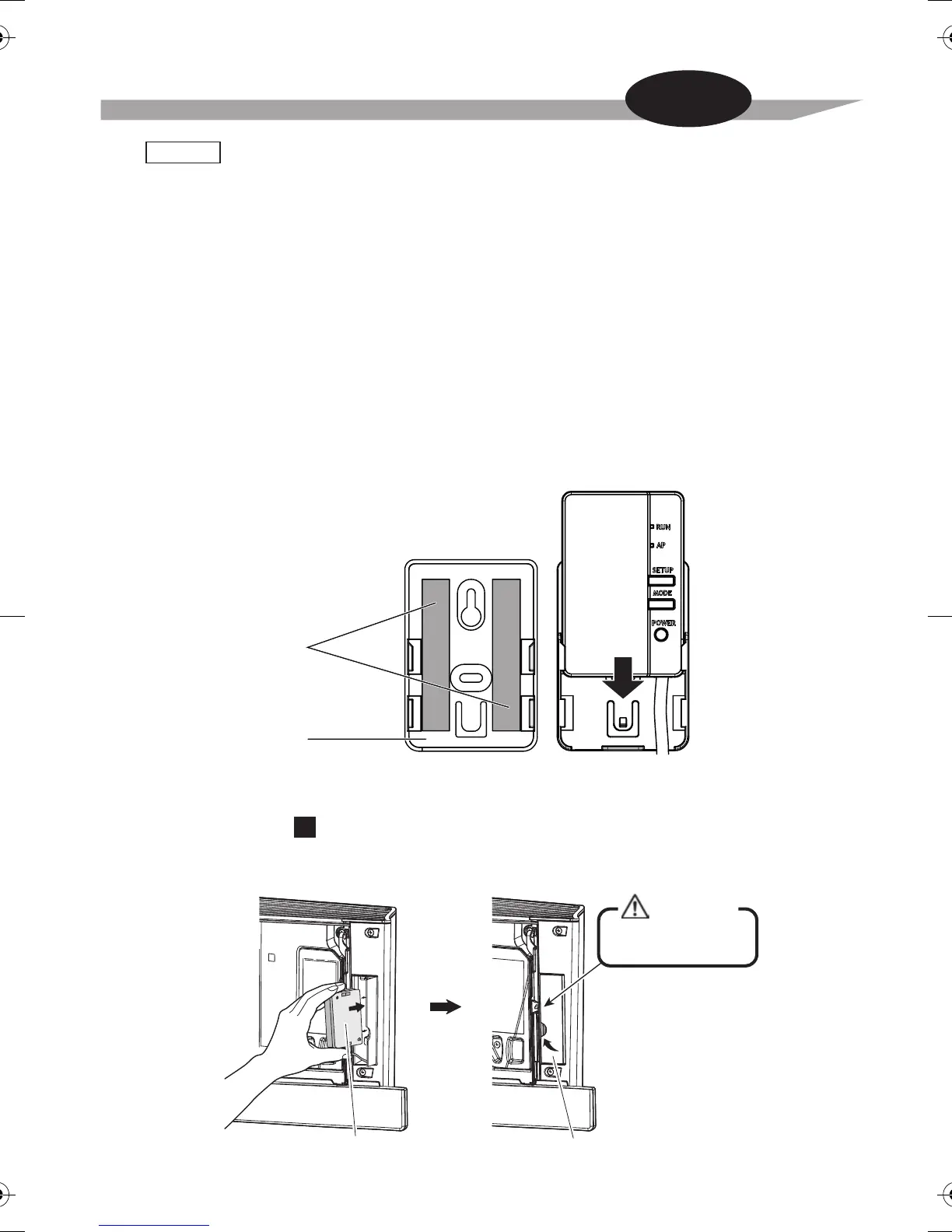
Position of the Wireless LAN connecting adapter on the wall/surface is fixed by double face tapes.
In this case screws located in accessory set are not necessary to fix the holder.
1. Attach two double face tapes located in accessory set to the back side of
holder as shown below.
2. Fix the Wireless LAN connecting holder on the wall/surface with the double face tapes.
3. Make sure that holder is fixed to the wall/surface enough to support the Wireless LAN
connecting adapter.
4. Attach the Wireless LAN connecting adapter to the holder by sliding into it.
NOTE
For more details about installation of Wireless LAN connecting adapter to your model
please visit http://www.daikinthai.com/wlan3/modbus
Wall/surface should be clean and degreased before attaching of the Wireless LAN connecting
holder by double face tapes.
Double face tape
Holder
The back side
of the holder
In the case of
B
Grab the adapter case with your fingers, insert it back into the indoor unit and close the door.
Close
Close this door before
operating the unit.
CAUTION
Adapter case


 To Next Page