13
Configuration
Configuration
Wireless Connection
Setting Sec ion
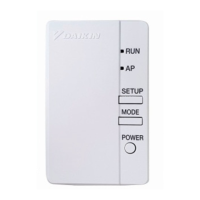
Push the [SETUP] button on the Wireless LAN connecting
adapter for approximately 2 seconds.
•
The [RUN] lamp on the Wireless LAN connecting adapter blinks more quickly.
When the Wireless LAN connecting adapter and the router (Wireless LAN access point)
are connected, this lamp lights. If you fail to connect, please try again from step 1 of
“Simple Wireless Connection Setting”. (It may not be possible to make the
“Simple Wireless Connection Setting”, depending on compatibility with the router.)
After connecting the Wireless LAN connecting adapter to the
router, the user will able to detect the Wireless LAN connecting
adapter via Home gateway application.
[About the SSID and KEY]
The [SSID] and [KEY] shown on the serial number sticker which is included in the accessories
are necessary when connecting the air conditioner and a smartphone via Wireless LAN.
Please keep them in a safe place.
3
4
Wireless Connection Setting
For Wireless LAN connecting adapters which cannot connect to communication devices
by [WPS] mode, please refer to our website, which explains procedures for the manual
connection mode (http://www.daikinthai.com/wlan3/modbus).
A


 To Next Page