3 Operacije
Operation manual
7
D2CNL024A1AA
Wall-mounted condensing boiler
3P469438-12N – 2020.07
INFORMACIJA
“Reset” button must be pressed for 3 seconds to remove
the error.
OBAVEŠTENJE
A table with all error codes, the reasons for their
appearance, and possible solutions, is located at the very
end of this manual.
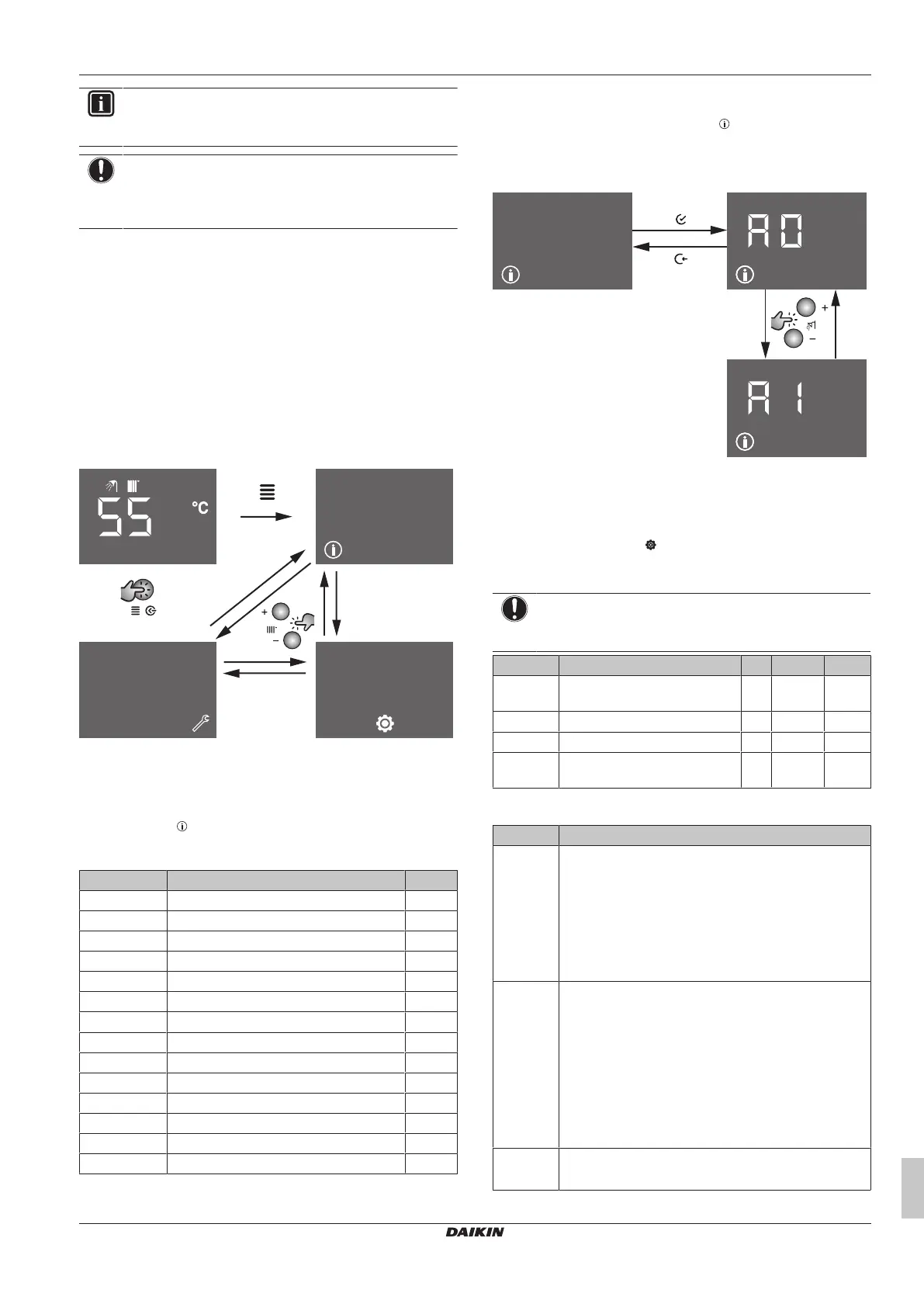
3.5 Menu functions
3.5.1 To use menu level 1
1 Press the "Menu" button while you are at home screen to go the
Menu screen. This is menu level 1 screen.
2 To switch between info, user settings and service settings,
press CH+ and CH- buttons.
3 To leave the menu and return to the home screen, press "Back"
button.
When there is no user interaction for one minute, the user interface
will leave the menu and switch to the blank screen.
3.5.2 Info menu
Info menu: Parameters
The info menu ( ) covers all possible information that is made
available to the end user and to the installer. This parameters are
read only and cannot be changed.
# Description (short) Unit
A0 Actual flow temperature °C
A1 Actual return temperature °C
A2 Actual domestic hot water temperature °C
A3 Actual flue temperature °C
A4
(a)
Actual outdoor temperature °C
A5
(a)
Actual solar temperature °C
A6 Actual water pressure bar
A7 Actual domestic hot water flow rate l/min
A8 Actual fan speed (rpm/100) rpm
A9 Current setpoint of boiler pump %
B0 Software version 0
B1 μ com ID low digit -
B2 μ com ID high digit -
B3 Ionisation current μA
(a) Not applicable if the sensor is not connected.
To use the info menu
1 Press the "Enter" button when the icon is displayed on the
menu level 1 screen.
2 Select the index number with DHW+ and DHW- buttons. Press
the "Back" button to return to menu level 1 screen.
3.5.3 User settings menu
User settings menu: Parameters (short)
The user settings menu ( ) comprises parameters that can be
changed and adjusted by users. You can read out and adjust the
parameters according to your preferences.
OBAVEŠTENJE
If you are not sure about the function of the parameter, do
not change it. Contact your service agent.
# Description Unit Default Range
U0 Summer-winter switch over
temperature
°C 20 10~30
U1 Heating slope — 0 0~40
U2 Central heating ECO mode — 0 0~1
U3 Domestic hot water comfort
mode
— 0 0~1
User settings menu: Parameters (detailed)
# Description
U0 When using outdoor sensor, above this parameter
value of outside temperature, the boiler senses the
season as summer and does not activate central
heating although there is demand. Summer-winter
switching has a hysteresis of ±1ºC.
i.e: When this parameter is adjusted to 20ºC, the boiler
switches to summer mode at 21ºC and switches back
to winter mode at 19ºC.
U1 This value is used when outside sensor is connected to
the boiler. The parameter heating slope is important to
adapt the weather compensation to the individual
heating system, the building and the thermal insulation.
The heating slope can be adjusted from 0 to 40. The
heating slope needs to be increased to increase the
boiler central heating set temperature. Colder
regions require a higher heating slope value.
Napomena: To activate weather compensation, the
heating slope value must be higher than "0".
U2 Enabling / disabling central heating ECO mode.
1 = enabled, 0 = disabled



 To Next Page