EasyManua.ls Logo

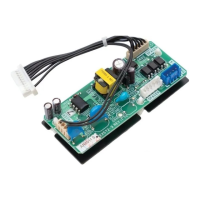
Daikin DIII EKMBDXB7V1 - User Manual

Daikin DIII EKMBDXB7V1
54 pages
Print Icon
To Next Page IconTo Next Page
Loading...
Design guide
Modbus Interface DIII
EKMBDXB7V1

Questions and Answers

  • W
    William JamesOct 31, 2025
    Why is there no Modbus communication with my Daikin DIII EKMBDXB7V1 Air Conditioner Accessories?
    • T
      thomaskaraOct 31, 2025
      If you're experiencing a lack of Modbus communication with your Daikin Air Conditioner Accessories, it might be due to an incorrect Modbus address setting at power on. To resolve this, power off the system and set DS2 according to the required Modbus address, referring to chapter “1.3.6 Dipswitch meaning”. Remember that the dipswitch on/off status is only detected when the PCB powers on. Alternatively, if no Modbus address setting is configured (DS2 is set to Off/Off/Off/Off), set DS2 according to the required Modbus address. See chapter “1.3.6 Dipswitch meaning”. Another potential cause is if only the firmware is present on the Modbus Interface DIII, indicated by the HAP blinking rapidly at 200ms. In this case, upload the latest application software, as detailed in chapter “4.2 Software...

Summary

Safety Precautions

1. Introduction

1.1 System layout

Diagram illustrating the typical setup for connecting a BMS to Daikin units via Modbus.

1.2 Limitations

1.3 Specifications

1.3.1 Dimensions and field wiring

Specifies the physical dimensions and wiring requirements for the Modbus Interface DIII.

1.3.2 Wiring diagram

Provides a detailed wiring diagram for connecting the Modbus Interface DIII.

1.3.3 LED meaning

Explains the meaning of the various LED indicators on the Modbus Interface DIII.

1.3.4 Termination resistance (SS switches)

Details how to set the termination resistance using SS switches.

1.3.5 Push buttons

States that push buttons BS1 till BS5 have no assigned meaning.

1.3.6 Dipswitch meaning

Explains the function of dipswitches DS1 and DS2 for configuration.

1.4 Overview of compatible Daikin units ranges with DIII connection

1.5 Overview of compatibility with other DIII centralised control equipment

2. Modbus communication

2.1 Modbus Interface DIII settings

Details Modbus communication settings including protocol, speed, parity, and address.

2.2 Communication format

2.2.1 Function format

Explains the format for Modbus function codes like Read Input Registers.

2.2.2 Character format

Describes the character format for Modbus messages (start bit, data, parity, stop bit).

2.2.3 Silent internal time

Specifies the silent interval time required between Modbus communication frames.

2.2.5 Response time

Defines the response time for the Modbus Interface DIII and master waiting time.

2.3 Communication procedure

2.3.1 System initialisation

Describes the steps for system startup and initialisation of the Modbus Interface DIII.

2.3.2 Monitor and operate units from the BMS

Explains how to monitor and control Daikin units using the BMS via Modbus.

2.3.3 Other DIII devices exist in the same system

Details behavior when other DIII devices are present in the system.

3. Modbus registers

3.1. Input registers

Lists and describes the input registers for status and information of DIII units.

3.2 Holding registers

Lists and describes the holding registers used for controlling Daikin units.

4. Software of Modbus Interface DIII

4.1 Software releases

Information on checking for the latest available software releases.

4.2 Software update with Updater

Instructions for updating the Modbus Interface DIII software using Daikin Updater.

4.2.2 Method 1) Update with the PC USB cable EKPCCAB*

Step-by-step guide for updating software using a USB cable.

4.2.3 Method 2) Update with a USB;RS485 converter.

Step-by-step guide for updating software using a USB/RS485 converter.

5. Modbus Interface DIII test operation

5.1 Introduction

Introduction to testing the Modbus Interface DIII setup with a Modbus master program.

5.2 Outline of system

Diagram of the system setup for testing the Modbus Interface DIII.

5.3 Test Operation Procedure

Guide on how to prepare register groups in the Modbus Poll software.

5.3.2 Start reading registers groups

Instructions for starting to read register groups using Modbus Poll.

5.3.3 Set a holding register

Procedure for changing values in holding registers using Modbus Poll.

6. Troubleshooting

No Modbus communication

Troubleshooting steps for issues related to no Modbus communication.

Software update with updater (via RS485) fails

Troubleshooting steps when software updates via RS485 fail.

A BMS set of a holding register is not reflected on the actual unit.

Troubleshooting for when BMS settings are not reflected on the actual unit.

7. Revision of the document

Daikin DIII EKMBDXB7V1 Specifications

General IconGeneral
CategoryAir Conditioner Accessories
ModelDIII EKMBDXB7V1
Communication MethodDIII-NET
Product TypeInterface Adapter
Power SupplyDC 12V

Related product manuals