EasyManua.ls Logo

Daikin DPS012 - Page 111

Daikin DPS012
122 pages
Print Icon
To Next Page IconTo Next Page
To Previous Page IconTo Previous Page
Loading...
For more detail go to:
Figure 84, page 116
For more detail go to:
Figure 83, page 114
For more detail go to:
Figure 86, page 118
For more detail go to:
Figure 85, page 118
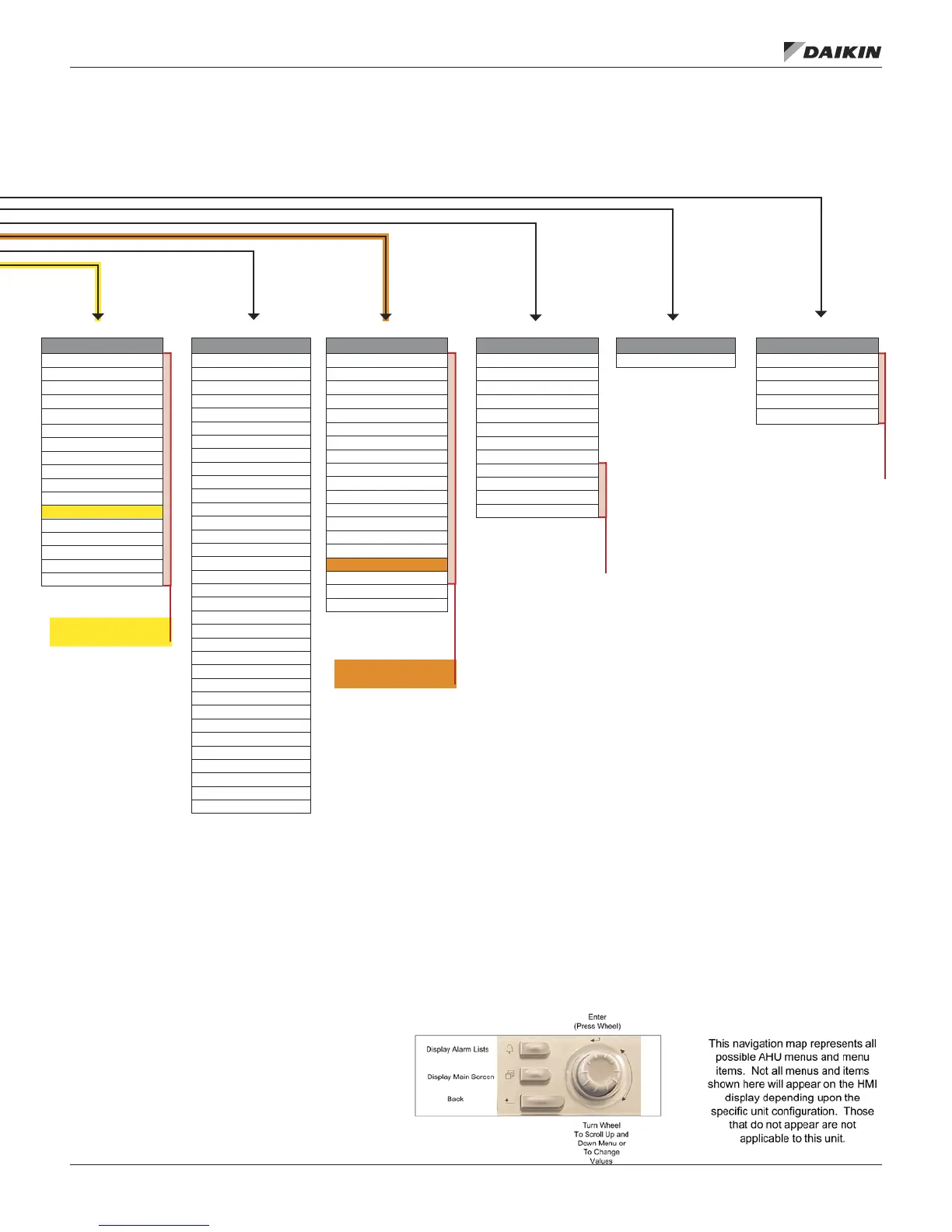
Manual Control
Manual Control= Normal
Supply Fan= Off
SAF Spd Cmd= 0%
INV/OF Ena= Off
INV Comp= Off
INV Spd Cmd= 0%
Comp 3= Off
OA Fan= Off
OA Fan Cmd= 0%
4 Way Valve= Cool
RcvrSol Valve= Closed
BP Sol Valve= Closed
EVI Cmd= 0%
EVO Cmd= 0%
RF/EF VFD= Off
RF/EF Spd Cmd= 0%
Var Cmp=
Var Cmp Cmd=
VComp Emg Stop=
Htg Valve= 0%
SCR Out= 0%
Htg Stg 1= Off
SCR Ena 1= Off
Htg Stg 2= Off
Htg Stg 3= Off
Htg Stg 4= Off
Reheat Valve= 0%
RH Output=
ERec Wheel= Off
ER Whl Cmd= 0%
ER BP Dmpr Cl= Off
ER BP Dmpr Op= Off
Alm Output= Off
Fan Op Out= Off
Unit Maintenance
Operating Hours
BMS Communications
LON Set-Up
BACnet MSTP Set-Up
BACnet IP Set-Up
D-Net Set-Up
Network Unit Set-Up
Commission Unit
Unit Set-Up
Timer Settings
SAF Set-Up
RF/EF Set-Up
Htg/Clg ChgOvr Set-Up
Cooling Set-Up
INV Cmp Set-Up
Econo Set-Up
Min OA Set-Up
Heating Set-Up
OA Fan Set-Up
Exp Valve Set-Up
Defrost Set-Up
Dehum Set-Up
Energy Rec Set-Up
D3 Set-Up
Alarm Conguration
Service Menus
Timer Settings
Operating Hours
Save/Restore Settings
Active Alarms
Alarm Log
Event Log (65300)
Data Snapshots (65500)
Alarm/Event Cong
Analog Input Status
Universal I/O Status
Digital Input Status
Digital Output Status
Network Input Status
Modbus Status
IP Set Up
D3 Status
Sensor Offsets
Reset Counte= XXXX
Last Reset Info
Trending
Trending Ena= No
Apply Chgs= No
Sample Time= 300s
TrendOnOff= Off
Auto Exp Time=
Export Data= No
Clear Trend= Done
Trend Full=
Points 1–8 (Fixed)
Points 9–24 (from List)
Points 25–27 (with IDs)
Points 28–30 (with IDs)
www.DaikinApplied.com 111 IM 1125-7 • REBEL ROOFTOPS
appendIx – keypad/dIsplay Menu sTruCTure

Table of Contents

Related product manuals