13
For eective dehumidication operation:
• Ensure “Dehumidication” is NOT set to “OFF”.
-
For detailed procedure to access the this function,
please visit the Daikin One+ Smart Thermostat website
at http://www.daikinone.com.
• Verify the cooling airow prole is set to “Prole D”.
- See the Cool Set-up section of the Installation Manual
for complete airow prole details.
- By default, “Dehumidication selection” is standard
and the cooling airow prole is set to “Prole D”.
• For additional dehumidification control, airflow
settings are eld adjustable and can be ne-tuned to
a value that is comfortable for the application from a
range of Cool Airow Trim.
• In addition, the system can have Enhanced
Dehumidication operation in setting “A”, “B”, or
“C” of “dehumidication” based on dehumidication
demand.
• See the DEHUMIDIFICATION SELECT section for
more detail.
The Daikin One+ system permits access to additional system
information, advanced set-up features, and advanced diag-
nostic/troubleshooting features.
These advanced features are organized into a menu structure.
For detailed functions and menu layout, please visit the Daikin
One+ Smart Thermostat website at http://www.daikinone.com.
This menu provides access to the most recent faults.
The recent system error histories are displayed on the
screen. Errors are stored in order from most recent to least
re-cent. Any consecutively repeated error is stored only
once.
NOTE: It is highly recommended that the error history
be cleared after performing maintenance or servicing the
system.
This menu displays information about the systems current
status. This menu can be utilized to conrm correct
functionality of the equipment and for troubleshooting
purposes.
This function can be enabled in this menu.
The mandatory system verication test is enabled from this
SYSTEM TEST menu, which enables a functional check
of the equipment, in addition to ensuring proper stop valve
position.
This menu allows for the adjustment of several cooling
performance variables. Cool Airow Trim (*1), Cool Airow
Proles, Cool Airow ON Delay, Cool Airow OFF Delay
and Dehumidication Select (some enable option or o can
be adjusted in this menu.
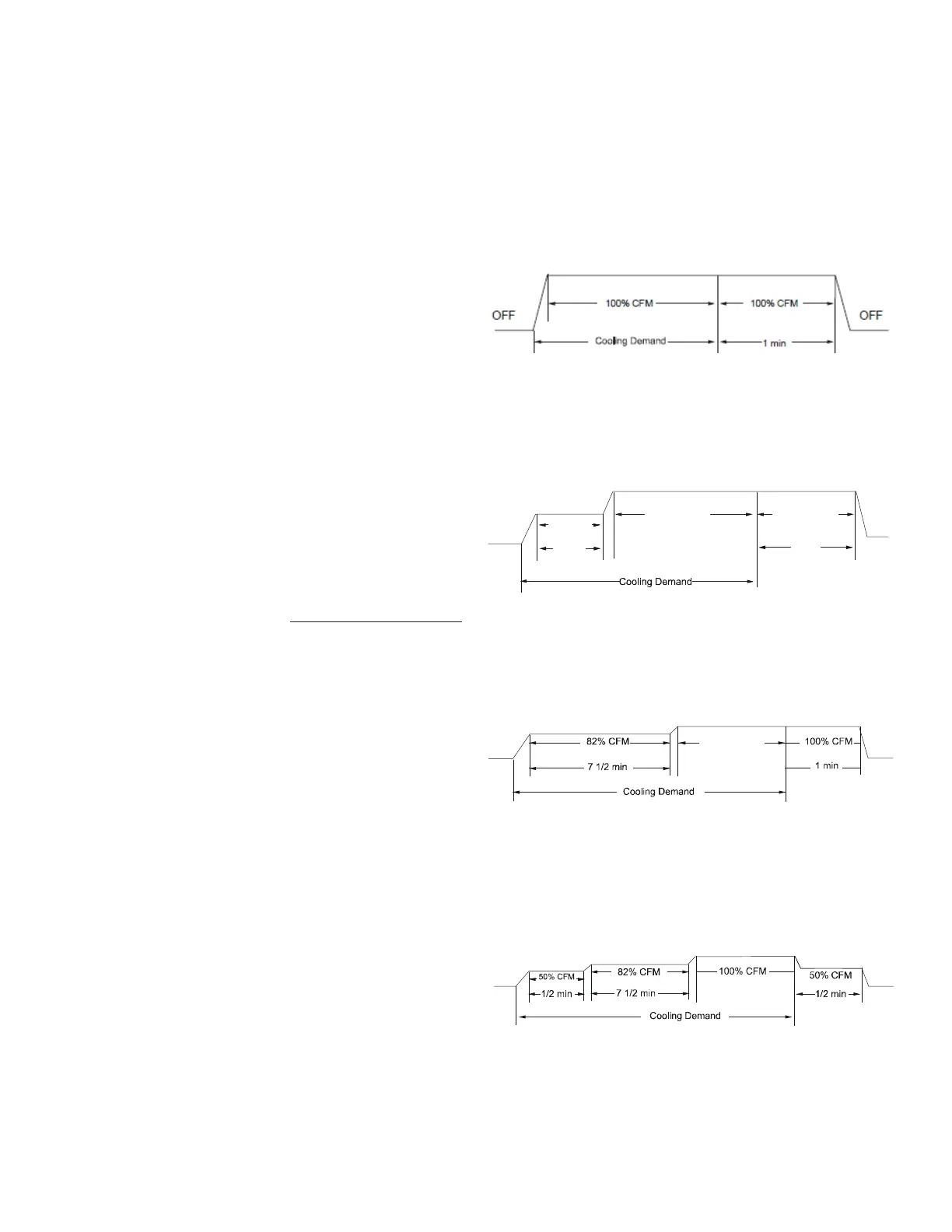
• provides only an OFF delay of one (1)
minute at 100%of the cooling demand airow.
• ramps up to full cooling demand airow
by rst stepping up to 50% of the full demand for
30 seconds. The motor then ramps to 100% of the
required airow. A one (1) minute OFF delay at 100%
of the cooling airow.
50% CFM
1/2 min
100% CFM
100% CFM
1 min
OFF
OFF
• ramps up to 82% of the full cooling demand
airow and operates there for approximately 7 1/2
minutes. The motor then steps up to the full demand
airow. Prole C also has a one (1) minute 100% OFF
delay.
• (default) ramps up to 50% of the demand
for 1/2 minute, then ramps to 82% of the full cooling
demand airow and operates there for approximately
7 1/2 minutes. The motor then steps up to the full
demand airow. Prole D has a 1/2 minute at 50%
airow OFF delay.
*1
1. At Cool and Heat Hi speed trim,
DZ9VCA6010* with D*96VC0804C,
D*97MC0804C and DM80VC0804C combination
trim more than 5% settings are invalid. Trimmed up
CFM makes miss matching error.



 To Next Page