22
LED COLOR LED Status Indication Probable Causes Corrective Actions
Red Communications LED
Outdoor Unit control
board: (H1P)
Indoor Unit control
bard: (H2P)
O Normal Condition
None None
1 Flash Communications Failure
Unknown packet is received
Communications failure
Depress learn button
Verify wiring connection
2 Flash Out-of-box reset
Control Power up
Learn button depressed
None
Green Receive LED
Outdoor unit control
board: (H2P)
Infoor unit control
board: (H3P)
O
No power
Communications error
No power to unit
Open fuse
Communication error
Check circuit breakers and fuses; Rest/Replace if
needed
Reset network by depressing learn button
Check communication wires (terminal 1/terminal 2
wires); Replace if needed
Check for shorts in low voltage wiring.
1 Steady Flash
Broken/disconnected communication
wire(s)
Unit is installed as a legacy/traditional
system
Check communication wires (terminal 1/terminal 2
wires); Replace if needed
Check installation type (legacy/traditional or
communicating)
Rapid Flashing
Control is “talking” on network as expected None
On Solid
Terminal 1 and Terminal 2 wires reversed
at indoor unit, thermostat, or outdoor unit
Short between terminal 1 and terminal 2
wires
Short between terminal 1 or terminal 2 two
wires and terminal C (24VAC) or terminal
R (24VAC, COM)
Check communication wires (terminal1/terminal 2
wires); Replace if needed
No network found
Normal Network Trac
Terminal 1/Terminal 2 miss-wire
If a network communication error has occurred, use the fol-
lowing steps to help troubleshoot the system. (For network
communication error codes, refer to the table below and the
tables of error codes for outdoor unit and indoor unit.)
After any wiring changes have been made or DS1 dip switches
on the outdoor unit control board have been changed, apply
power to the system and see if the error codes have cleared.
1. Conrm low voltage wiring is correct per installation
instructions. Check for miswiring. (i.e. Terminal 1 and
2 is reversed)
NOTE: A removable plug connector is provided with the con-
trol to make thermostat wire connections. This plug may be
removed, wire connections made to the plug, and replaced.
It is STRONGLY recommended that you do not connect more
than two wires into a single terminal in the eld because there
is a risk of the wires becoming loose. Failure to do so may
result in intermittent operation.
2. Check wires for damage. (i.e. Broken wire at terminal,
broken inside wire nuts or damaged cable between
units.)
3. Perform continuity check on wires to make sure cable
is okay. Replace the cable if necessary.
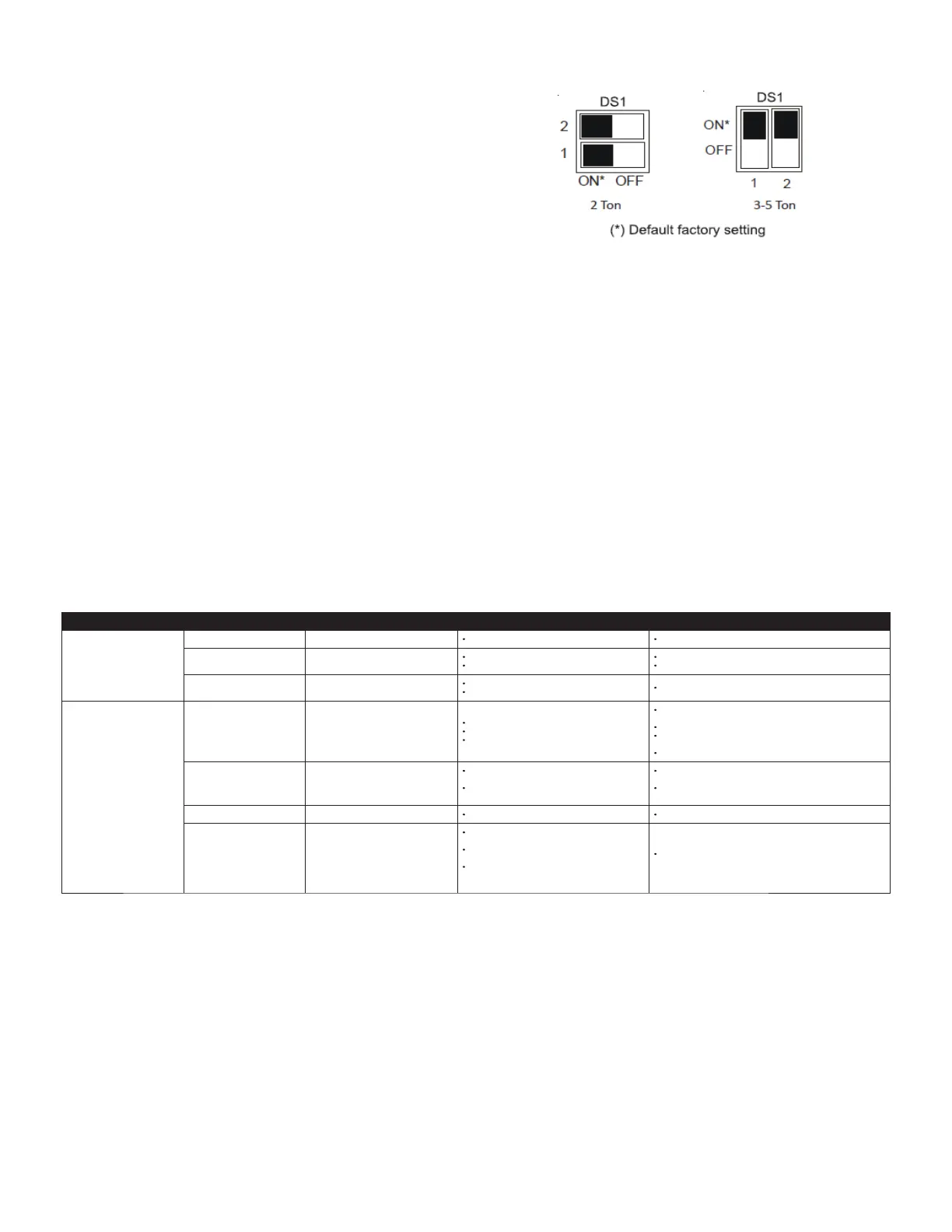
4. Change both dip switches of DS1 on the outdoor unit
control board to the opposite position. See image
above.
The integrated control module has some on board tools that
can be used to troubleshoot the network. These tools are:
red communications LED, green receive (Rx) LED, and the
learn button.
• Red communications LED - Indicates the status of
the network. The table below indicates the LED status
and the corresponding potential problem.
• Green receive LED - Indicates network traffic.
The table below indicates the LED status and the
corresponding potential problem.
• LEARN button - Used to reset the network. Press
the button for approximately 5 seconds to reset the
network.



 To Next Page