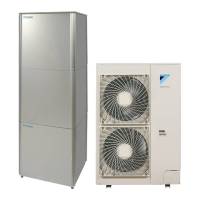
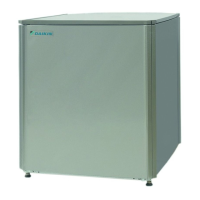
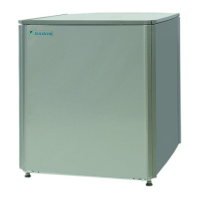
This document is an operation manual for a Daikin indoor unit, designed for air-to-water heat pump systems and their options. The specific models covered are EKHBRD011ADV17, EKHBRD014ADV17, EKHBRD016ADV17, EKHBRD011ADY17, EKHBRD014ADY17, and EKHBRD016ADY17. The manual provides comprehensive instructions for starting up, operating, maintaining, and troubleshooting the unit.
Function Description
The Daikin indoor unit is the internal component of an ERSQ or ERRQ air-to-water heat pump system. It is designed for floor-standing indoor installation and primarily used for heating applications. The unit can be integrated with field-supplied space heating radiators and, optionally, with an EKHTS domestic hot water tank. A remote controller, which includes room thermostat functionality, is supplied as standard for controlling the installation.
The system offers various operation modes:
- Space Heating Operation: This mode allows for heating based on either room temperature control or leaving water temperature control.
- Room Temperature Control: Heating is activated as required by a user-defined room temperature set point, which can be set manually or via the schedule timer. An automatic setback function can be enabled to lower the room temperature during specific periods, such as at night, to optimize energy consumption.
- Leaving Water Temperature Control: Heating is activated based on a water temperature set point, adjustable manually, through the schedule timer, or automatically via weather-dependent control. Weather-dependent operation automatically adjusts the leaving water temperature based on outdoor ambient temperature, leading to lower power consumption.
- Domestic Water Heating Operation: This mode is available if a domestic hot water tank option is installed. It includes several sub-modes:
- Automatic Storage: The unit delivers hot water to the tank based on a daily fixed pattern, typically heating water during the night when space heating requirements are lower. The heated water is stored at a higher temperature to meet daily demand.
- Manual Storage: This is a one-time hot water production feature, immediately heating water to a specified storage temperature.
- Reheat: This function prevents the domestic hot water from cooling below a minimum set temperature, ensuring continuous availability of hot water.
- Disinfection Operation: Periodically heats the domestic hot water tank to a specific temperature for disinfection purposes.
- Emergency Operation: In this mode, heating is exclusively performed by the heater kit, bypassing the heat pump. This is activated via a field setting and is useful if the heat pump is not functioning.
- Other Operation Modes:
- Start-up Operation: Indicates when the heat pump is starting up and not yet in a steady state.
- Defrost Operation: Occurs during space heating or domestic water heating if the outdoor heat exchanger is at risk of freezing due to low outdoor temperatures. The system reverses its cycle to prevent freezing.
- Quiet Mode Operation: Reduces compressor speed to lower noise levels, though this may extend the time required to reach the desired temperature set point.
Usage Features
The remote controller is the primary interface for operating the EKHBRD unit, providing full control over all heating applications, including capacity, electrical supply, and installed options.
Quick Start-up: The manual provides a step-by-step procedure for quickly initiating both space heating and domestic water heating.
Remote Controller Interface: The controller features various buttons and icons for intuitive operation:
- ON/OFF Button: Starts or stops space heating.
- Operation LED: Indicates space heating operation (lit) or malfunction (blinking).
- Operation Mode Icons: Display current modes like space heating, domestic water heating, or quiet mode.
- External Control Icon: Indicates forced operation of the outdoor unit, disabling remote controller operation.
- Day of the Week Indicator & Clock Display: Shows current day and time, crucial for schedule timer programming.
- Schedule Timer Icon: Indicates if the schedule timer is enabled.
- Action Icons: Represent programmed actions for the schedule timer.
- OFF Icon: Indicates the OFF action in schedule timer programming.
- Inspection Required Icons: Signal the need for system inspection.
- Temperature Display: Shows current or set point temperatures (room or water).
- Setting Icon: Used for installation purposes.
- NOT AVAILABLE Icon: Displays when an option is not installed or a function is unavailable due to permission levels or slave controller use.
- Defrost/Start-up Mode Icon: Indicates active defrost or start-up.
- Compressor Icon: Shows when the outdoor unit compressor is active.
- Heater Step Icon: Indicates heater kit operation.
- Pump Icon: Shows when the circulation pump is active.
- Outdoor Temperature Display: Flashes when outdoor ambient temperature is shown.
- Weather Dependent Set Point Icon: Indicates automatic adjustment of leaving water temperature based on outdoor ambient temperature.
- Temperature Icon: Displays when room temperature or set points are shown.
- Test Operation Icon: Indicates test mode.
- Field Set Code & Error Code: Used for configuration and troubleshooting.
- Domestic Water Heating Button: Enables/disables domestic hot water modes.
- Weather Dependent Set Point Button: Enables/disables weather-dependent set point function for space heating.
- Inspection/Test Operation Button: Used for installation and field settings.
- Programming Button: Multi-purpose button for programming the controller.
- Schedule Timer Button: Enables/disables the schedule timer and sets clock/programs controller.
- Time Adjust Buttons: Adjusts clock, toggles temperature displays, and used in schedule timer programming.
- Leaving Water Temperature Adjust Buttons: Adjusts leaving water temperature set point.
- Room Temperature Adjust Buttons: Adjusts room temperature set point.
- Quiet Mode Button: Enables/disables quiet mode.
Setting the Clock: Essential for schedule timer functionality, allowing users to set the current time and day of the week. The clock needs manual adjustment for daylight saving changes and resets after power failures exceeding one hour.
Schedule Timer Operation: The unit supports a flexible schedule timer for automated operations, allowing up to five actions per day for space heating, domestic water heating, and quiet mode. Programming can be based on temperature set points or ON/OFF instructions.
Temperature Read-out Mode: Users can view various actual temperatures (leaving water, entering water, indoor, outdoor, and hot water tank) by holding down a specific button.
Field Settings: The system's configuration is managed through field settings, accessible via the remote controller. These settings allow customization of various parameters, including temperature compensation, storage timing, setback functions, disinfection, and option setups.
Remote Alarm Option: An optional EKRP1HBA digital I/O PCB can be connected to the indoor unit to remotely monitor the system, providing outputs for THERMO ON/OFF, ALARM OUTPUT, and DOMESTIC HOT WATER MODE ON/OFF.
Optional Remote Controller: If an additional remote controller (slave) is installed, it has limited access compared to the main (master) controller, primarily for basic operation rather than schedule or parameter settings.
Maintenance Features
To ensure optimal availability and longevity of the unit, regular maintenance checks and inspections are recommended, preferably annually, by a local Daikin technician.
Operator Maintenance:
- Cleaning: The remote controller should be kept clean using a soft, damp cloth.
- Water Pressure Check: The operator should verify that the water pressure indicated on the manometer is above 1 bar.
Important Considerations:
- Power Supply: During extended periods of inactivity (e.g., summer for heating-only applications), it is crucial NOT to switch off the power supply to the unit. Maintaining power allows for automatic, repetitive pump movement, preventing it from jamming.
- Refrigerant Information: The product contains fluorinated greenhouse gases (R134a with a GWP value of 1430). It is essential not to vent these gases into the atmosphere. Dismantling, refrigerant treatment, and oil/parts disposal must be carried out by qualified installers in accordance with local and national legislation, at specialized treatment facilities for re-use, recycling, and recovery.
- Greenhouse Gas Emissions: In Europe, the total refrigerant charge's greenhouse gas emissions (in tonnes CO2-equivalent) determine maintenance intervals, following applicable legislation. The manual provides a formula for calculating these emissions.
Troubleshooting
The manual offers guidelines for common problems:
- Blank Display: Suggests checking the mains power supply and if the benefit kWh rate power supply is active.
- Error Codes: Advises consulting the local dealer and referring to the installation manual for a detailed list of error codes.
- Incorrect Schedule Timer Execution: Recommends checking and correcting the clock and day of the week settings.
- Non-functional Domestic Hot Water Schedule Timer: Instructs users to push the schedule timer button to ensure it is enabled.
- Capacity Shortage: Advises consulting the local dealer.
The manual emphasizes that for any issues beyond basic troubleshooting, a qualified service person should be contacted. Users are cautioned against inspecting or servicing the remote controller or indoor unit themselves due to electrical and hot parts.


 To Next Page
 General