19
English
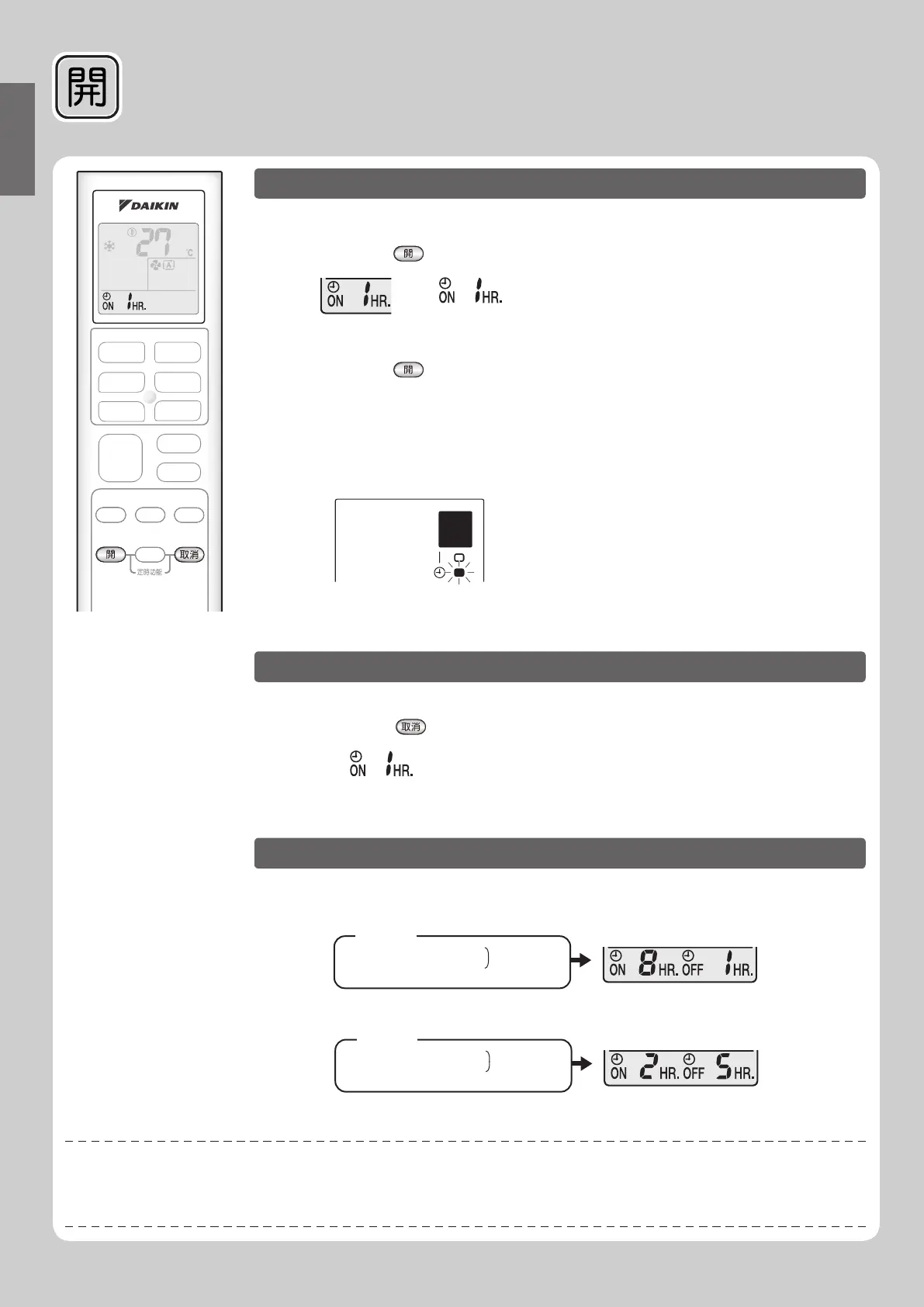
1.Press .
• “ ” is display on the LCD.
2. Press until the time setting reaches the
point you prefer.
• Each pressing of button increases the time setting by 1 hour.
• The TIMER lamp lights
• Setting time can be increase to 12 hours maximum.
orange.
Display
ON TIMER Operation
■
To use ON TIMER operation
■
To cancel ON TIMER operation
Press .
• The TIMER lamp goes off.
■
To combine ON TIMER and OFF TIMER
• A sample setting
- When setting while unit is operating.
for combining the 2 timers is shown below.
(Example)
Turn off unit in the next 1 hr.
Turn on unit in the next 8 hr.
(7 hr. after turn off)
Combined
NOTE
■
In the following cases, set the timer again.
• After a breaker has turned off.
• After a power failure.
After replacing batteries in the remote controller.•
• “ ” disappear from the LCD.
- When setting while unit is stopped.
(Example)
Turn on unit in the next 2 hr.
Turn off unit in the next 5 hr.
(3 hr. after turn on)
Combined


 To Next Page