12
Adjusting the Airow Direction
Youcanadjusttheairowdirectiontoincreaseyourcomfort.
CAUTION
• Alwaysusearemotecontrollertoadjusttheanglesoftheapsandlouvres.
−Ifyouattempttomovetheapsandlouvresforciblybyhandwhentheyareswinging,themechanism
maybedamaged.
−Insidetheairoutlet,afanisrotatingatahighspeed.
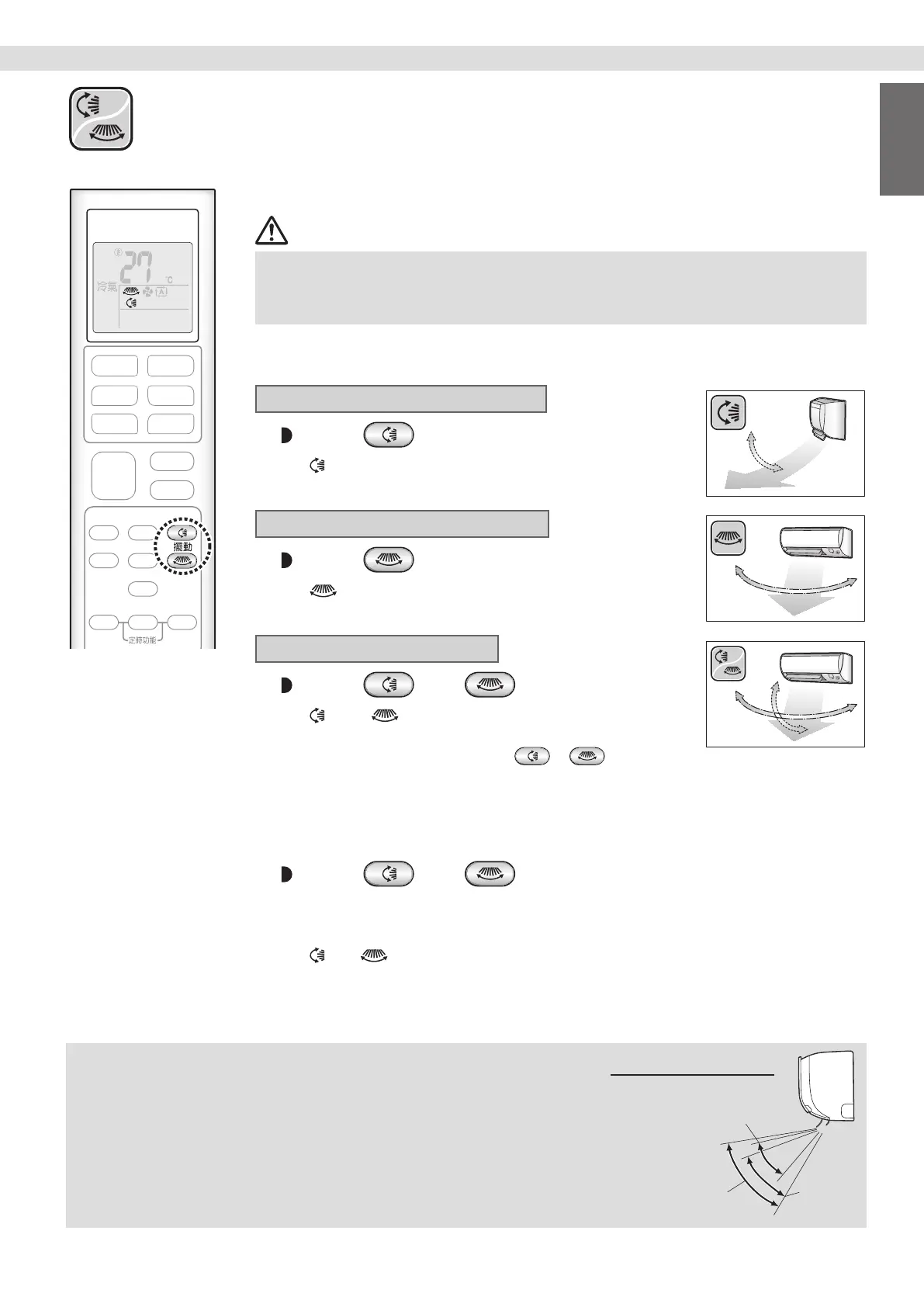
To start auto swing
Up and down airow direction
Press .
•“ ”appearsontheLCD.
•Theaps(horizontalblades)willbegintoswing.
Right and left airow direction
Press .
•“ ”appearsontheLCD.
•Thelouvres(verticalblades)willbegintoswing.
The 3-D airow direction
Press and .
•“ ”and“ ”appearontheLCD.
•Theapsandlouvresmoveinturn.
•Tocancel3-Dairow,presseither
oragain.
Theapsorlouvreswillstopmoving.
To set the aps or louvres at the desired position
•Thisfunctioniseffectivewhiletheapsorlouvresareinautoswingmode.
Press and when the aps or louvres reach
the desired position.
•Inthe3-Dairow,theapsandlouvresmoveinturn.
•“
”or“ ”disappearsfromtheLCD.
NOTE
Notes on airow direction setting
• Themovablerangeoftheapsvariesaccordingtotheoperationmode.
Note on 3-D airow
•Using3-Dairowcirculatescoldair,whichtendstocollectatthebottomoftheroom,
andhotair,whichtendstocollectneartheceiling,throughouttheroom,preventingareas
ofcoldandhotdeveloping.
Movable range of the flaps
COOL / DRY
FAN ONLY
HEAT
English
Basic Operation Basic Operation
01_EN_3P492259-18L.indd 12 12/13/2019 2:08:19 PM



 To Next Page