7 Configuration
Installer and user reference guide
38
SERHQ020~032BAW1 + SEHVX20~64BAW
Split packaged air-cooled water chiller
4P508020-1A – 2018.01
Setting
(= binary)
Value
Description
Refrigerant recovery/vacuuming mode.
This is a field setting of the outdoor module. In case of
SEHVX40+64BAW, perform the setting on both outdoor modules.
In order to achieve a free pathway to reclaim refrigerant out of the
system or to remove residual substances or to vacuum the system,
it is necessary to apply a setting which will open the required
valves in the refrigerant circuit so the reclaim of refrigerant or
vacuuming process can be done properly.
To stop the refrigerant recovery/vacuuming mode, push BS1. If
BS1 is not pushed, the system will remain in refrigerant recovery/
vacuuming mode.
(default)
Deactivated
Activated
7.2.9 Field settings on the user interface
The user can change the field settings using the user interface.
Each field setting is assigned a 3-digit number or code, e.g. [5-03],
which is indicated on the user interface display. The first digit [5] is
the 'first code' or field setting group. The second and third digit [03]
together are the 'second code'.
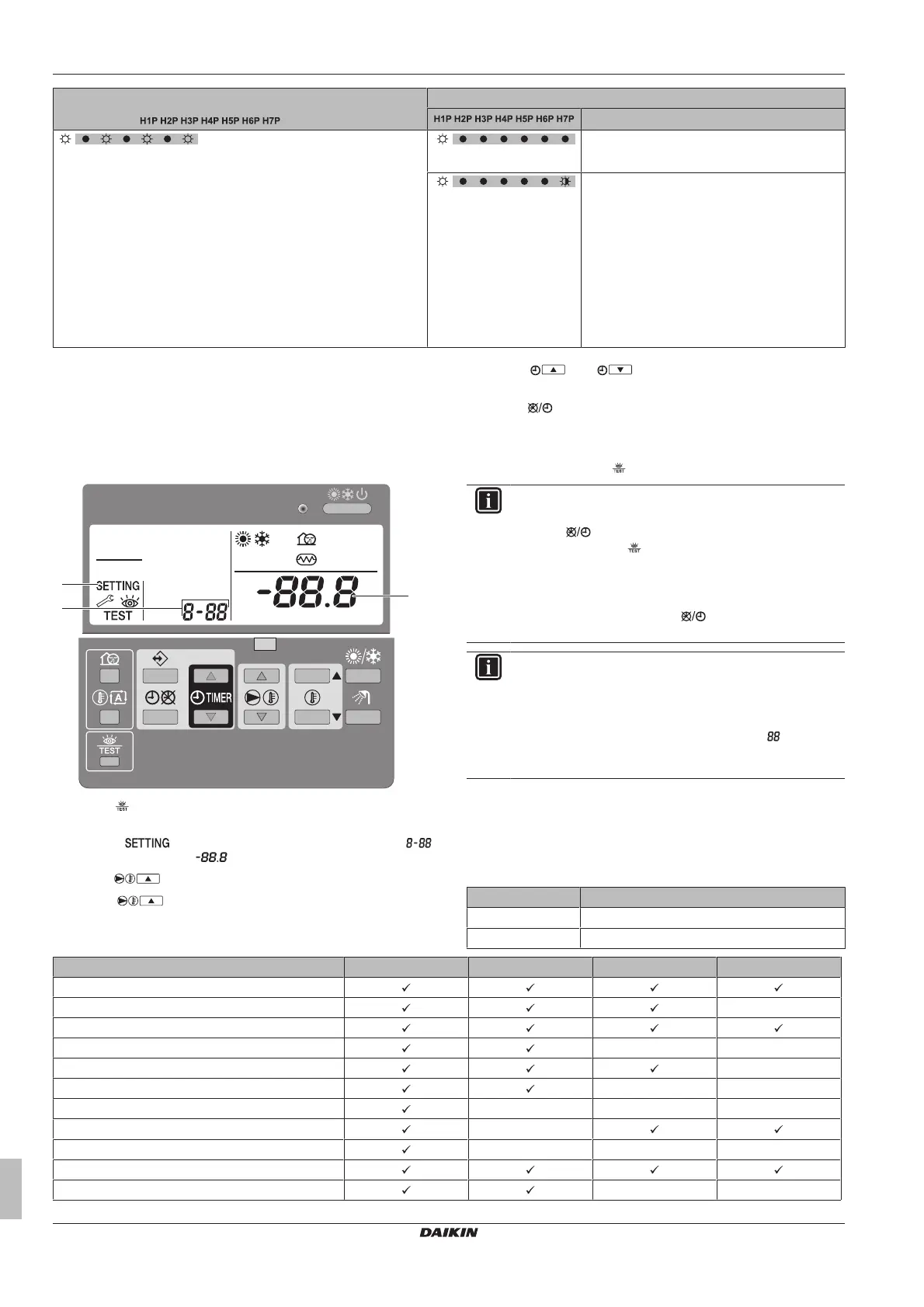
1 Press for a minimum of 5 seconds to enter the field setting
mode.
Result: (c), the current selected field setting code
(b) and the set value (a) are displayed.
2 Press to select the appropriate field setting first code.
3 Press to select the appropriate field setting second
code.
4 Press and to change the value of the selected
field setting.
5 Press to save the new value.
6 Repeat the previous steps to change other field settings as
required.
7 When finished, press to exit the field setting mode.
INFORMATION
▪ Changes made to a specific field setting are only stored
when is pressed. Navigating to a new field setting
code or pressing will discard any changes.
▪ Field settings are grouped by their first code, e.g. field
settings [0-00]; [0-01]; [0-02]; [0-03] are defined as
"Group 0". When different values are changed within
the same group, pressing will save all the values
changed within this group.
INFORMATION
▪ Before shipping, the set values have been set as
shown in "7.2.9Field settings on the user interface"on
page38.
▪ When exiting the field setting mode, " " may be
displayed on the user interface display while the unit
initializes itself.
[0]Remote control setup
[0‑00] User permission level
The user permission level defines which buttons and functions are
available for the user. By default no level is defined, so all buttons
and functions are operable.
[0‑00] Description
2 Permission level 2
3 Permission level 3
Master Slave Permission level2 Permission level3
Operation ON/OFF
Setting the leaving water temperature —
Setting the room temperature
Quiet mode ON/OFF — —
Weather dependent setpoint operation ON/OFF —
Setting the clock — —
Programming the schedule timer — — —
Schedule timer operation ON/OFF —
Field settings — — —
Error code display
Test operation — —



 To Next Page