16 Operation
Installer and user reference guide
68
SERHQ020~032BAW1 + SEHVX20~64BAW
Split packaged air-cooled water chiller
4P508020-1A – 2018.01
INFORMATION
Press to return to previous steps in the programming
procedure without saving modified settings.
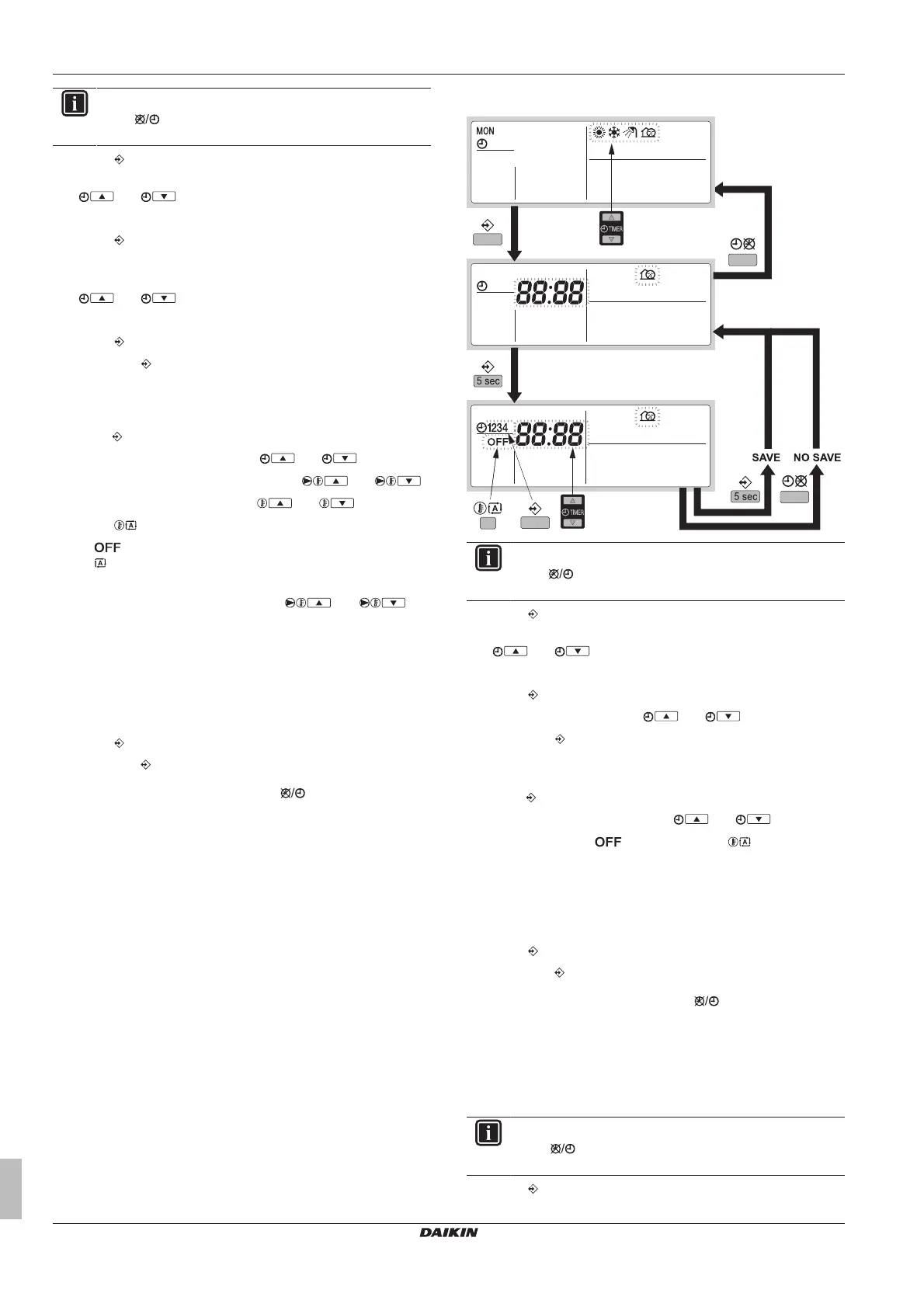
1 Press to enter the programming/consulting mode.
2 Select the operation mode you would like to program using
and .
Result: The actual mode is blinking.
3 Press to confirm the selected mode.
Result: The actual day is blinking.
4 Select the day you would like to consult or to program using
and .
Result: The selected day is blinking.
5 Press to confirm the selected day.
6 Hold down for 5seconds to program the detailed actions.
Result: The first programmed action of the selected day
appears.
7 Select the action number you would like to program or to modify
using .
8 Set the correct action time using and .
9 Set the leaving water temperature using and .
10 Set the room temperature using and .
11 Press to select:
▪ : to switch heating and the remote controller off.
▪ : to select automatic temperature calculation for leaving
water temperature
12 Set the appropriate shift value using and . For
more information about weather dependent setpoint, see
"16.3.6Schedule timer"on page65.
13 Repeat this procedure to program the other actions of the
selected day.
Result: When all actions have been programmed, make sure
that the display shows the highest action number you would like
to save.
14 Press for 5seconds to store the programmed actions.
Result: If is pressed when action number 3 is displayed,
actions 1, 2 and 3 are stored, but action 4 is deleted. You
automatically return to step6. Press several times to return
to previous steps in this procedure and finally return to normal
operation.
15 You automatically return to step 6; start again to program the
following day.
To program quiet mode
INFORMATION
Press to return to previous steps in the programming
procedure without saving modified settings.
1 Press to enter the programming/consulting mode.
2 Select the operation mode you would like to program using
and .
Result: The actual mode is blinking.
3 Press to confirm the selected mode.
4 Consult the action(s) using and .
5 Hold down for 5seconds to program the detailed actions.
Result: The first programmed action appears.
6 Select the action number you would like to program or to modify
using .
7 Set the correct action time using and .
8 Select or deselect as an action using .
9 Repeat this procedure to program the other actions of the
selected mode.
Result: When all actions have been programmed, make sure
that the display shows the highest action number you would like
to save.
10 Press for 5seconds to store the programmed actions.
Result: If is pressed when action number 3 is displayed,
actions 1, 2 and 3 are stored, but action 4 is deleted. You
automatically return to step6. Press several times to return
to previous steps in this procedure and finally return to normal
operation.
11 You automatically return to step 6; start again to program the
following day.
To consult programmed actions
INFORMATION
Press to return to previous steps in the consulting
procedure.
1 Press to enter the programming/consulting mode.



 To Next Page