6
OPERATING INSTRUCTIONS
3
1 2
4
5
6
7
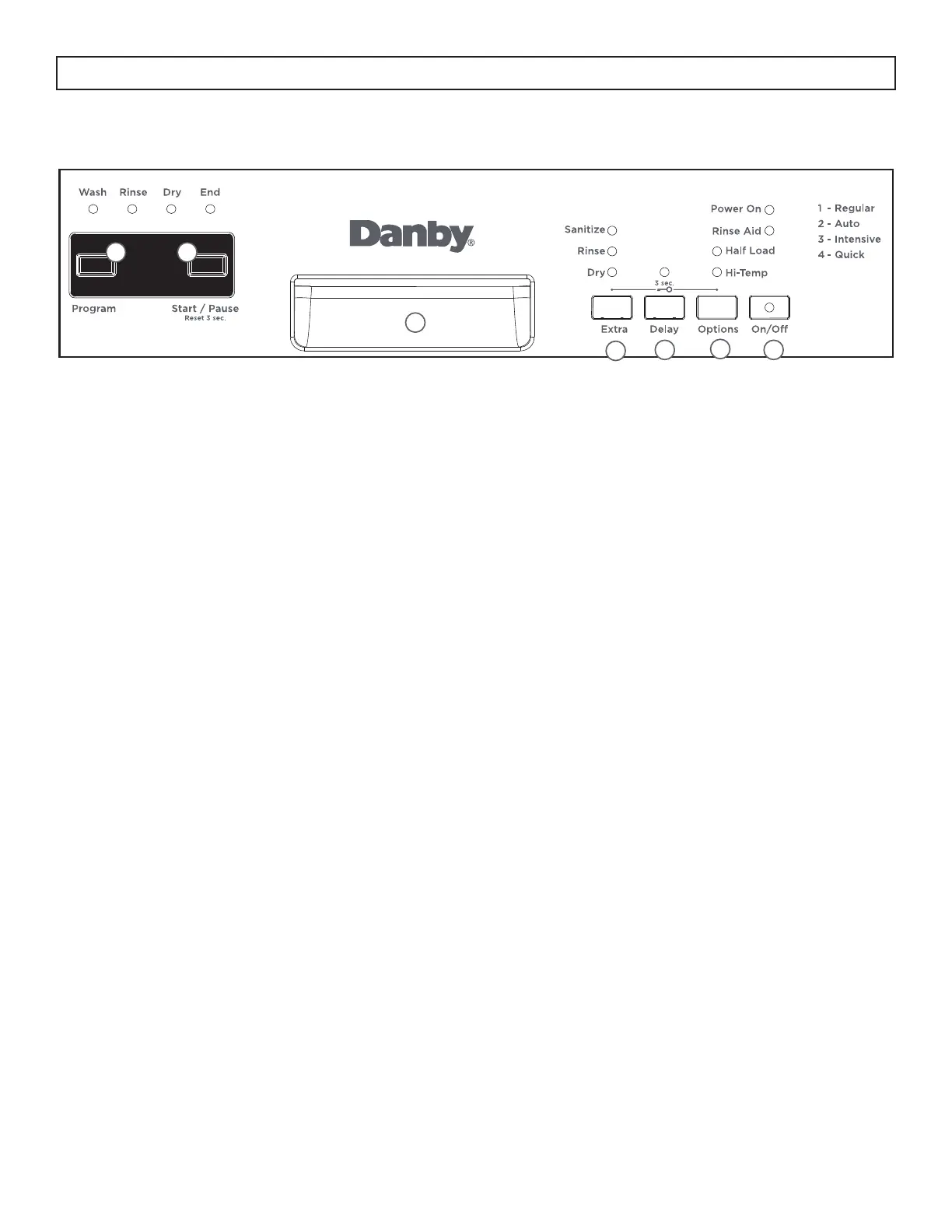
CONTROL PANEL - BUTTONS
1. Program button: Press to select the desired program.
2. Start/Pause button:
• Press to start the desired program.
• Press to pause a program that is running. Press again to restart the program.
• Press and hold for 3 seconds to cancel a program which it is in operation.
3. Handle
4. Extra button: Press to select extra functions such as sanitize, extra rinse and extra dry.
• Sanitize: raises the water temperature in the fi nal rinse
• Extra rinse: adds an extra rinse cycle to the program
• Extra dry: adds an extra dry cycle to the program
5. Delay button: Press to set the time delay function.
6. Options button: Press to select the half load and hi - temp functions.
• Half load: used to run the dishwasher when it is only half full.
• Hi-temp: both the water temperature and the washing time are increased.
7. Power button: Use to turn the dishwasher on or off.






 To Next Page