17
OPERATING INSTRUCTIONS
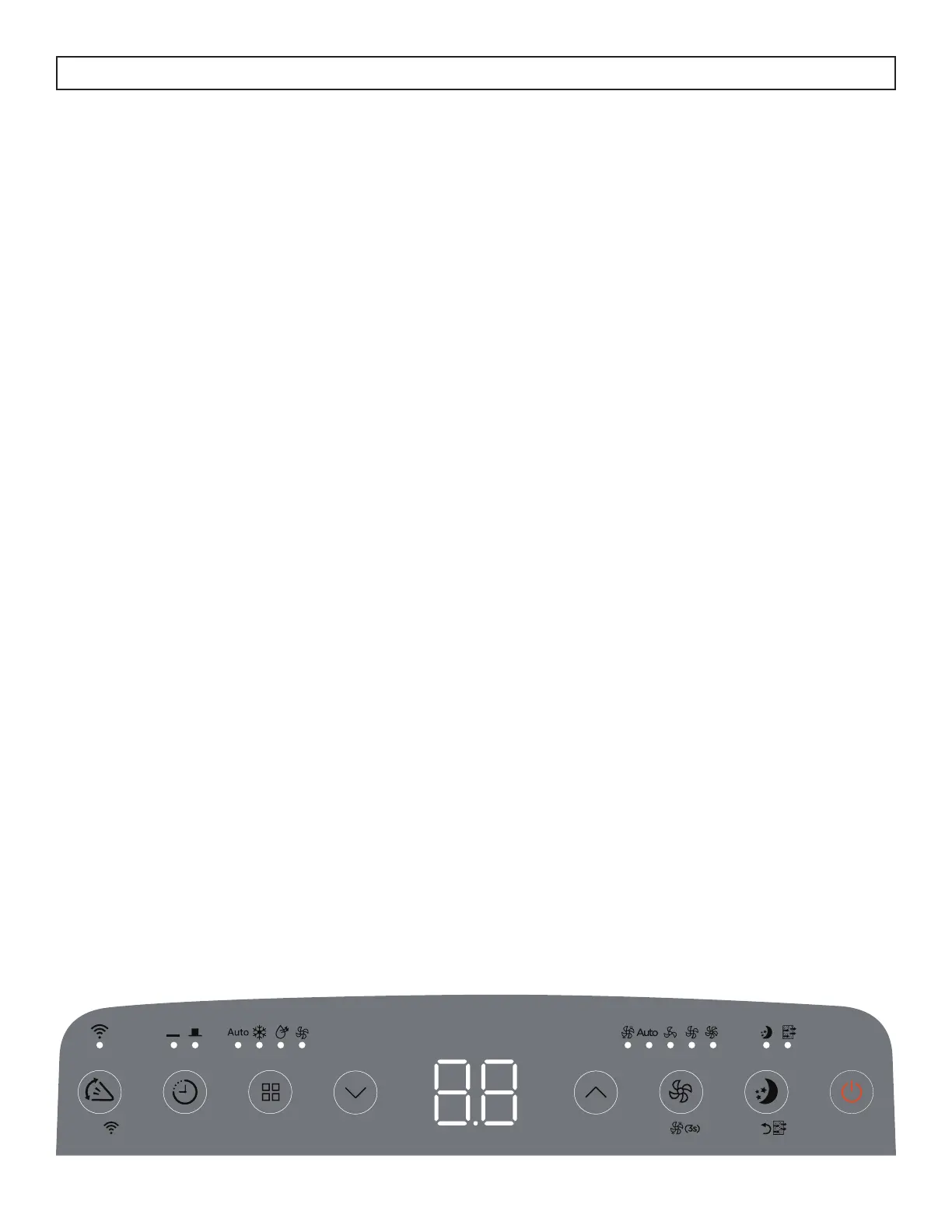
CONTROL PANEL
1. Swing and wireless connect button:
• Press to start the auto swing feature.
• Press and hold for three seconds to start using the wireless connect feature.
2. Timer button: Press to set the automatic timer. Light will indicate whether a timer is set.
3. Mode button: Press to select the desired mode. Light will indicate current mode.
4. Temperature control buttons:
• Press to modify the set temperature in 1° increments in a range of 16 - 30°C (60 - 86°F).
• Press to modify the timer setting in 0.5 hour increments up to 10 hours and then in 1 hour
increments up to 24 hours.
• Press and hold both temperature control buttons for three seconds to change the temperature
display from °C to °F.
5. LED display:
• Shows the set temperature in °C or °F.
• Shows the timer settings.
• Shows error codes.
• When on fan mode, shows the room temperature.
6. Fan button:
• Press to select fan speed. Light will indicate current speed.
• Press and hold for 3 seconds to turn the continuous fan on or off.
7. Sleep and fi lter button:
• Press to start the sleep feature.
• The fi lter light will illuminate after 250 hours of use as a reminder to clean the fi lter; to reset the fi lter
after cleaning, press and hold the sleep button for three seconds.
8. Power button: Press to turn the appliance on or off.
3sec
3sec



 To Next Page