27
Chapter 4: Connecting So Smart to a Network
4.1 Setting Network Sharing using Windows XP on your PC
In order to connect your So Smart Player to your local area
network or to an individual PC, we need to configure the
Internet Protocol on your PC:
◈
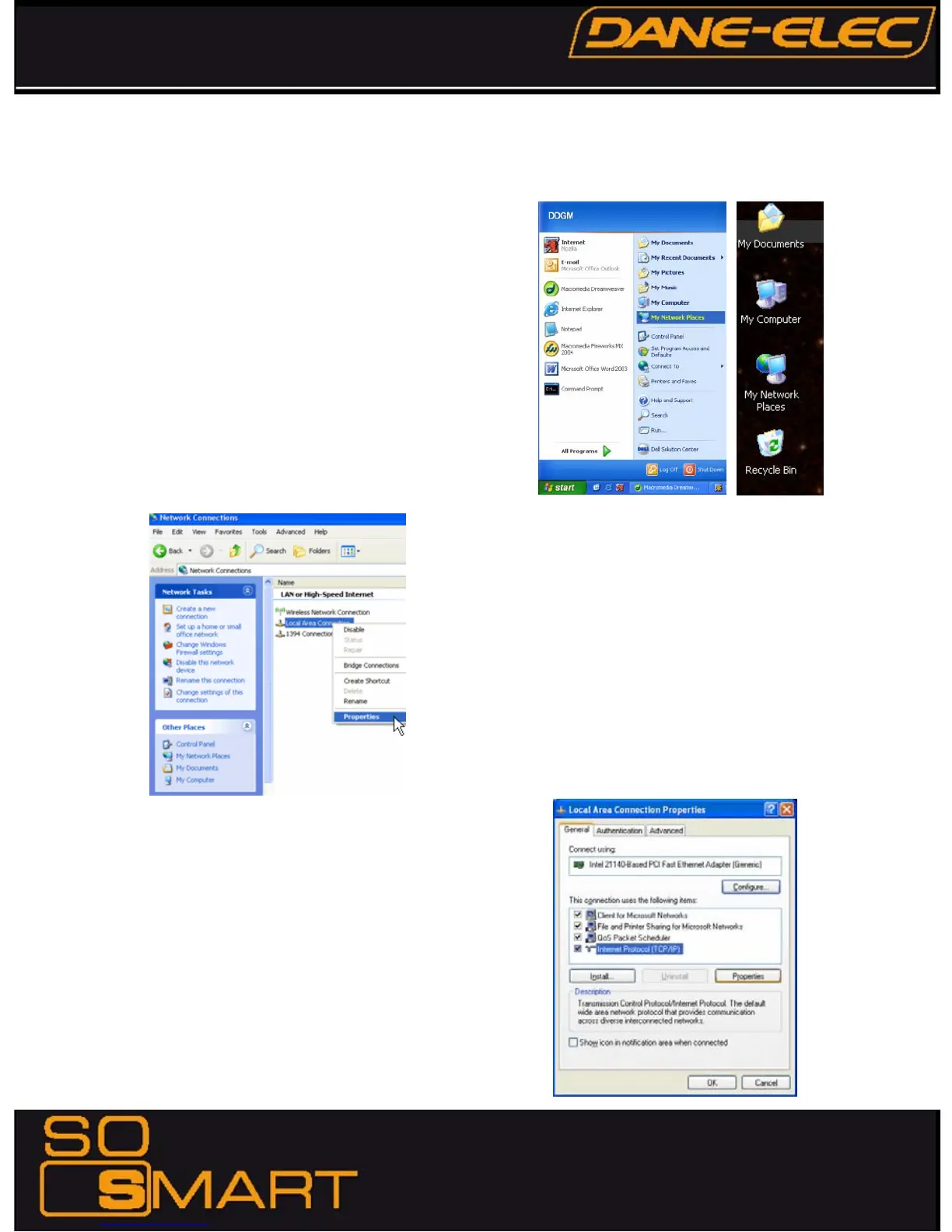
On your Win-XP PC, Click START.
◈
Right-click on MY NETWORK PLACES, and
◈
Select PROPERTIES
Alternatively, if the “MY NETWORK PLACES” icon is visible on
your Desktop, simply right click on the Icon and Select
Properties.
Navigate to Local Area Connection. Right click on it and
left click Properties.
The Local Area Connection Properties window is displayed.
Right click the Connection and hit 'Properties'. The window on
the right opens up.
Select Internet Protocol (TCP/IP) and click INSTALL.










 To Next Page