Installation MCD Remote Operator
MG.17.E5.02 - VLT® is a registered Danfoss trademark 4
2.6. For use with MCD 500
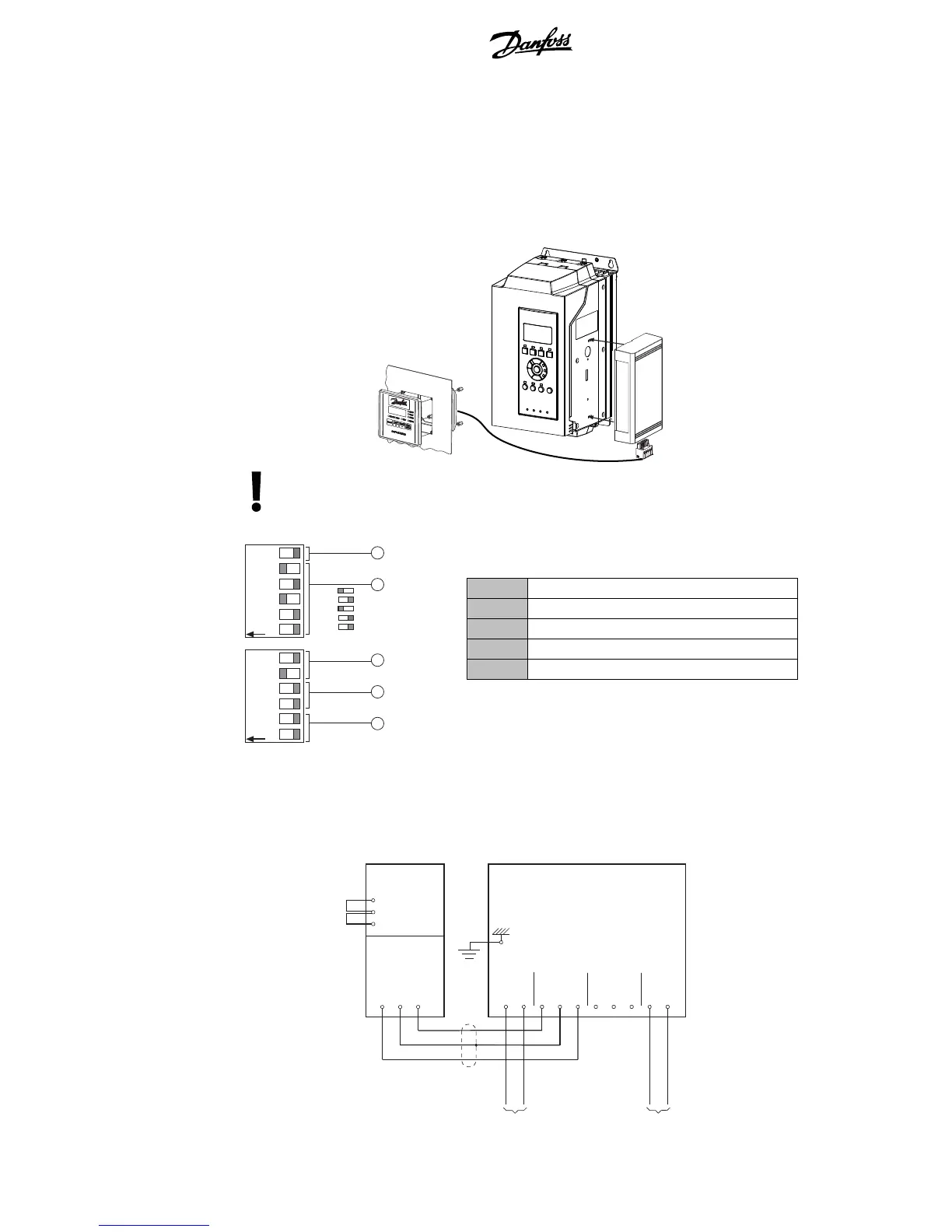
In order to use the Remote Operator with MCD 500 soft starters, a Modbus Module must first be installed
to the starter using the following steps:
1. Remove control power and mains supply from the soft starter.
2. Attach the Modbus Module to the side of the starter as illustrated.
177 HA5 31.10
Remove mains and control voltage from the soft starter before attaching or removing
accessories. Failure to do so may damage the equipment.
3. The DIP switches on the Modbus Module must be set as follows:
1 Protocol = AP ASCII
2 Address = 20
3 Baud Rate = 9600
4 Parity = No parity
5 Timeout = No timeout
123456
ON
123456
ON
+16
+8
+4
+2
+1
0
0
0
0
0
DIP SWITCH A DIP SWITCH B
177HA543.10
1
2
3
4
5
4. Apply control power to the soft starter. The LED on the Modbus module should flash.
5. In order for the MCD 500 to accept commands from the serial network, the soft starter must be
in Auto On mode and links must be fitted to terminals 17 and 25 to 18.
6. Connect the RS485 cable between the Remote Operator and the Modbus Module. Apply
control voltage to the Remote Operator.
177HA535.10
MCD 500
(Auto On mode)
REMOTE OPERATOR
RS485
Serial Port
B8
B7
B6
B1
B2
B3 B6
B7 B8
RS485 RS485
4-20 mA
Analog Output
B10
B11
4-20 mA
Supply Voltage
18~30 VAC/VDC
12
PO
+ GND -
- GND +- GND ++ - ~/+ ~/-
MODBUS MODULE
17
18
25
Stop
COM
Reset



 To Next Page