PAGE 26 46210/46220-0998 <90-00036>
462xx-xx REV ____
WARNING:
REMOVE fuse
before removing
or inserting module
Use wrist strap
ESD SENSITIVE DEVICE
POWER
ALARM
uP LED
MSTR
AUX
GREEN = RCV
RED = XMT
Front View
Place Thumb
Here
Side View
If one of the alarm interface boards inside the unit is removed or
disconnected, a point-64 alarm failure is generated in the alarm
display reporting that board’s alarms.
Connect a dumb terminal or personal computer operating as a
dumb terminal to the master port for maintenance purposes.
Refer to the Printer Syntax chapter.
To replace the fuse:
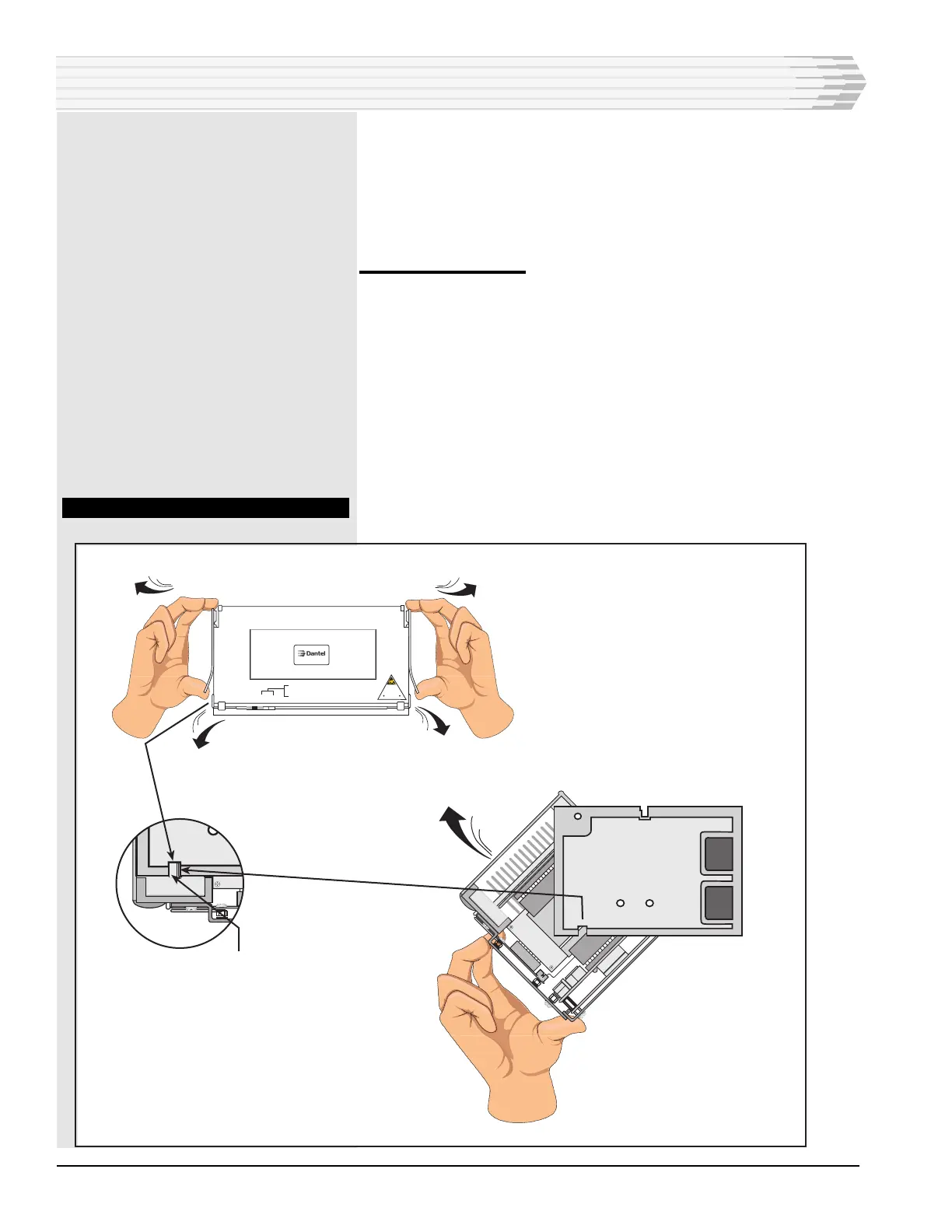
1. Open the 46210/46220 (refer to Fig. 20).
2. Pull the power supply and CPU boards down from the other cir-
cuitry (refer to Fig. 21).
3. Replace the fuse (F1) on the power supply board with a GMT-type
fuse rated at one ampere (refer to Fig. 22).
4. Push the power supply and CPU boards back into place and close
the unit.
5. Fuse replacement complete.
FIG. 20 - OPENING THE 46210/46220
OPERATION



 To Next Page