4
1.
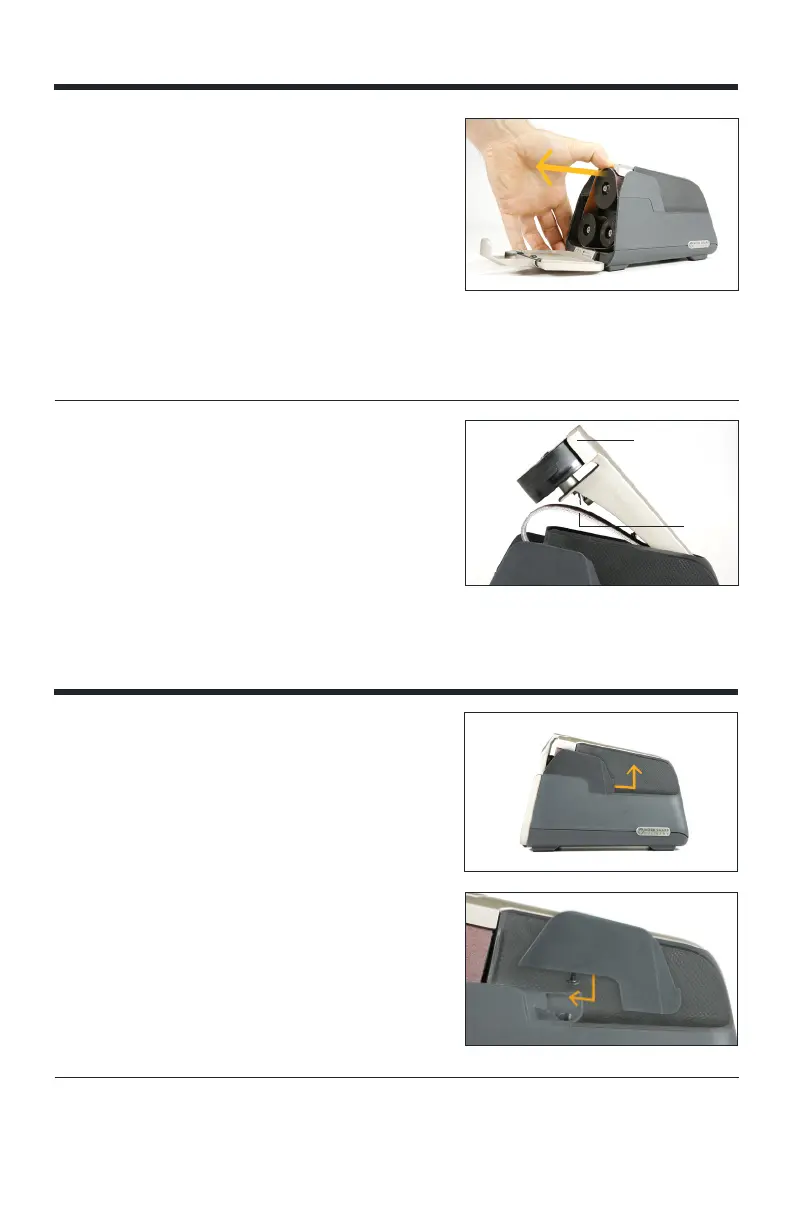
Pull open the front cover of the unit. Cover is
secured with magnet.
2. Press down on the tensioner, located behind the
top, large pulley (wheel).
3. Holding tensioner down, slide belt off.
4. Lift up tensioner to find extra belt storage.
5. To install new belt, hold tensioner down and slide
belt around all 3 pulleys (wheels).
For more info about belts, see SHARPENING
BELT INFORMATION section.
CHANGING/REPLACING BELTS
ON
OFF
Belts
Belt Tensioner
1. Push back on guide from the front of the
sharpener until the guide snaps out of place.
2. Lift the guide to remove.
TIP 1: Remove guides to clean debris on the
leather liner with a dry cloth or brush.
TIP 2: Remove right or left guide to access
scissor guide. See sharpening scissor section for
more detail.
3. To reinstall guide, align screw with hole on
sharpener.
4. Push the guide forward toward the front of the
sharpener until it snaps into place. Make sure it is
flush with the sharpener.
The E5 Upgrade Kit includes expandable sharpening capabilities with 15° EAST GUIDES
and 20° WEST GUIDES (sold separately).
REMOVING GUIDES
BELT STORAGE
With the belt removed, lift the belt tensioner to
reveal belt storage space.



 To Next Page