Revision No. 005 August 2020
DataRemote 2020
WHAT DO YOU NEED TO KNOW
BEFORE INSTALLING YOUR DEVICE
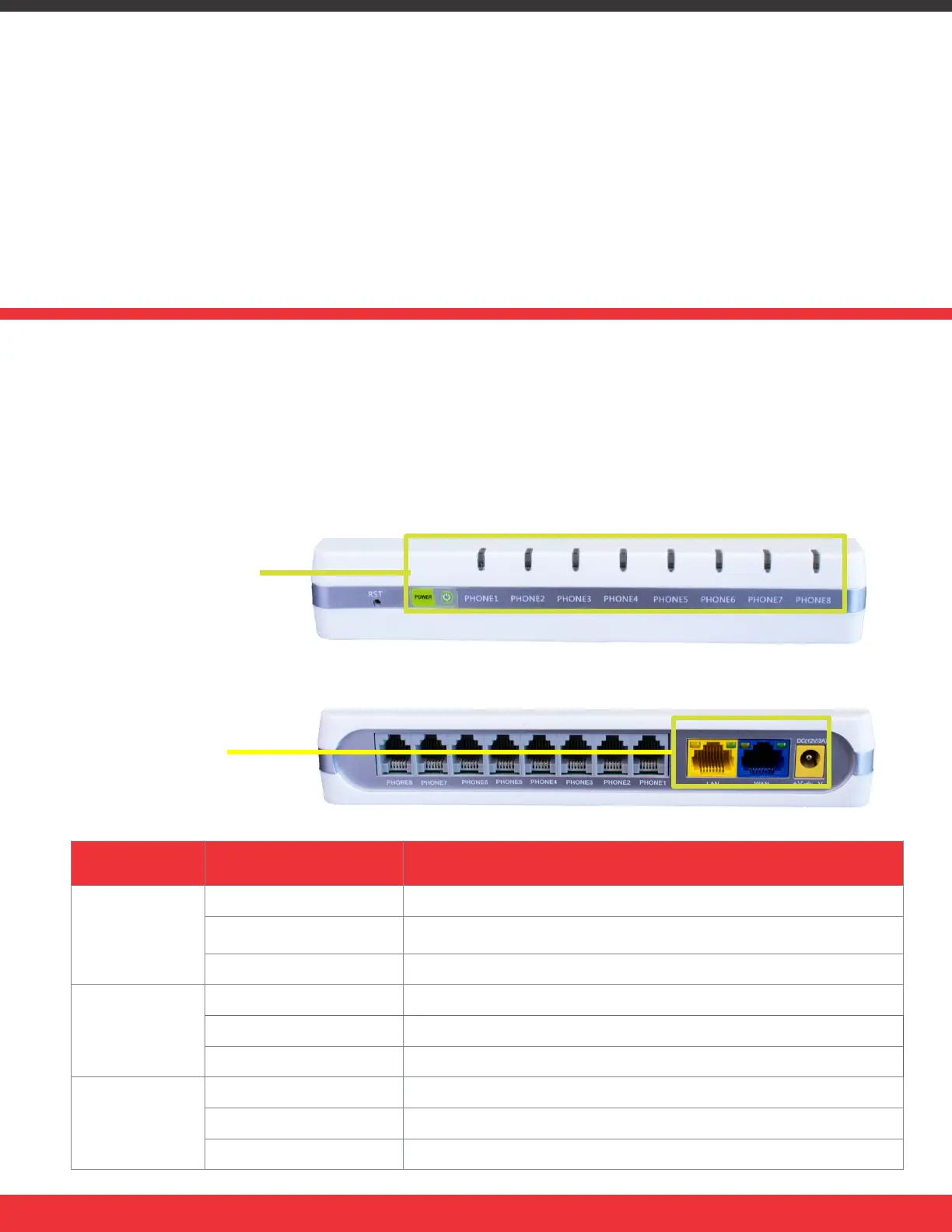
LED LIGHT INDICATORS
NOTE: Before you use your device, please get acquainted with the LED indicators and connectors.
FRONT PANEL
LED STATUS
Before you can connect your DataRemote DRI-9080 device to the Internet and use it, you must
have access to high-speed Internet. A high-speed Internet connection can be accessed through
DSL, cable modem, and/or a leased line.
Make sure you are connecting your new DataRemote DRI-9080 device near a power source and
away from extreme heat / humid sources.
LED STATUS EXPLANATION
POWER
Solid (GREEN) The router is powered on (External Power) and running normally.
Flashing (GREEN)
The router is powered on (Internal Power - BAT) and running
normally.
No Light The router is powered off.
FXS Ports
On (GREEN) Registered
OFF Not registered
On blinking (GREEN) FXS port active / call in progress
WAN/LAN
(Rear panel)
OFF Device is not connected to Internet via Ethernet cable
On (GREEN) Connected (registered)
On blinking (GREEN) Active Data Traffic
REAR PANEL
LED STATUS
Page 5


 To Next Page