EasyManua.ls Logo

Datavideo PTC-280 - 9 Dip Switch Settings; Dip Switch Sw1

Datavideo PTC-280
100 pages
Print Icon
To Next Page IconTo Next Page
To Previous Page IconTo Previous Page
Loading...
72
9. DIP Switch Settings
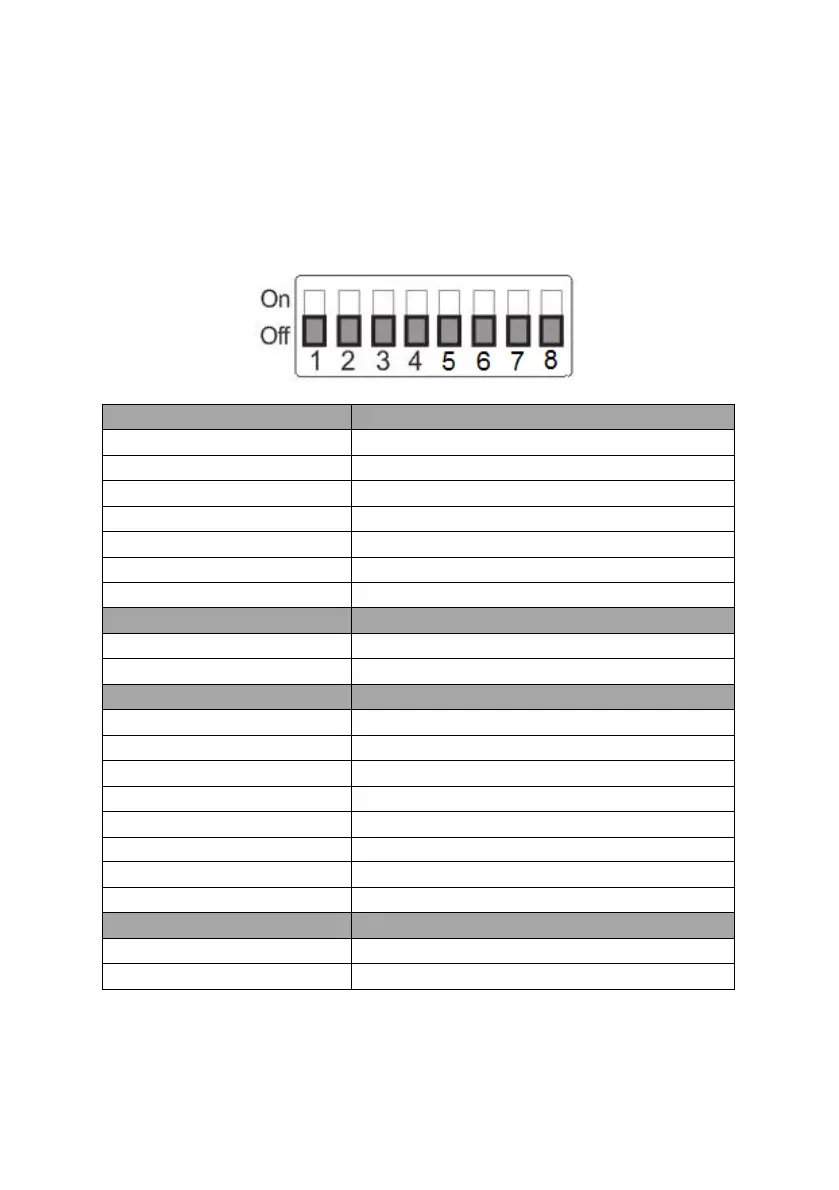
9.1 DIP Switch SW1
The DIP Switch SW1 can be found at the bottom of the camera, where the
user is allowed to set the camera’s VISCA ID, enable remote control, select the
video resolution, and configure how the video mode can be selected.
DIP SW 1/2/3
VISCA ID
(1,2,3) = (ON,OFF,OFF)
VISCA-ID 1
(1,2,3) = (OFF,ON ,OFF)
VISCA-ID 2
(1,2,3) = (ON ,ON ,OFF)
VISCA-ID 3
(1,2,3) = (OFF,OFF,ON)
VISCA-ID 4
(1,2,3) = (ON ,OFF,ON)
VISCA-ID 5
(1,2,3) = (OFF,ON ,ON)
VISCA-ID 6
(1,2,3) = (ON ,ON ,ON)
VISCA-ID 7
DIP SW 4
Remote Control Protocol
ON
DVIP
OFF
RS-422
DIP SW 5/6/7
Resolution
(5,6,7) = (OFF,OFF,OFF)
1920 x 1080i 59.94
(5,6,7) = (ON,OFF,OFF)
1920x1080i50
(5,6,7) = (OFF,ON,OFF)
1920 x 1080p 59.94
(5,6,7) = (ON,OFF,OFF)
1920 x 1080p 50
(5,6,7) = (OFF,OFF,ON)
3840 x 2160p 29.97
(5,6,7) = (ON,OFF,ON)
3840 x 2160p 25
(5,6,7) = (OFF,ON,ON)
3840 x 2160p 59.94
(5,6,7) = (ON,ON,ON)
3840 x 2160p 50
DIP SW 8
Video Mode Selection Method
ON
Video mode selectable by DIP switch only
OFF
Video mode selectable by menu