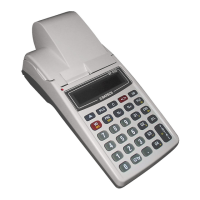
DP-50 / DP-50D / MP55-B - USERS MANUAL
OPERATION MODES
The ECRs working mode can be set when on the display is shown
REG - 'REGISTRATION', Registering of the sales;
X - 'X REPORTS', Reports of the ECR;
Z - 'Z REPORTS', Reports of the ECR with clearing;
PGM - 'PROGRAMMING', Programming of the ECR settings;
- Connection to PC for:
1. Reporting the fiscal memory (by using the applications
'Memory Reader' and 'Fiscal Memory Interpreter' or other with
similar functionality);
- Programming and reporting from PC
( by using the application "Ecr Tool" or its analog)
- Showing the battery voltage and the current date and time.
- Turning off the ECR when it is in "OFF" mode.
From any state of the ECR with the keys
the current state changes to
The operators have no equal rights when accessing the modes. The access
permissions are defined as the follows:
- operators 1..24 (cashiers) are allowed to access only REG mode;
- operators 25, 26 are allowed to access REG and Х modes;
- operators 27, 28 are allowed to access REG, Х and Z modes;
11



 To Next Page