EasyManua.ls Logo

Datel TurboFire 2 - User Manual

Datel TurboFire 2
6 pages
Print Icon
To Next Page IconTo Next Page
Loading...
TurboFire
Wireless Controller
For Xbox 360
User Guide
1. Introduction
2. Safety Information
3. Insert Batteries
4. Controller Button Layout
5. Syncing the Controller
6. Using the Turbo Rapid Fire Feature
Step 1: Set Turbo Rapid Fire to ‘on’ or ‘off’
Step 2: Choose Rapid Fire Buttons
Step 3: Set Turbo Rapid Fire Speed
7. Using the Sniper Mode Feature
Step 1: Set Sniper Mode to ‘on’ or ‘off’
Step 2: Set Sniper Mode Speed
8. Customizer PC Software
9. Compatibility Warranty
10. FCC Rules, Part 15
11. Customers in Canada
12. Technical Support and Customer Service
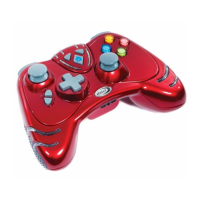
Congratulations on your purchase of Datel’s state-of-the-art TurboFire 2® Wireless
Controller for Xbox 360®. TurboFire 2® is the only third party Xbox 360® controller to
offer 100% compatible communication with the Xbox 360® using the console’s proprietary
wireless technology.
It faithfully recreates all of the functionality of the original Xbox 360 controller including
vibration feedback and full analogue input. In addition, the TurboFire 2 Wireless
Controller enhances your gaming with a programmable Turbo Rapid Fire feature, a
programmable Sniper mode feature and new ergonomic design.
TurboFire 2 is a fully customizable controller using the Customizer PC software which is
downloadable from Datel’s website. The Customizer PC software allows the customizing
of the controllers feature buttons and a number of settings (see section ‘8’).

1. Introduction
Index
Question and Answer IconNeed help?

Do you have a question about the Datel TurboFire 2 and is the answer not in the manual?

Summary

2. Safety Information

IMPORTANT BATTERY PRECAUTIONS

Recommendations to avoid damage to batteries or the product.

3. Insert Batteries

4. Controller Button Layout

5. Syncing the Controller

6. Using the Turbo Rapid Fire Feature

Step 1: Set Turbo Rapid Fire On or Off

How to enable or disable the Turbo Rapid Fire feature.

Step 2: Choose Rapid Fire Buttons

Assigning buttons for the Turbo Rapid Fire feature.

Step 3: Set Turbo Rapid Fire Speed

Adjusting the speed of the Turbo Rapid Fire function.

7. Using the Sniper Mode Feature

Step 1: Set Sniper Mode On or Off

How to enable or disable the Sniper Mode feature.

8. Customizer PC Software

12. Technical Support and Customer Service

Summary

2. Safety Information

IMPORTANT BATTERY PRECAUTIONS

Recommendations to avoid damage to batteries or the product.

3. Insert Batteries

4. Controller Button Layout

5. Syncing the Controller

6. Using the Turbo Rapid Fire Feature

Step 1: Set Turbo Rapid Fire On or Off

How to enable or disable the Turbo Rapid Fire feature.

Step 2: Choose Rapid Fire Buttons

Assigning buttons for the Turbo Rapid Fire feature.

Step 3: Set Turbo Rapid Fire Speed

Adjusting the speed of the Turbo Rapid Fire function.

7. Using the Sniper Mode Feature

Step 1: Set Sniper Mode On or Off

How to enable or disable the Sniper Mode feature.

8. Customizer PC Software

12. Technical Support and Customer Service

Datel TurboFire 2 Specifications

General IconGeneral
ConnectivityWired
PlatformPlayStation 2
CompatibilityPlayStation 2
Turbo FunctionYes
ColorBlack
TypeGame Controller
FeaturesTurbo function
ConnectionUSB
BatteryNot Applicable (Wired)

Related product manuals