The TurboFire 2 controller is equipped with a unique programmable Sniper Mode feature
which allows for you to slow down the movement of either analogue stick. In slowing
down the movement of either analogue stick allows for slower more precise movements,
which is an advantage when playing in a sniper situation which requires accurate aiming.
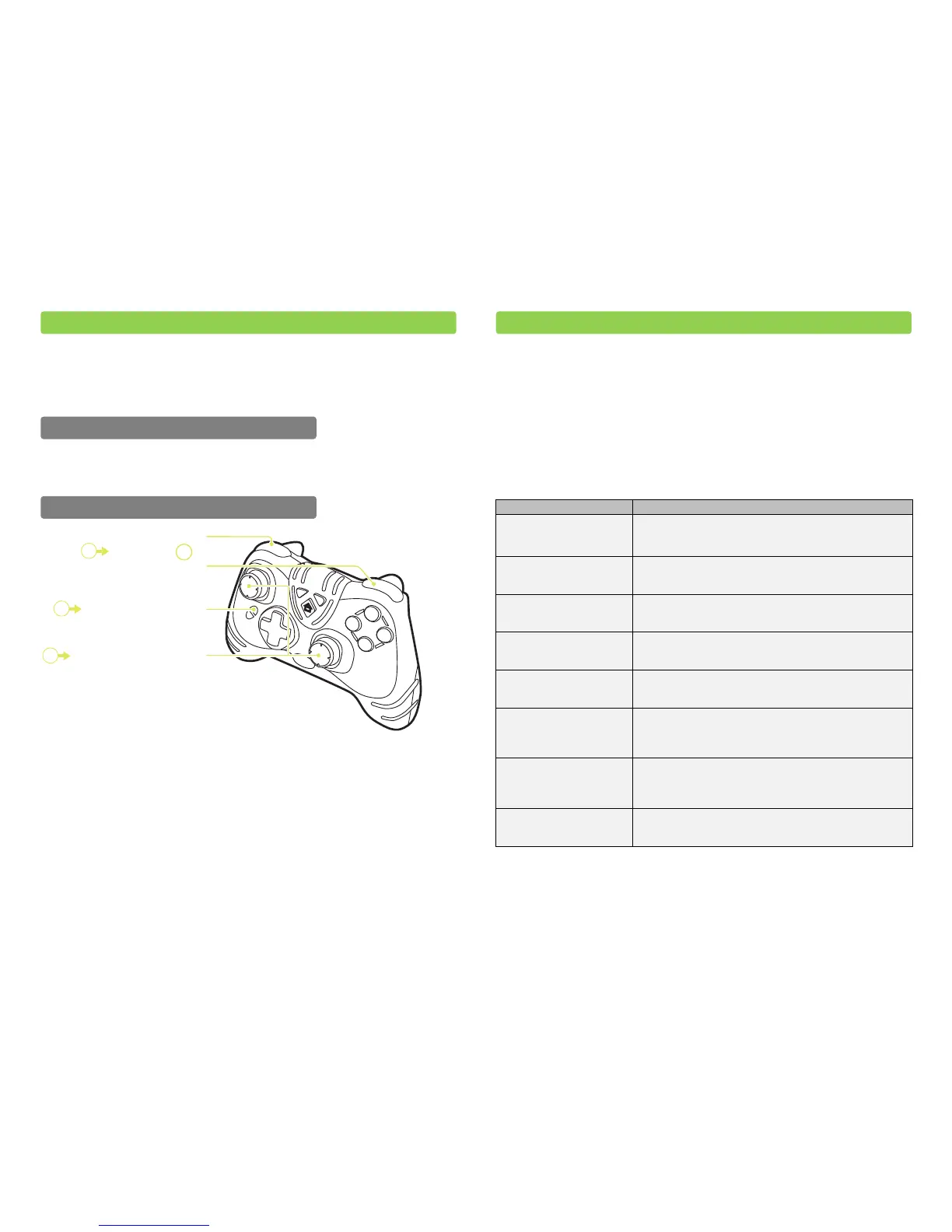
Sniper Mode can be set to ‘on’ or ‘off’ by pressing ‘Feature Button 1’. When set to ‘on’ the
Feature Indicator Light on the right handle of the pad will illuminate.
When programming the Sniper Mode speed you need to set the speed at which either of
the analogue sticks will operate. When holding either of your analogue sticks at the
furthest point this is full speed. Sniper Mode allows you to set the speed, so instead of the
furthest point being full speed you can set a lower speed of your choice.
To program the Sniper Mode speed, first ensure that Sniper Mode is set to ‘off’. Next
press and hold ‘Feature Button 1’, press and hold either ‘LB’ or ‘RB’ and set the full speed
by moving either of your analogue sticks upwards. Once you have positioned either of
your analogue sticks in the position which you would like as the full speed release
‘Feature Button 1’ and ‘LB’ or ‘RB’. While programming Sniper Mode, the Feature
Indicator Light on the right handle of the pad will flash.
The ‘Feature Button 1’ and the ‘Feature Button 2’ are pre-loaded with Turbo Rapid Fire
and Sniper Mode, both of which as well as a whole host of other features are
downloadable using Datel’s Customizer PC software. The Customizer PC software is
downloadable from Datel’s website, www.codejunkies.com.
The Customizer PC software as well as allowing the downloading of a whole host of
features, also allows the changing of a variety of settings and the updating of your
controllers software.
Please find a list below of the currently downloadable features and customizable settings:
Analogue Sensitivity allows you to adjust the sensitivity of the
‘Right Analogue Stick’, ‘Left Analogue Stick’, ‘RT Button’ and ‘LT
Button’
Turbo Rapid Fire is pre-loaded on your controllers ‘Feature
Button 2’ but it can be reassigned to either ‘Feature Button 1 or
‘Feature Button 2’
Sniper Mode is pre-loaded on your controllers ‘Feature Button 1’
but it can be reassigned to either ‘Feature Button 1’ or ‘Feature
Button 2’
If you would like to reduce the vibration feedback when
emptying clips on an enemy. Assign Low Recoil to ‘Feature
Button 1’ or ‘Feature Button 2’
Playback a selection of pre-set sound clips during online game
play. Assign Sound Player to ‘Feature Button 1’ or ‘Feature
Button 2’
Call of Duty Remap for Halo
Reach
If you prefer the controller layout of “Call of Duty” over the
controller layout of “Halo Reach”. Assign the Call of Duty Remap
for Halo Reach to ‘Feature Button 1’ or ‘Feature Button 2’ to
play the game like “Call of Duty”
Halo Reach Remap for Call of
Duty
If you prefer the controller layout of “Halo Reach” over the
controller layout of “Call of Duty”. Assign the Halo Reach Remap
for Call of Duty to ‘Feature Button 1’ or ‘Feature Button 2’ to
play the game like “Halo Reach”
Button Remapping gives you the ultimate control over your
controller layout, by allowing you to choose which button
should be pressed to activate each control
Please beware that the listed downloadable features and customizable settings may
change without warning and further downloadable features and customizable settings
may become available.
LB Button
or
RB Button
Press and Hold
Press and Hold Feature Button 1
Move the Left or Right Analogue
Stick Upwards to set speed
1
2
3
8. Customizer PC Software
Step 2: Set Sniper Mode Speed
Step 1: Set Sniper Mode to ‘on’ or ‘off’
7. Using the Sniper Mode Feature


 To Next Page