The TurboFire 2 controller is equipped with a unique programmable Turbo Rapid Fire
feature that can boost your firepower in any Xbox 360 game. The Turbo Rapid Fire can be
set to operate at different speeds and can be assigned to wide range of buttons.
Turbo Rapid Fire can be set to ‘on’ or ‘off’ by pressing ‘Feature Button 2’. When set to on
the Feature Indicator Light on the left handle of the pad will illuminate. When pressing
the buttons which are assigned Turbo Rapid Fire the Feature Indicator Light on left handle
of the pad will flash at the speed of which Turbo Rapid Fire is operating.
By default, Turbo Rapid Fire is assigned to the right trigger button but different games will
use different buttons for actions like jump, shoot, block etc. In order for you to get the
most out of the Rapid Fire feature you can choose exactly which button or buttons it is
assigned to.
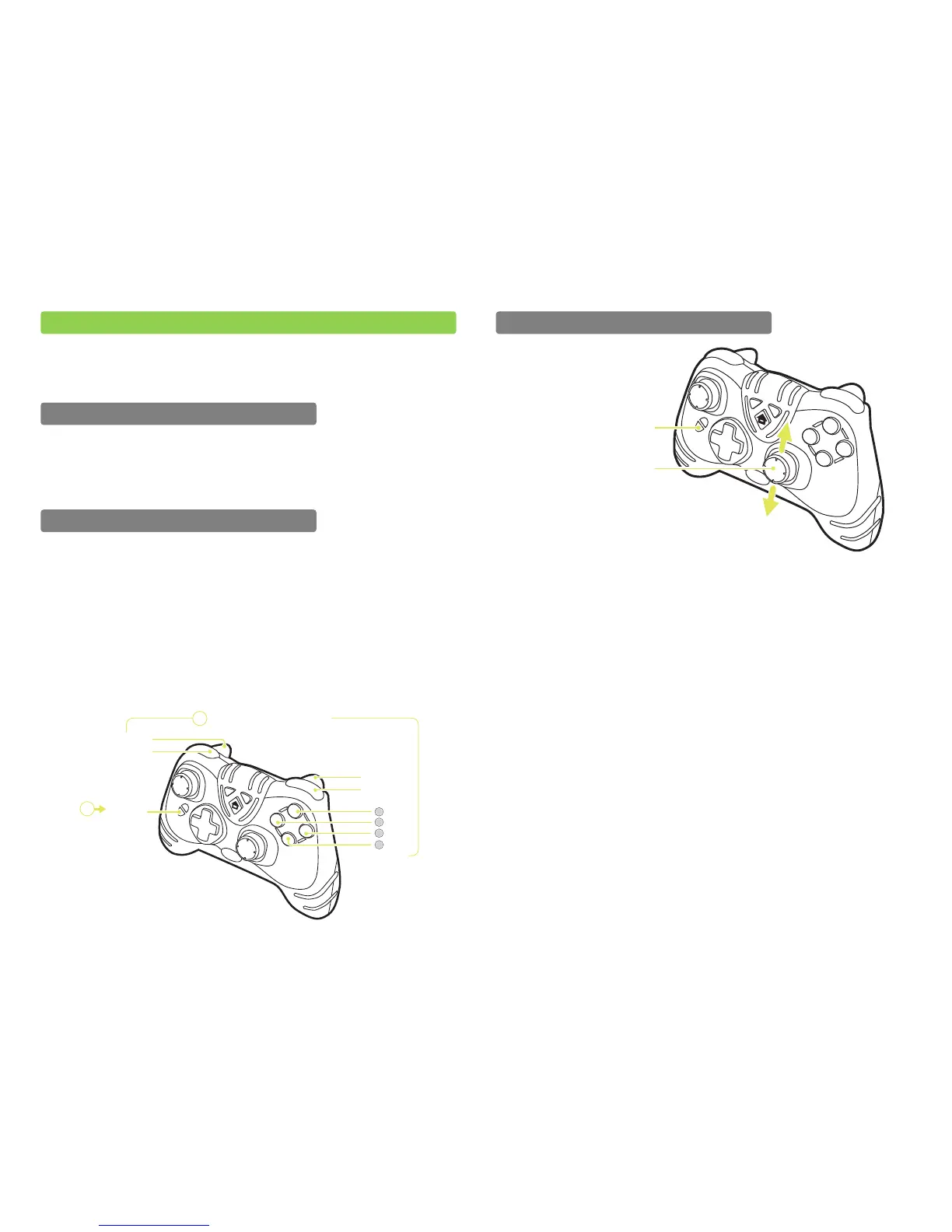
To program which buttons will use Rapid Fire, press and hold the ‘Feature Button 2’ and
then any one of the buttons shown in the following illustration. When you have made
your selection, release ‘Feature Button 2’. When making your selection, the Feature
Indicator Light on the left handle of the pad will flash to indicate the speed at which Rapid
Fire is operating. Turbo Rapid Fire can be enabled on the following 8 buttons:
After assigning Turbo Rapid Fire to one or more buttons (see previous section), you can
now set the speed at which Turbo Rapid Fire operates. To program the speed at which
Rapid Fire operates, press and hold the ‘Feature Button 2’ and move the right analogue
stick up to increase the speed and down to decrease the speed. Once you have set the
speed which you would like, release ‘Feature Button 2’.
When increasing and decreasing the speed at which Rapid Fire operates the Feature
Indicator Light on the left handle of the pad will flash increasing in speed until remaining
solid to indicate maximum speed and decreasing in speed until flashing at a constant low
speed indicating the lowest speed.


 To Next Page