3-4 HH7700-MSOP
3: Radio Operation
Setting Squelch Level
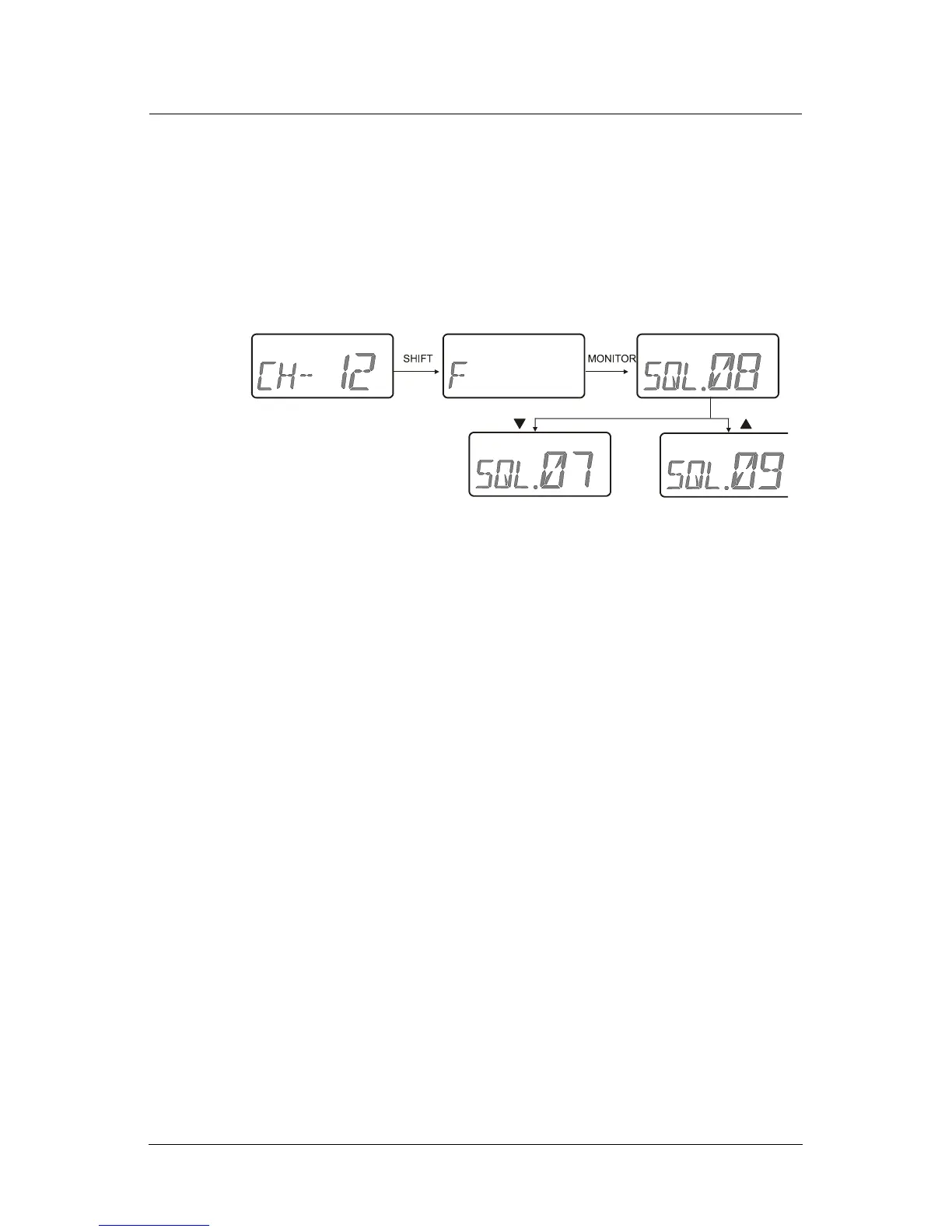
To set the squelch level:
1. Navigate to the channel to set.
2. Press
SHIFT and MONITOR.
3. Press ▲ to scroll up through the 16 squelch levels and press ▼ to
scroll down through the 16 squelch levels.
4. Press
SHIFT to release the squelch level function.
Note: If a button is not pressed during squelch level changes, this mode
terminates automatically after 5 seconds.
Scanning
There are two types of scanning: Memory and Dual Watch.
Conditions
The following conditions apply to scanning:
• Scan lists, range and speed are defined using the Programmer.
• There has to be more than one channel on the memory scan list
for scanning to proceed.
•A
SCAN button and DUAL WATCH button must designated using the
Programmer.
•Memory (
M) and Dual Watch (D) scanning takes place in channel
mode or frequency mode as illustrated on the next page.



 To Next Page