RT7000-MSOP 3-1
CHAPTER 3
OPERATION
These procedures discuss using the front panel to program the radio. To
program the radio from a computer, refer to the Radio Control 2 operator
manual (RC2-MSOP); the 7000ALE option must be installed in the radio.
Powering the RT7000
Use the PWR ON knob to turn on the RT7000. The version level of the
installed software is displayed.
Display: RT7000
VER 701xx (where xx is the version level)
The BITE system runs automatically and indicates that everything is functional.
Display: RT7000
MODULES OK
The BITE system searches for any installed options. These options are
displayed with the current channel number (upper left corner), channel
frequency (upper center) and clarifier offset (if any, below the frequency).
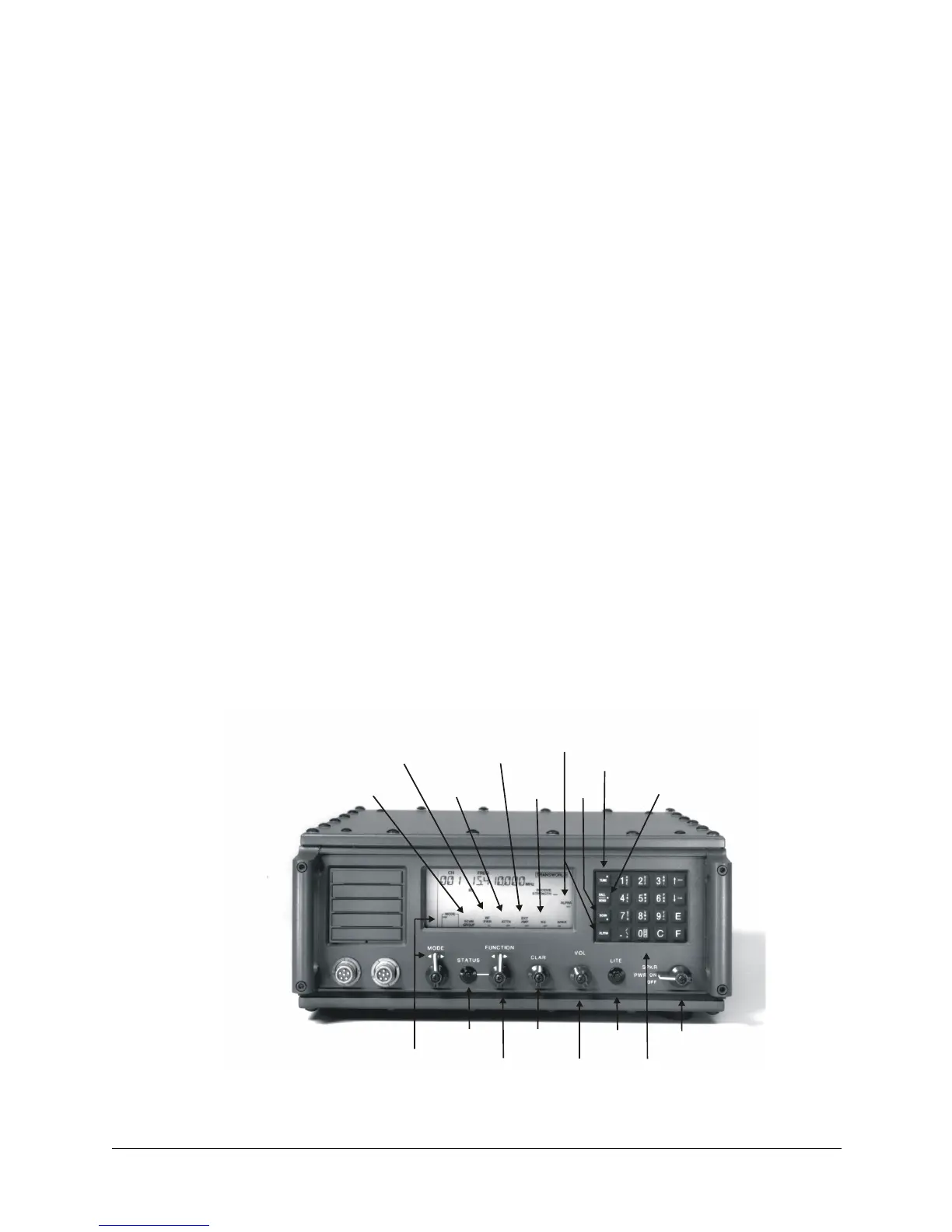
Figure 3-1. Front Panel Features
Mode
Select
Status
Function
Clarifier
Volume
Light
Power/
Speaker
Scan
Group
RF Power
Level
Rx
Atten-
uator
External
RF
Amplifier
Squelch
Keypad
Alpha
Tune
Call/
Send
Scan


 To Next Page