2 Quick Start
Dave Smith Instruments
Quick Start
The best way to get started is to watch our Tempest Quick Start video, presented
by Roger Linn. Visit www.davesmithinstruments.com/product/tempest/ to see
this and other helpful videos.
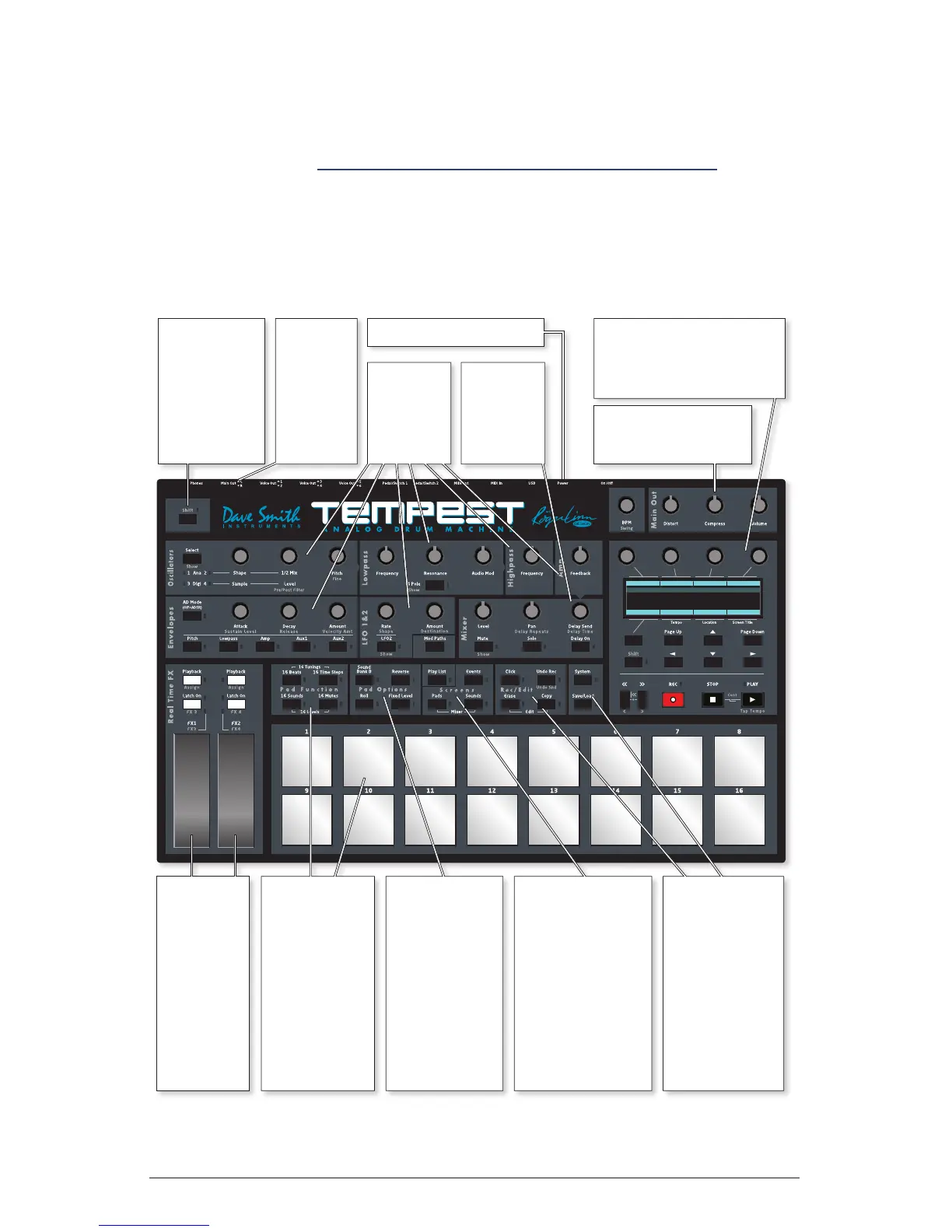
Overview of Panel Controls
Select Value
System
1. Click Level
2. One bar count in
3. Fixed Velocity level
4. Pedal 1 Mode
5. Pedal 1 Expr Pedal Asn
120
Off
120
Expr Pdl
Mod Src Expr Pdl1
Use position
and
pressure
sensitive
touch strips
to alter
either
sounds or
entire beats
in real-time.
The 16 pads
can be used
to play
16 drumbeats,
16 sounds,
16 time steps
for step record,
16 tunings,
16 mutes, or
16 volume
levels.
Select Bank A
or B sounds,
Roll for
repeating notes
or beat stutter,
Fixed Level to
defeat touch
sensitivity, or
Reverse to play
backwards.
Select what’s on
the screen: the
functions of the
pads, a grid
showing drumbeat
or play list events,
Sound settings, or
Mixer settings.
Play List plays a
programmed list
of beats.
Quickly erase
or copy sounds
or beats, undo
last edit, turn
click on/off, a
menu of editing
functions,
save/load to
internal flash or
MIDI/USB, and
system settings.
Hold either
Shift key to
select the
alternate
function
printed below
some controls.
Connect
stereo
outputs or
6 direct
voice
outputs to
mixer.
Adjust
synthesis
settings of
last sound
pad hit.
Adjust mix
settings of
last played
sound
pad.
Graphic OLED screen,
4 Soft Knobs, 1 Soft Key,
screen navigation keys,
Shift and Transport keys.
Set Tempo, Distortion,
Compression,
and Main Volume.
Connect power supply.


 To Next Page