Dazzle ZiO! Hi-Speed Portable Reader/Writer User’s Guide • Getting Started • Page 16
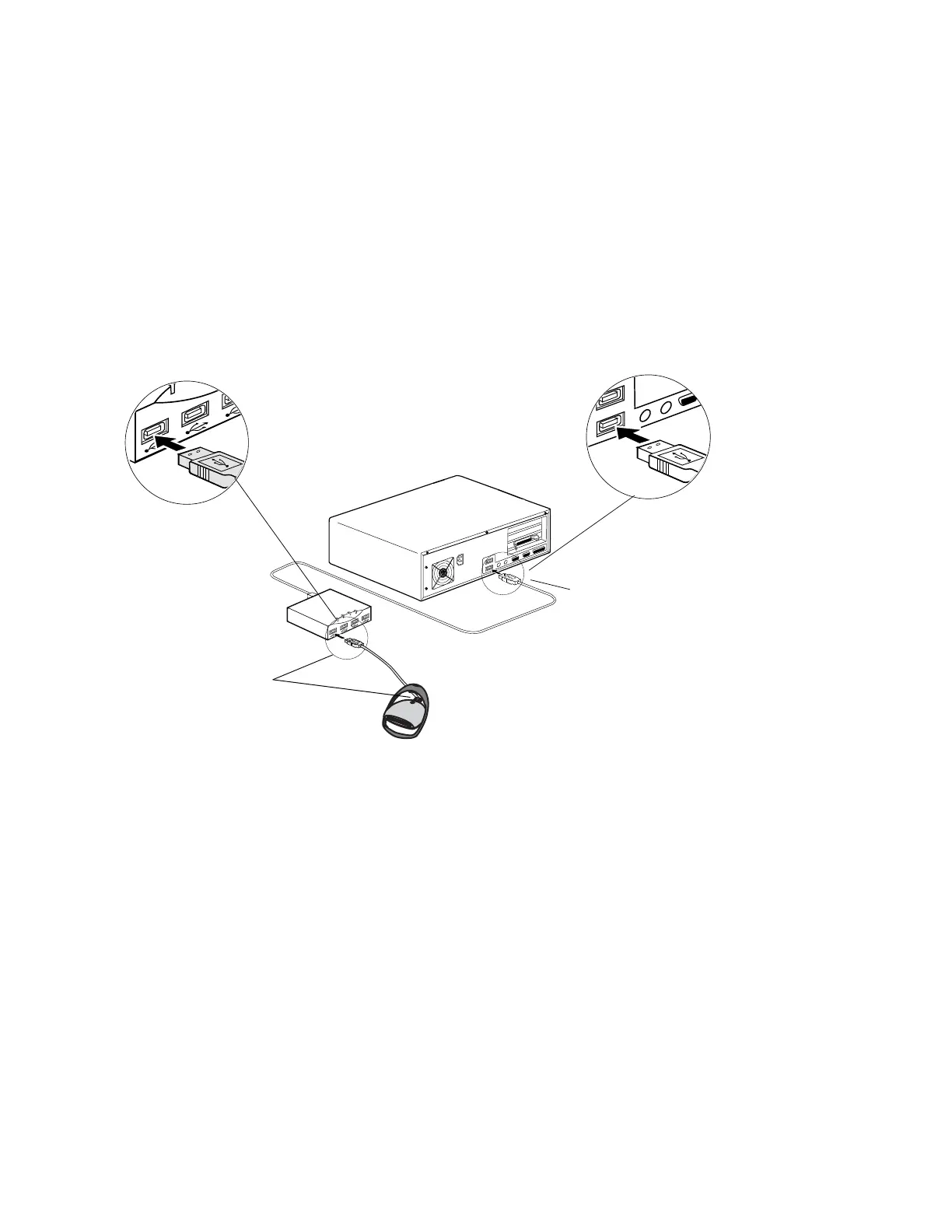
Connecting to a USB Hub
1. Connect the USB hub (purchased separately) to an available USB port on your com-
puter.
2. Connect the ZiO HS Reader/Writer directly to an available USB port on the USB hub.
If your hub is located in an inconvenient location, connect one end of the provided USB
extender cable to the USB connector on the back of your ZiO HS Reader/Writer, and
then connect the other end of the cable to an available USB port on the USB hub.
Note: Be sure the cable ends are properly aligned before connecting and do not force
the connection.
Enlarged View
Enlarged View
Connect one end of the
extender cable to the ZiO HS
Reader/Writer and connect the other
end of the cable to the hub
(or connect the ZiO HS Reader/Writer
directly to the USB hub)
Connect the hub’s USB cable
to the USB port on your computer



 To Next Page