Dazzle ZiO! Hi-Speed Portable Reader/Writer User’s Guide • Using the Reader/Writer • Page 29
Formatting a Card on a PC
Sometimes it may be more convenient to format a digital media card in the ZiO HS
Reader/Writer rather than in your original digital device. In some cases, your device may
not have a format option, or you may be required or prompted to format a card. To format
a digital media card in the ZiO HS Reader/Writer, follow the steps below.
Caution: Formatting a card completely erases any data on the card. If there are important
images or files you want to safeguard for later use, save a backup copy on your hard drive,
CD-R drive, or other type of removable media before formatting a card.
Note: The screens below differ slightly for each of the supported operating systems, but
the procedure for formatting a card is the same.
1. Insert a card in the ZiO HS Reader/Writer, as explained earlier in this guide.
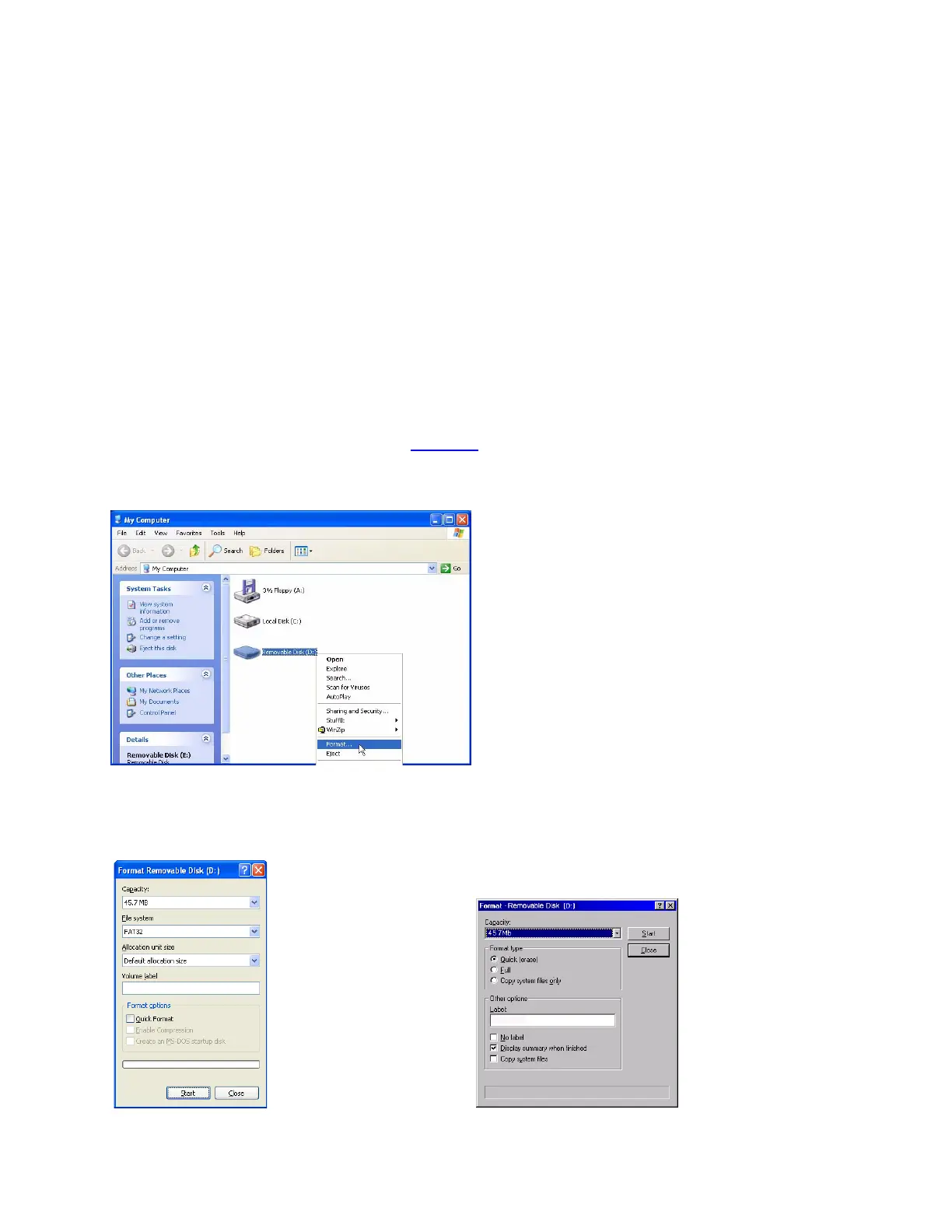
2. Open My Computer, as shown on page 25, and right-click on the Removable Disk icon
A pop-up menu appears.
3. Select Format in the pop-up menu.
The Format window appears for your operating system.
Windows XP and 2000 Format Window
Windows 98 SE and Me Format Window



 To Next Page