EasyManua.ls Logo

dbx 3BX - Tracking; Noise; Transition Level Range

dbx 3BX
19 pages
Print Icon
To Next Page IconTo Next Page
To Previous Page IconTo Previous Page
Loading...
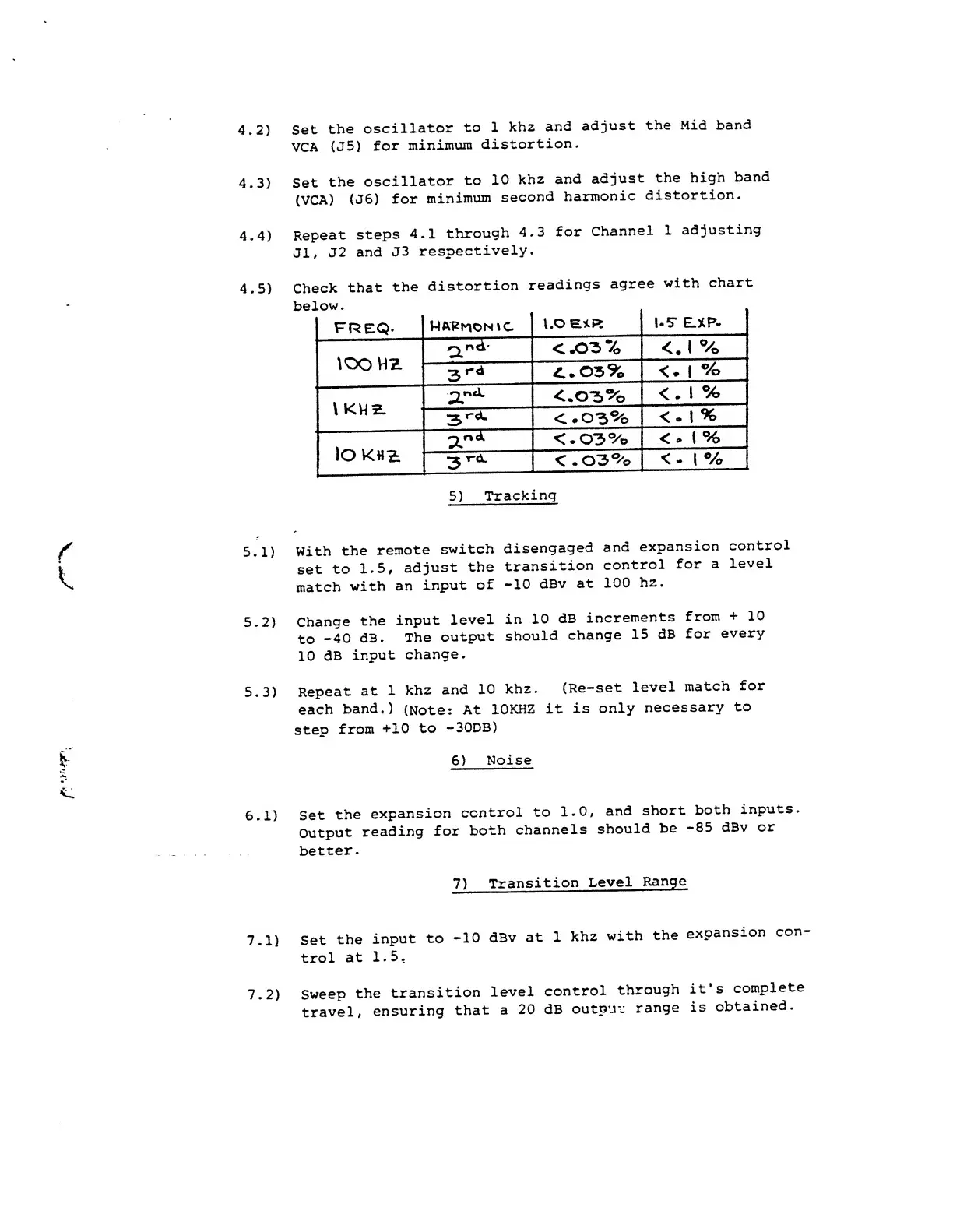
4.2)
Set
the
oscillator
to 1
khz
and
adjust
the Mid
band
VCA
(J5)
for
minimum
distortion.
4.3)
Set
the
oscillator
to
10
khz
and
adjust
the
high
band
(VCA)
(J6)
for
minimum
second
harmonic
distortion.
4.4)
Repeat
steps
4.1
through
4.3
for
Channel
1
adjusting
Jl,
J2
and
J3
respectively.
4.5)
Check
that
the
distortion
readings
agree
with
chart
LUW
.
FREQ-
1,0
e*Pt
1.5*
EJCP.
tOO
HZ
a
ni
<
JOS
%
<.
1
%
3
rd
£..
03
%
<.
1
%
\
KHZ
•a."
4-
<.
03
%
<
.
1
%
3
rd.
<.
03
%
<-
1
%
lO KHZ.
2
.
n<l
<.03%
<
. 1
%
3
T
*
d
-
<.03%
<
-
1
%
5)
Tracking
5.1)
With
the
remote
switch
disengaged
and
expansion
control
set
to
1.5,
adjust
the
transition
control
for
a
level
match
with
an
input
of
-10
dBv
at
100
hz.
5.2)
Change
the
input
level
in
10
dB
increments
from
+
10
to
-40
dB.
The
output
should
change
15
dB
for
every
10
dB
input
change.
5.3)
Repeat
at
1
khz
and
10
khz.
(Re-set
level
match
for
each
band.)
(Note:
At
10KHZ
it
is
only
necessary
to
step
from
+10 to
-30DB)
6)
Noise
6.1)
Set
the
expansion
control
to 1.0,
and
short
both
inputs.
Output
reading
for
both
channels
should
be
-85
dBv
or
better.
7)
Transition
Level
Range
7.1)
Set
the
input
to
-10
dBv
at 1
khz
with
the
expansion
con-
trol
at
1.5,
7.2)
Sweep
the
transition
level
control
through
it's
complete
travel,
ensuring
that
a
20
dB
output
range
is
obtained.

Other manuals for dbx 3BX

Related product manuals