EasyManua.ls Logo

dbx 3BX - LED Display Board Calibration

dbx 3BX
19 pages
Print Icon
To Next Page IconTo Next Page
To Previous Page IconTo Previous Page
Loading...
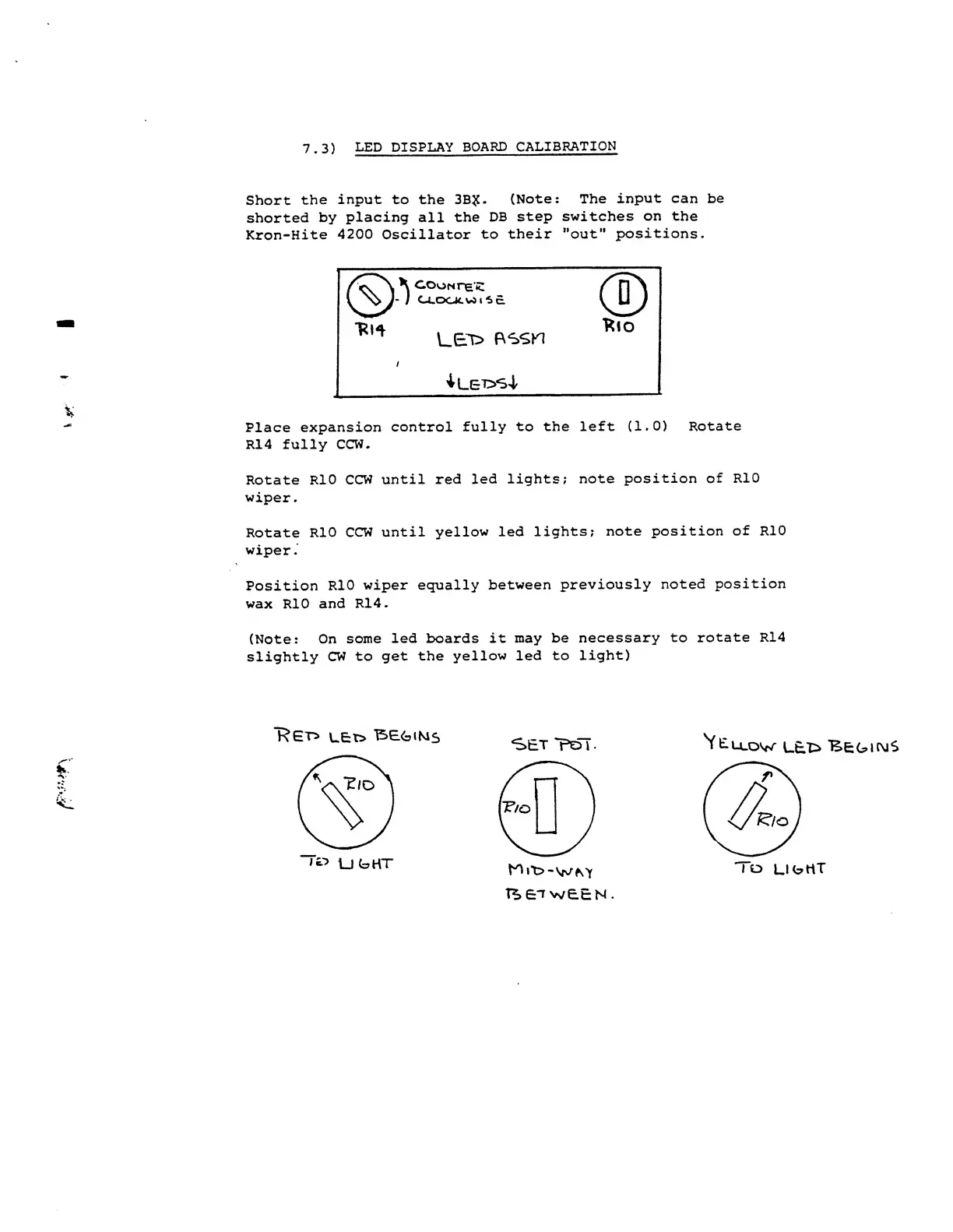
7.3)
LED DISPLAY
BOARD
CALIBRATION
Short
the
input
to the 3B?.
(Note: The
input
can be
shorted
by placing
all
the
DB
step
switches
on the
Kron-Hite
4200
Oscillator
to
their "out"
positions.
Place
expansion
control
fully
to the left (1.0)
Rotate
R14 fully
CCW.
Rotate
RIO
CCW
until
red
led
lights;
note
position of
RIO
wiper.
Rotate
RIO
CCW
until yellow
led
lights;
note
position
of RIO
wiper
.
Position
RIO
wiper
equally
between
previously
noted
position
wax
RIO
and
R14.
(Note:
On
some
led
boards
it may be
necessary
to
rotate R14
slightly
CW
to
get the
yellow led to
light)
'RG'n
1
\_E:t>
TSE.G1MS
UGHT
SET
ToT.
hOito-WM
T*.£lw£EN
'Vtu.ow
lel>
Begins

Other manuals for dbx 3BX

Related product manuals