EC-5 3 INSTALLING THE SENSORS
3 Installing the Sensors
When selecting a site for installation, it is important to remember
that the soil adjacent to the sensor surface has the strongest influ-
ence on the sensor reading and that the sensor measures the VWC.
Therefore any air gaps or excessive soil compaction around the sen-
sor can profoundly influence the readings. Also, do not install the
sensors adjacent to large metal objects such as metal poles or stakes.
This can attenuate the sensors electromagnetic field and adversely af-
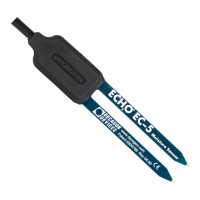
fect output readings. Because the EC-5 has gaps between its prongs,
it is also important to consider the size of the media you are insert-
ing the sensor into. It is possible to get sticks, bark, roots or other
material stuck between the sensor prongs, which will adversely affect
readings. Finally, be careful when inserting the sensors into dense
soil, as the prongs will break if excessive sideways force is used when
pushing them in.
Installation Procedure
When installing the EC-5, it is best to maximize contact between
the sensor and the soil.
• If you are installing sensors in a lightning prone area with
a grounded data logger, please see our Application Note at
www.decagon.com/lightning.
• Decagon advises that you test the sensors with your data log-
ging device and software before going to the field.
The EC-5 sensor was designed for easy installation into the soil. Af-
ter digging a hole to the desired depth, push the prongs on the sensor
into undisturbed soil at the bottom of the hole or into the sidewall
of the hole. Make sure that the prongs and black overmolding are
buried completely. Note: The sensor may be difficult to insert into
extremely compact or dry soil. If you have difficulty inserting the
sensor, try loosening the soil somewhat or wetting the soil. Never
pound the sensor into the soil
Carefully backfill the hole to match the bulk density of the surround-
5


 To Next Page