Digitale Positions-Anzeige
Digital posítion readout
Wahltaste Absolut-/lnkremental-Anzeíge
Absolute/incremental selector
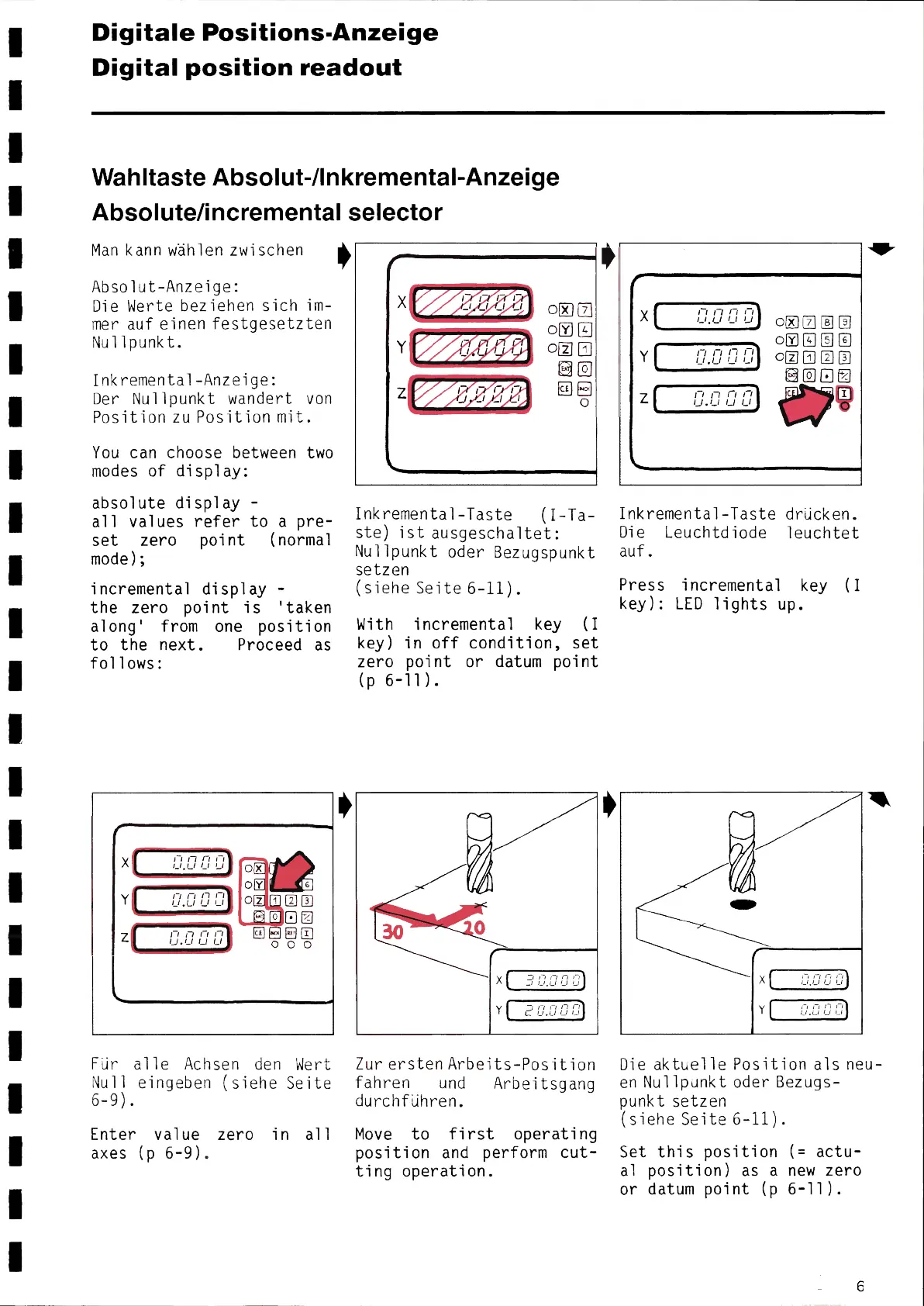
Man kann wählen zwischen ф
Absolut-Anzeige:
Díe Werte beziehen sich im-
mer auf einen festgesetzten
Nullpunkt.
Inkremental-Anzeige:
Der Nullpunkt wandert von
Position zu Position mit.
You can choose between two
modes of display:
absolute display -
a11 values refer to a pre-
set zero point (normal
mode);
incremental display -
the zero point is 'taken
along' from one position
to the next. Proceed as
follows:
Γ
X
Y
z
ľ 1lľ ri j
_ι, Lı i i J
Γі fl fl rI
u ,ιI iJ u
Γ~ fl fl (1
IJ.L i ıJ Lı
Für a11e Achsen den Wert
Nu11 eingeben (siehe Seite
6-9).
Enter value zero in a11
axes (p 6-9).
ф
ґ
X
Y
Ľ
`
J
oD Π
° a
~σ a
®a
cε 0
O
Inkremental-Taste (I-Ta-
ste) ist ausgeschaltet:
Nullpunkt oder Bezugspunkt
setzen
(siehe Seite 6-11).
With incremental key (I
key) in off condition, set
zero point or datum point
(p 6-11).
~1
Y
_~ Ì ĺ~ĺ ĺ Ì~ J
C _i, Ü і ĺ _
Zur erstenArbeits-Position
fahren und Arbeitsgang
durchführen.
Move to first operating
position and perform cut-
ting operation.
,
,
/
X
Y
z
`
l
ĺ
`
,_-, rl fl fl
Lı,c,ı u ıJ
ΠΓіПΓі і
L ı.L, Li LI
ґі Л Π Γ l
IJ.Li 1J Lı
000aa
oσaa©
oc~oaa
®000
Inkremental-Taste drücken.
Die Leuchtdiode leuchtet
auf..
Press incremental key (I
key): LED lights up.
~/.
%
X
Y
_~г г г]
Γ Γ ,_) ,__,
,_,
.,_, ι
Die aktuelle Position a1s neu-
en Nullpunkt oder Bezugs-
punkt setzen
(siehe Seite 6-11).
Set this position (= actu-
a1 position) as a new zero
or datum point (p 6-11).


 To Next Page
 Loading...