4 Operating Joystick model
33
4.6 Joystick Path Setting Window
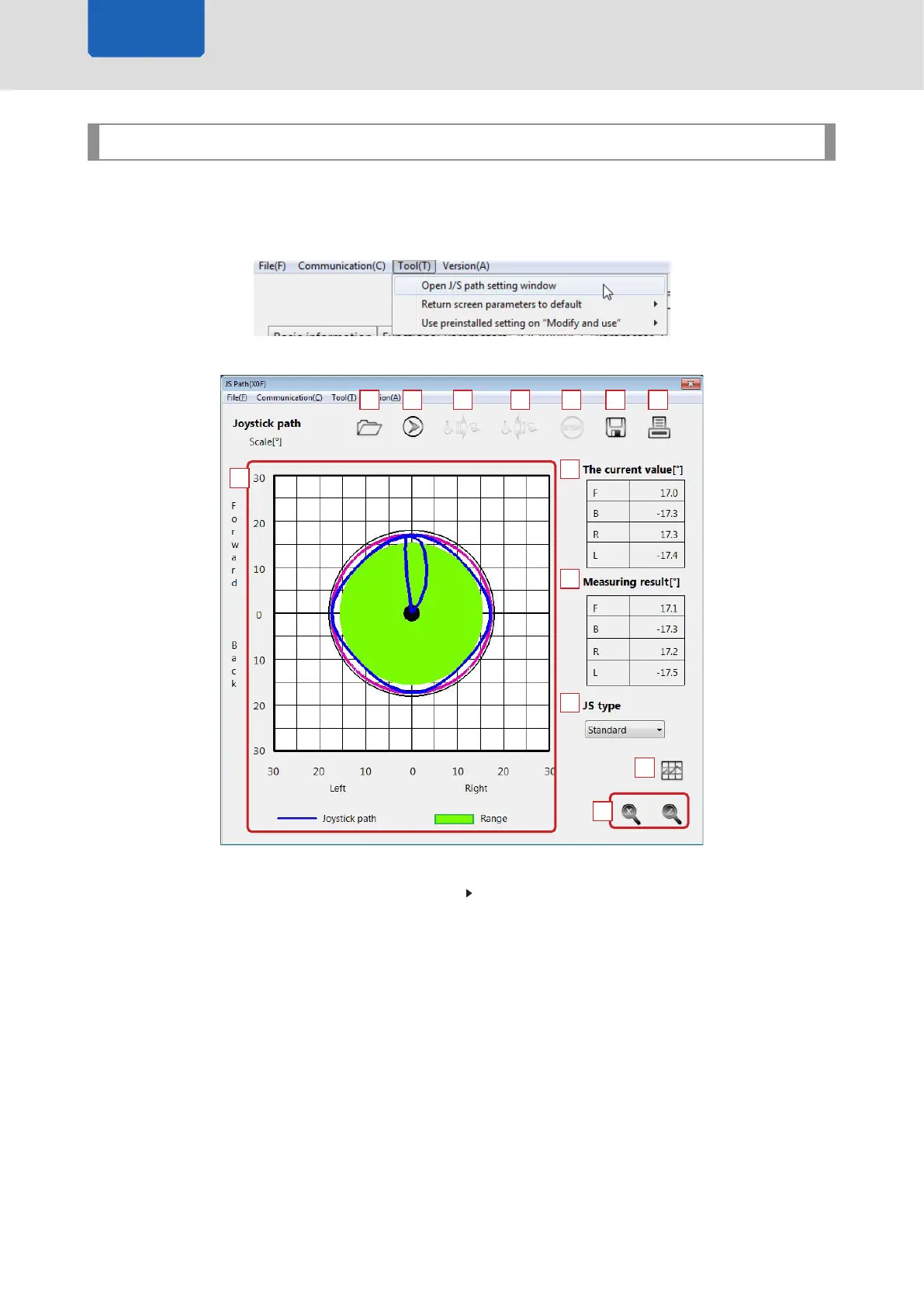
The Joystick Path Setting Window examines joystick operations.
Selecting [Tool] > [Open J/S path setting window] from the menu bar on the Driving Parameters window
opens the Joystick Path Setting Window in a new window.
13
1 2 3 4 5 6 7
8
9
10
11
12
1 [Open] Icon
This icon opens the data les saved to the PC.
P.24 “4.4.2 Recalling Setting Data”
The same operation can be performed by selecting [File] > [Open] from the menu bar.
2 [Start Diagnostics] Icon
This icon starts the diagnostic test.
The same operation can be performed by selecting [Communication] > [Start to record J/S path]
from the menu bar.
3 [Read] Icon
This icon reads the diagnostic results. The icon is available after the diagnostic process is started.
The same operation can be performed by selecting [Communication] > [Read J/S path data from
wheelchair] from the menu bar.
Joystick model



 To Next Page