EN
21
2 / USING YOUR APPLIANCE
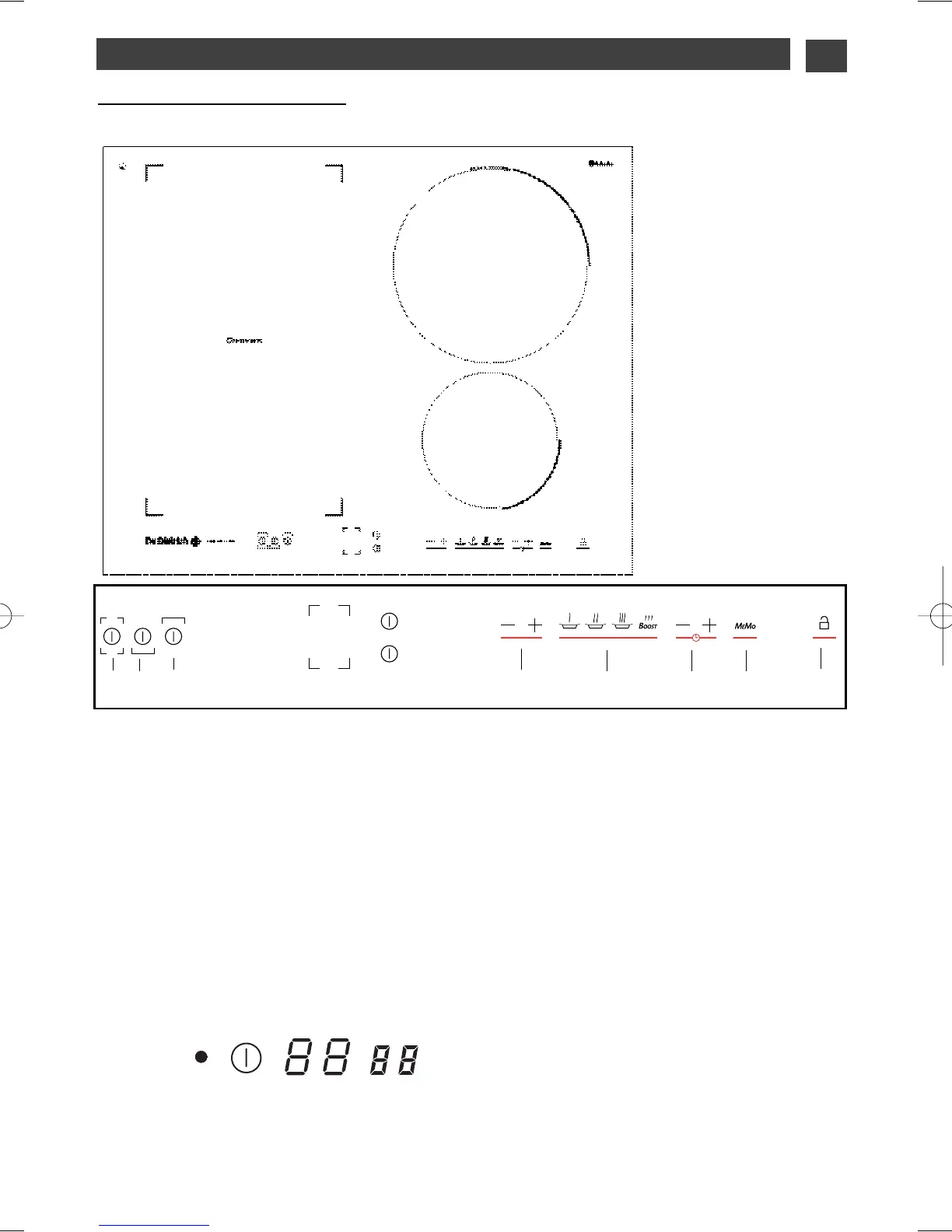
Description of your top
•
Adjustment touch controls
Use these touchpads to select, turn on and
turn off the cooking zones. When a zone is
selected, you will see it light up, and you can
adjust its settings.
A complete C
ONTINUUM zone
B front C
ONTINUUM zone
C rear C
ONTINUUM zone
E zone 23 cm.
F zone 16 cm
•
Adjustment touch controls
These touchpads allow you to adjust power,
timer, programmer... for each of the selected
zones.
G adjusting the power
H preselecting the power
I adjusting the timer
J
M
E
M
O
function
K locking - unlocking - Clean lock
If there is no cookware on the selected zone,
your adjustments will delete automatically
after a few moments.
BAC
E
F
G
H
I
J
K
23 cm
50 W à 3200 W
50 W à 4600 W
16 cm
50 W à 2200 W
DTI743
Total dimensions (L x
l
) -
DTI743X : 65 x 52
Recess cut-out (L’ x
l
’)
DTI743X : 56 x 49
Indicator for
selected zone
Power
display
For a selected zone
Timer
display


 To Next Page